If you already use a separate graphics tablet or a mouse, a compact monitor with dimensions and a stand that suit your desk is a good fit. If you want to draw directly on the image on screen, a pen display is the better choice. As well as checking the working area, make sure you have the right computer connections and cables, and enough room for your hand.
Which screen types suit different artists?
Illustrators with limited desk space
If you draw on your computer using an existing input device, weigh up the monitor’s width and stand depth against the space you need for your keyboard and drawing hand. The dimensions published for models from ASUS, BenQ and Dell make it easier to compare them with your desk.
Character artists who need to judge colour accurately
If you assess colours on screen, check which colour mode you need and whether the figures come from the manufacturer or an independent test. BenQ, PRAD and EIZO offer different information on colour modes and calibration.
Artists who draw directly on the screen
If you want to move your pen directly over the image on screen, compare pen displays by their active area, positioning options and connection requirements. Wacom and Huion each provide details of their devices and input options.
What should you look for when buying?
Compact monitor with a separate input device
A good fit if: You already work with a mouse or graphics tablet and need screen space for your image and toolbars.
Bear in mind: You can’t draw directly on a standard monitor with a pen, and its dimensions and stand depth need to suit your desk.
Pen display
A good fit if: You want to draw directly on the character image on screen.
Bear in mind: You’ll need room for your hand and arm as well as the active area; the device doesn’t automatically replace your computer.
For consumers who digitally paint game characters on a small desk, four priorities stand out, depending on how they work. Each person is assigned to the priority that matters most to them.
| Buying priority |
What to check before buying |
Who is it most relevant to? |
| Desk space and positioning |
Compare the width and depth of the casing, including the stand, with the space available; check the exact model’s height adjustment and VESA size. |
If my small desk also needs to fit a keyboard and leave room for my drawing hand, every centimetre counts. Around 36% of consumers put available desk space first. |
| Colour assessment |
Decide which target colour space you need, and distinguish claims about the relevant colour mode from independent test results. |
If I make colour decisions for my character on screen, I want to know how the mode I need performs in practice. Around 29% of consumers prioritise colour assessment. |
| Direct pen input |
Decide whether a separate graphics tablet will do; check the pen display’s active area, positioning options and computer compatibility. |
If I want to draw lines directly on the image on screen, I need a suitable pen input option. Around 21% of consumers prioritise direct pen input. |
| Connections and cables |
Check the computer’s video output and power requirements; confirm the cables and what’s included with the specific version. |
If I want a tidy connection between my screen and computer, their ports need to work with the monitor’s features. Around 14% of consumers prioritise connections and a neat workflow. |
Which buying mistakes should you avoid?
-
Comparing screen size alone
The diagonal measurement doesn’t tell you how much desk space the casing and stand will take up. Your drawing hand also needs room to move.
Measure the space you have and compare it with the dimensions of the exact model, including its stand.
If the stand gets in the way, you may need a suitable mount or a different setup. If you use a mount, check its compatibility and weight capacity too.
-
Assuming a colour space figure guarantees accuracy in every colour mode
Manufacturer claims and results for a particular preset don’t necessarily describe the same thing. For the BenQ PD2506Q tested, PRAD rated the sRGB preset more favourably than the DCI-P3 preset in 2022.
Decide which target colour space you need, then look for information on that mode for the exact model.
-
Expecting a standard monitor to work as a pen display
A monitor displays an image, but it doesn’t automatically support direct pen input. For this way of working, you’ll need a suitable pen display or a separate input device.
Before choosing a model, decide whether you want to draw on the image itself or use a separate graphics tablet.
If you expect direct input but choose a standard monitor, you’ll need an additional input device or a different type of screen.
-
Assuming USB-C guarantees a one-cable setup
The available features depend on both the monitor and the computer. The models mentioned differ in their USB-C power delivery; a port on its own doesn’t confirm that video, data and charging will all work as you want them to.
Check the video output, power requirements and what’s included for both devices.
Depending on the connection, you may need a suitable cable, power adapter or dock.
Which brands are worth considering?
ASUS
The ProArt PA248QFV is a 24.1-inch 16:10 option for a compact workspace.
- ASUS Germany lists a 1920 × 1200 resolution, 100% sRGB, height adjustment and VESA 100 × 100 mm.
- It’s a standard monitor; these specifications don’t confirm direct pen input or independently measured colour accuracy.
BenQ
The Creative Pro PD2506Q combines a 25-inch QHD screen with USB-C.
- BenQ lists 100% sRGB, 95% DCI-P3 and 65 W USB-C Power Delivery.
- In its 2022 test of the PD2506Q, PRAD rated the sRGB preset more favourably than the DCI-P3 preset. This assessment applies to the model tested, not to BenQ monitors as a whole.
Dell
The Pro P2425DE is a 23.8-inch QHD monitor with a USB-C hub, suited to buyers who value computer connectivity.
- Dell Germany lists an IPS panel and a USB-C hub with 90 W power delivery.
- These features don’t confirm pen input or independently tested colour accuracy.
Wacom
The Cintiq 16 DTK168K0B is a pen display for drawing directly on screen.
- Wacom lists the Pro Pen 3, an active area of 345 × 215 mm and fold-out stand legs.
- A more adjustable stand is listed separately as an accessory; also check your computer’s connections.
Huion
The Kamvas 16 (Gen 3) is another option for direct pen input on a compact display.
- Huion specifies a 15.8-inch screen, 2560 × 1440 resolution, a battery-free pen and selectable colour modes.
- Claims about precision and factory calibration are provided by the manufacturer and haven’t been independently measured here.
EIZO
The ColorEdge CS2400S is an option if a controlled colour workflow is important to you.
- EIZO lists a 24-inch 16:10 format and hardware calibration with ColorNavigator.
- Calibration won’t solve space or input issues, and it isn’t automatically necessary if direct pen input or a shallow stand is your priority.
Joybuy products for a small drawing desk
This selection features standard monitors for digital drawing with a separate input device. For direct pen input on screen, you’ll need a pen display.
 No image available
KOORUI MB24V29FS4
For digital drawing with a separate input device; not a pen display.
24 inches, FHD (1920 × 1080), IPS and, according to the product name, 99% sRGB.
The product details list dimensions of 541.9 × 185.1 mm, HDMI, VGA, VESA 100 × 100 mm and a tilt-adjustable stand.
View at Joybuy
 No image available
KTC H24B9S
For displaying images from a computer with a separate input device; not a pen display.
The product name lists 24 inches, FHD (1920 × 1080), IPS, 144 Hz and 116% sRGB.
HDMI, DisplayPort, Adaptive Sync and VESA 100 × 100 mm are listed as features; the stand is tilt-adjustable.
View at Joybuy
 No image available
Acer Vero B247YGbmiqprx
For digital drawing with a separate input device; this model is not a pen display.
The product details list a 24-inch screen, FHD (1920 × 1080) resolution and an IPS panel.
VGA, HDMI, DisplayPort, height adjustment up to 165 mm, pivot functionality and VESA 100 × 100 mm are listed.
View at Joybuy
 No image available
Acer Vero B248YGbemiqprcuzx
For a screen you can position to suit your setup, with a separate input device; not a pen display.
The product details list a 23.8-inch screen and FHD resolution (1920 × 1080).
DisplayPort, HDMI and USB ports, as well as height adjustment and pivot functionality, are listed. The product name specifies a 5-MP IR webcam with microphone.
View at Joybuy
 No image available
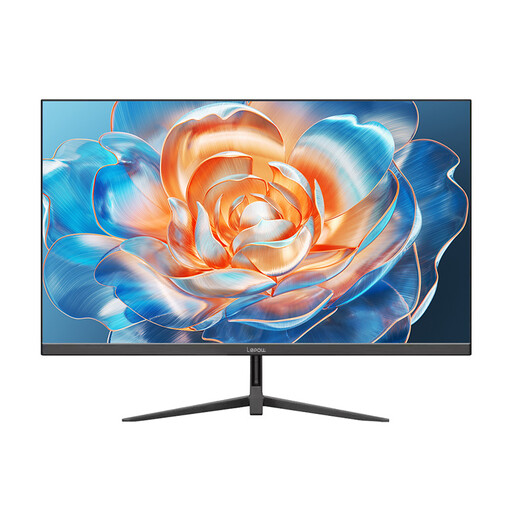
Lepow HC-24Z2
For displaying images while drawing digitally with a separate input device; not a pen display.
The product details list a 23.8-inch screen, FHD resolution, 100 Hz and 100% sRGB.
HDMI is listed; the product details also describe a metal stand.
View at Joybuy
Frequently asked questions
Are figures such as 100% sRGB enough to judge colour reliably?
Not on their own. In its 2022 test of the BenQ PD2506Q, PRAD rated the sRGB preset more favourably than the DCI-P3 preset. Check information on the colour mode you need, and distinguish manufacturer claims from test measurements.
How do I find a screen that suits a small desk?
First measure the available width and depth, leaving room for your input devices. Compare this with the dimensions of the exact model, including its stand, and check whether height adjustment or a suitable mount would work for your setup.
Do I need to connect a pen display to a computer?
Check the connections on the exact model against your computer’s video and power ports. Wacom lists host computer requirements for the Cintiq 16 if you want to use its maximum resolution and refresh rate. Don’t assume compatibility based on the product name alone.
What energy label applies to computer monitors in Germany?
The European Commission generally classifies computer monitors as electronic displays covered by the EU energy label, which uses a scale from A to G. Check the information for the specific model before buying; this doesn’t amount to a blanket recommendation for any particular efficiency class.
Which consumer rights should I be aware of when buying online?
For a consumer purchase in Germany, statutory rights against the seller should be distinguished from a voluntary guarantee. According to the Verbraucherzentrale, a standard online purchase generally comes with a 14-day right to cancel, subject to legal exceptions. Your rights in the event of faulty goods should be considered separately.


