What to look for when buying
First, decide what matters most to you: image detail, desk space, on-screen colours, your laptop connection or how prints look.
| Buying priority |
What to check |
Who it matters most to |
| Detail when cropping |
Consider native resolution and screen size together, and check your preferred scaling on your own computer. |
If you want to make tight crops and assess details in your subject alongside your editing tools, the image on screen is a priority. This is the main concern for around 29% of consumers. |
| Space and purchase cost |
Measure the available width and depth, then compare them with the monitor’s dimensions, including the stand. |
If you also need room for study materials on the same small desk, every centimetre counts. Space and cost are the main concern for around 24% of consumers. |
| On-screen colours |
Choose a suitable colour mode and check which profiling options fit your workflow. |
If you mainly view your pet photos on screen, a suitable colour workflow matters more than a colour gamut figure on its own. Colour is the main concern for around 23% of consumers. |
| Connecting a laptop |
Check the video output and cable for your specific computer, and compare the USB-C charging power required with what the monitor offers. |
If you use a laptop at your study desk and want to connect it to the monitor for video or charging, the connection needs to suit your device. A laptop connection is the main concern for around 12% of consumers. |
| Assessing colours for print |
Decide on your print requirements, suitable colour modes and calibration method, and consider any setup involved. |
If you want to assess colours for print, your monitor, calibration and output process need to work together. Print colour is the main concern for around 12% of consumers. |
Manufacturers’ colour gamut figures don’t automatically tell you how accurately a specific device displays colour or whether it will match a print. Adobe describes colour management as part of a workflow across devices; choosing a monitor doesn’t replace it.
Joybuy monitors for detail-focused cropping
The following Joybuy models are monitors for detail-focused cropping. Depending on the model, check the resolution, available desk space and features that suit your output and laptop workflow.
 No image available
MSI MAG 274UPDFDE E16M
This 27-inch UHD model is an option if you want to assess image detail when cropping.
Product name: UHD at 160 Hz or FHD at 320 Hz, Mini-LED and Rapid IPS. Choose UHD mode for fine image detail; Dual Mode also offers FHD.
View at Joybuy
 No image available
MSI PRO MP273UPDE E6
This 27-inch 4K UHD model is an option for detail-focused cropping.
The product name also lists IPS, 60 Hz and HDR Ready.
View at Joybuy
 No image available
INNOCN CB27U1, 27-inch, 4K UHD, White
The 27-inch 4K UHD specification makes this model worth considering for assessing image detail.
The product name lists 3840 × 2160 pixels, an IPS panel, 120 Hz and USB-C with 90 W Power Delivery.
View at Joybuy
 No image available
KTC M27P6, 27-inch, 4K Mini-LED
This 27-inch 4K model is an option if you want to assess image detail in UHD when cropping.
The product name lists 4K at 160 Hz or FHD at 320 Hz, Fast IPS and USB-C with 65 W. Choose UHD mode for fine detail; Dual Mode can switch to FHD.
View at Joybuy
 No image available
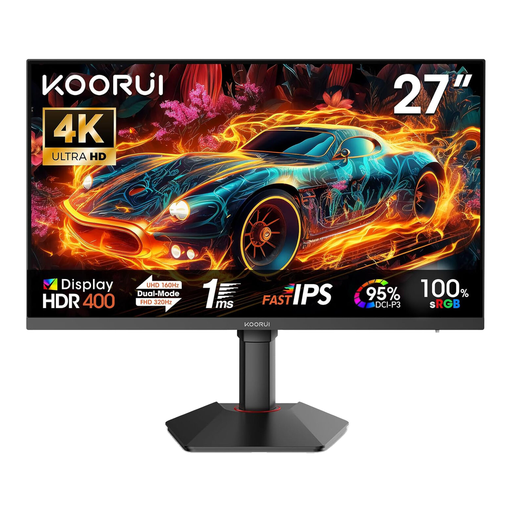
KOORUI G2741L, 27-inch, 4K UHD
The 27-inch 4K UHD specification is relevant for detail-focused cropping.
The product name lists 3840 × 2160 pixels, Fast IPS and 160 Hz in 4K mode or 320 Hz in FHD. Choose 4K mode for fine image detail.
View at Joybuy
Frequently asked questions
Does a 4K monitor automatically increase the resolution of an exported cropped photo?
No. 3840 × 2160 describes the monitor’s resolution, not the number of pixels in your exported photo file. The image data and export settings determine the export; check the file’s pixel dimensions after cropping.
How do I set up the monitor to assess colour?
Choose a colour mode that suits your output and use colour management in your photo-editing software. If you need to assess colours reliably, check how the specific model can be profiled and calibrated; a manufacturer’s figure is no substitute for this process.
Can my laptop receive video and power through a single USB-C cable?
That depends on whether your laptop supports the required video output, and whether the connection, cable and charging power are all compatible. ASUS lists up to 96 W for the PA279CRV and EIZO up to 60 W for the CS2740; these figures apply to those specific models and aren’t a guarantee for every laptop.
What should I consider in terms of costs and faults?
When comparing options, consider the total cost and effort involved, including whether you’ll need a suitable cable or colour-measuring equipment. If a product is faulty, statutory rights against the seller are separate from a voluntary manufacturer’s warranty. The Verbraucherzentrale explains repair or replacement as a possible step when a product is faulty.
What labelling and right to cancel apply when buying a monitor in Germany?
Computer monitors are generally covered by the EU energy label for electronic displays, which uses classes from A to G. For a distance contract with a consumer, there is generally a right to cancel under § 312g BGB, subject to statutory exceptions. § 355 BGB sets a 14-day cancellation period; the start of the period and any applicable exceptions should also be checked for the specific contract.


