What should you look for when buying?
First, check the lighting and monitor position, then see how readable your plans are at your chosen resolution and scaling. Next, decide whether side-by-side views or connecting a laptop call for particular screen formats or ports.
| What matters when buying |
What to look for |
Who will find this especially important? |
| Readability in light from a window |
Consider window position and sun protection; check the anti-glare screen surface and typical brightness. The German Social Accident Insurance and the Federal Institute for Occupational Safety and Health recommend positioning your line of sight to minimise disruption from reflected light. |
If I work beside a bright window, I want to keep reflections to a minimum without relying on monitor brightness alone. This matters to around 31% of consumers who prioritise glare control. |
| Small plan details |
Check a typical drawing using your intended software, resolution and text scaling. ASUS Germany and BenQ Germany list 3840 × 2160 pixels for selected 27-inch models, while Dell Germany lists 2560 × 1440 pixels for the P2725D. |
If I check fine lines and small labels, I need a view that remains readable at my preferred scaling. Around 25% of consumers are primarily concerned with reviewing details. |
| Plan and documents side by side |
Arrange the windows you need at your preferred scaling and check the usable desk width. LG Germany lists 3440 × 1440 pixels in a 21:9 format for the 34U650A-B. |
If I keep comments or supporting documents open alongside the plan, I want to avoid constantly switching between windows. Around 19% of consumers prioritise side-by-side views. |
| A suitable setup |
Check the dimensions, including the stand, and whether you can position the monitor at an angle to the window; check the height and tilt adjustments on the specific model. |
If space on my desk is limited, I still need to be able to position the screen comfortably in relation to the window and my documents. Around 13% of consumers are primarily concerned with positioning. |
| Connecting a laptop |
Check the video output, supported USB-C or DisplayPort functions, cables and required charging power against the specifications of the monitor you’re considering. EIZO lists up to 94 W of power delivery via USB-C for the EV2740X. |
If I want to connect my laptop through the monitor, its video output and, where relevant, power delivery must be suitable for my computer. Around 12% of consumers prioritise connecting a laptop. |
Joybuy product selection
This selection from Joybuy includes monitors for detailed plan views, QHD work and wide side-by-side views. Compare the resolution and format with your usual magnification and the space available.
 No image available
INNOCN 40C1U, 40 inches, 5K
For viewing a plan and supporting documents at the same time, this model offers a 21:9 format and PIP/PBP.
The stated resolution is 5120 × 2160 pixels; the screen has a matte finish.
Joybuy
 No image available
Lenovo ThinkVision T27Q-40, 27 inches, QHD
For individual plan views with readable magnification, a 27-inch QHD format is one option. Compared with the 27-inch 4K models mentioned, it offers fewer native pixels for fine details.
The resolution is 2560 × 1440 pixels. The specifications list an anti-glare screen surface, 350 cd/m² brightness and a stand that can be adjusted for height, tilt, swivel and pivot.
Joybuy
 No image available
KTC H27T27, 27 inches, QHD
For reviewing plans at a comfortable magnification, this model offers QHD resolution of 2560 × 1440 pixels.
The listed features include HDMI and DisplayPort connections and a 100 × 100 mm VESA mount. Compared with the 27-inch 4K models mentioned, QHD offers fewer native pixels for fine details.
Joybuy
 No image available
TCL 27P2A, 27 inches, QHD
For enlarged single views, the 2560 × 1440 pixel QHD resolution is an alternative. It offers fewer native pixels for fine details than the 27-inch 4K models mentioned.
The description lists Mini LED technology and an adjustable stand.
Joybuy
 No image available
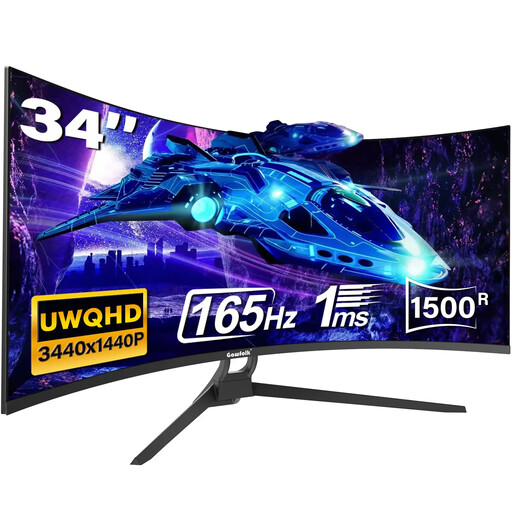
Gawfolk, 34 inches, UWQHD, 21:9
The 21:9 format may suit you if you want a plan and supporting documents side by side. The resolution is 3440 × 1440 pixels, giving it less native screen height than the 2160 pixels of the 4K models mentioned.
The specifications list 300 cd/m² and HDMI and DisplayPort connections.
Joybuy
Frequently asked questions
Will a brighter monitor on its own help with sunlight by a window?
No. The German Social Accident Insurance recommends positioning your screen-based workstation so your line of sight runs as parallel as possible to the window. Add sun protection if needed, and treat typical brightness and the screen surface as additional factors when choosing a monitor.
How should I position my monitor for reviewing plans?
If possible, position your workstation so your line of sight runs parallel to the window, and check whether you can shade the screen from direct sunlight. Then adjust the zoom and text scaling using a plan as a guide, so the labels are easy for you to read.
What should I consider when it comes to power consumption and complaints?
Check the EU energy label for the specific monitor; the European Commission describes an A-to-G scale for electronic displays. If a product is faulty, distinguish your statutory rights against the seller from a voluntary guarantee, as explained by the consumer advice centre.
Are there any special rules in Germany for working at a screen by a window?
For workplaces and teleworking locations covered by ASR A6, the specific requirements for screen-based work set out in those rules apply. For private use outside this scope, they don’t establish a general obligation on employers.
Can I return a monitor bought online?
For consumer contracts made online, you generally have a 14-day right to cancel after receiving the goods. You must notify the retailer that you wish to cancel. Check the terms of your specific purchase, especially if you’re buying for a business rather than for private use.


