If you want to see your play script and scene outline at the same time, start by considering your window layout, readable text size and your computer’s scaling settings. A 27-inch QHD monitor could work, but it isn’t essential; at a shared desk, you’ll also need to consider the adjustable stand and available space. USB-C docking is only worthwhile if the monitor, cable and laptop you’re using are compatible for video output and charging.
Who needs which type of monitor?
Writers who need a scene outline
If you want to see your play script alongside an outline, research or revision notes, check how the windows actually fit on your computer and how easy the text is to read. A higher resolution alone doesn’t guarantee a suitable display.
People sharing a workspace
If you share a desk and screen, you’ll need to be able to adjust the screen position to suit different eye levels. Measure the available desk space too, so there’s room for the stand and your scripts.
Writers using different laptops
If a different laptop is regularly connected at the shared desk, the monitor needs to support each device’s video output, charging requirements and connection needs. USB-C alone doesn’t tell you whether every feature will work with a particular laptop.
What should you look for when buying?
27-inch QHD with an adjustable stand
A good fit if: you want your play script and notes side by side, and have enough desk space and a suitable text size.
Consider: you’ll need enough room at the shared desk, and readability also depends on scaling.
23.8-inch Full HD
A good fit if: a compact screen at the shared desk matters more than having lots of space for documents open side by side.
Consider: 1920 × 1080 pixels provide fewer pixels for side-by-side documents than the QHD models mentioned here.
27-inch 4K
A good fit if: other tasks as well as writing would benefit from finer detail, and you can set a suitable scaling level on your computer.
Consider: extra pixels don’t automatically make a play script easier to read; desk space and text size still matter.
| What matters |
What to check before buying |
Who is it important to? |
| Text and supporting material |
Display a typical page of text and your notes side by side on your own computer; check the resolution and scaling together. |
If I want to read my play script and scene outline at the same time, the text needs to remain readable at my chosen scaling level. Around 33% of consumers say having text windows open side by side is their main buying consideration. |
| Adjustability at a shared desk |
Check the stand and the available height adjustment; also consider how much usable space you need for scripts. |
If several people use the screen, its position should be adjustable to suit different eye levels. Around 25% of consumers prioritise this kind of adjustability at a shared desk. |
| Connecting a laptop |
Check the video output, charging power required and any USB or network connections needed for each laptop. |
If I connect different laptops and peripherals at my writing desk, I don’t want to have to guess whether the features will work just from the shape of the connector. Around 25% of consumers say easily switching between laptops is their main consideration. |
| Extra features and energy use |
Consider only the connections and resolution you need; compare the energy label and product information sheet for the same model. |
If I’m choosing a monitor for working on a play script, I don’t want to assume I need features that won’t be useful at my desk. Around 17% of consumers prioritise the purchase and running costs. |
Avoid common buying mistakes
-
Choosing the highest resolution without testing text
The options considered range from 23.8-inch Full HD to 27-inch 4K. The pixel count alone won’t tell you whether your play script will be comfortable to read at your chosen scaling level.
Open a page of text and a supporting window side by side on your computer, then check the text size and scaling before choosing Full HD, QHD or 4K.
-
Assuming USB-C guarantees one-cable docking
A USB-C connector doesn’t guarantee that your laptop can output a video signal through it, or that the monitor provides enough power to charge it.
Check the features of the laptop and monitor connections, as well as the charging needs of every device you use. Depending on your laptop, you may also need a compatible cable, power supply or adapter.
-
Measuring only the screen size
At a shared desk, the screen position, stand and space for scripts all need to work together.
Measure the usable desk space and check which positions you can set on the actual stand.
Key brands at a glance
Dell
The Pro Plus P2725DE combines 27-inch QHD, an adjustable stand and a USB-C hub, making it an option if you want room for text and notes side by side.
- Dell Germany lists a resolution of 2560 × 1440 pixels and up to 150 mm of height adjustment for the P2725DE.
- These specifications apply to this particular model. Check your window layout, scaling and laptop compatibility at your own desk.
EIZO
The FlexScan EV2490 is a more compact 23.8-inch option with USB-C docking for a shared workspace.
- EIZO lists Full HD, USB-C with up to 70 W, LAN and adjustability for this model. EIZO also offers a five-year manufacturer’s warranty.
- Full HD offers fewer pixels for documents side by side than QHD. Check device compatibility and the warranty terms for your specific situation.
BenQ
The GW2790QT combines 27-inch QHD, USB-C and an adjustable stand for regular laptop connections.
- BenQ specifies DisplayPort Alt Mode, data transfer and 65 W Power Delivery for this model’s USB-C connection; the stand offers 110 mm of height adjustment.
- The advertised Eye-Care effect does not, by itself, demonstrate an independently verified health benefit. Also check that the video output and charging requirements match your laptop.
ASUS
The ProArt PA279CRV is a 27-inch 4K model for writing desks where other tasks could also benefit from finer detail.
- ASUS specifies a resolution of 3840 × 2160 pixels, USB-C Power Delivery of 96 W and up to 130 mm of height adjustment for this model.
- These specifications don’t establish a general advantage over QHD for working exclusively with play scripts. Check whether you need the resolution and other features for your tasks.
Philips
The 27E1N5600HE/00 combines 27-inch QHD and USB-C with a webcam and microphone, making it an option if you also have video calls at your writing desk.
- Philips lists an integrated 5 MP webcam and a USB-C connection for compatible devices on this model.
- If you don’t need video-conferencing equipment at your desk, these features shouldn’t be the deciding factor just because you’re working on a play.
Joybuy monitors for working with text
The Joybuy models below include 27-inch 4K and QHD options, as well as a portable 22-inch QHD monitor for text and supporting material. With a high-resolution screen, check the text size and scaling on your computer.
 No image available
MSI MAG 274UPDFDE E16M, 27-inch UHD, Mini-LED
Could suit you if you want to arrange text and supporting material across a larger display; check readability at your chosen scaling level.
Specifications in the product name: 27-inch, UHD, Mini-LED, Rapid IPS, plus 160 Hz in UHD mode and 320 Hz in FHD mode.
View at Joybuy
 No image available
KTC M27P6, 27-inch 4K MiniLED, white
Could be an option for displaying text and supporting material on a high-resolution screen; check that the text remains easy to read with your computer’s scaling settings.
Specifications in the product name: UHD, dual mode with 4K 160 Hz and FHD 320 Hz, Fast IPS, HDR1400 and Type-C with 65 W.
View at Joybuy
 No image available
Dell Pro 27 E2726DS, 27-inch WQHD
Could suit side-by-side text windows if the screen size and text work for you at your chosen scaling level and shared desk.
Specifications in the product name: WQHD and IPS. Check separately that it has the connections you need for your laptop.
View at Joybuy
 No image available
Dell Pro Plus P2725DE, 27-inch QHD USB-C hub monitor
Could suit you if you want your play script and notes side by side and have enough space at the shared desk.
Specifications in the product name: 2560 × 1440 pixels. Check that the USB-C features work with your laptop and meet its charging requirements.
View at Joybuy
 No image available
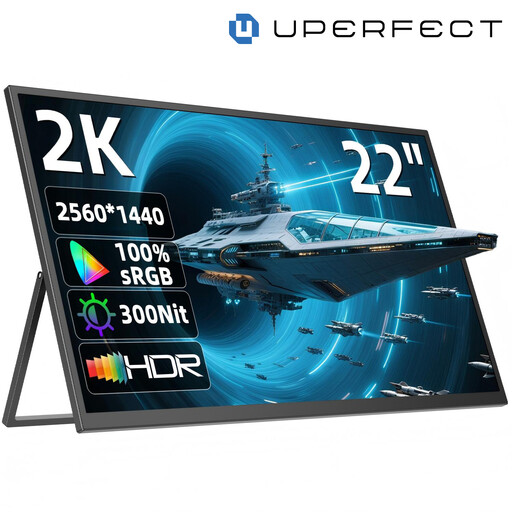
UPERFECT 22-inch 2K Portable Monitor, QHD IPS
Could be an option if you want to use a portable monitor at a shared desk. At 22 inches, it offers less physical screen space than a 27-inch monitor, which could matter when viewing text and supporting material side by side.
Specifications in the product name: 2560 × 1440 pixels, adjustable stand, USB-C and VESA compatibility.
View at Joybuy
Frequently asked questions
How should I set up the monitor if several people use the desk?
Adjust the screen position and text size so they’re comfortable to read whenever someone else takes over, and check for reflections at the desk itself. For display screen equipment in workplaces, the German Social Accident Insurance also refers to workplace regulations for desk-sharing. These can’t be applied automatically to every shared desk at home.
Will any USB-C connection provide both a picture and laptop charging?
No. Check each laptop’s video output and charging requirements against the monitor connection and the cable you plan to use. BenQ specifies DisplayPort Alt Mode and 65 W Power Delivery for the GW2790QT; EIZO lists up to 70 W for the EV2490. These model specifications don’t replace checking compatibility with your device.
How can I check energy use and warranty details before buying?
Compare the EU energy label and product information sheet for the specific monitor. Also distinguish your statutory rights against the seller from a voluntary manufacturer’s warranty, and check the terms of each; the Verbraucherzentrale (German consumer advice centre) explains the difference.
Are there specific display-screen workplace rules for a shared desk?
The Workplace Ordinance and relevant technical rules apply to display screen workstations in workplaces, including desk-sharing arrangements. The German Social Accident Insurance refers to these rules; whether they apply to your specific workplace depends on the relevant scope. Simply describing a desk as “shared” doesn’t mean every private purchase relates to a workplace display screen workstation.
Can I return a monitor bought online if it doesn’t fit on my desk?
For online consumer contracts in Germany, you generally have a 14-day right to cancel after receiving the goods; you must tell the retailer that you wish to cancel. The Verbraucherzentrale explained this rule in August 2026. Check the details of your specific contract, and don’t confuse cancellation with your rights if the product is faulty.


