A monitor with the right USB-C or Thunderbolt connection and sufficient Power Delivery can remove the need for a separate laptop charger on your desk – but the monitor still needs its own power socket. For colour-critical print jobs, a consistent colour workflow and calibration options matter more than a high colour gamut figure on its own. For detailed layouts, consider resolution and screen space alongside how much room the monitor takes up.
Which monitor is right for you?
Poster designers with a laptop and few power sockets
If you want to charge your laptop through the monitor, the video output, cable and charging power all need to be compatible. The monitor will still need its own power socket. ASUS Germany lists 96 W USB-C Power Delivery for the PA279CRV, while BenQ Germany specifies 90 W over Thunderbolt 4 for the PD2732U.
Designers working on colour-critical print jobs
For consistent assessments of poster colours, consider the intended print workflow, suitable colour modes and calibration method together. EIZO specifies hardware calibration for the CS2740 and CG2700X; according to EIZO, the CG2700X also has an integrated sensor for self-calibration.
Designers working on detailed layouts
If you need to check small text, image crops and multiple tools, weigh up resolution and screen space alongside desk space and scaling. ASUS lists 27 inches and 3840 × 2160 pixels for the PA279CRV, as does BenQ for the PD2732U.
What should you look for when buying?
When you have few spare power sockets, start by checking that the laptop connection is right for you. Colour workflow, layout space and ongoing costs each call for different checks.
| What you need |
What to check before buying |
Who is it most important to? |
| Charge your laptop and free up a socket |
Check that your laptop port supports video output, and that the cable is suitable and the monitor’s specified input provides enough charging power. |
If I want to avoid using a separate laptop charger at my workstation, the connection and charging power need to suit my device. Around 36% of consumers prioritise laptop power delivery. |
| Assess poster colours for print |
Check that the colour modes, calibration method and profiles match your intended print workflow. |
For colour-critical print jobs, I want to be able to assess whether my screen is right for my colour-managed workflow; a colour gamut figure alone cannot tell me that. Around 29% of consumers prioritise this print workflow. |
| See the details in your layout |
Compare screen size and resolution with the space available on your desk and your preferred operating system scaling. |
When I’m checking fine text and image details, I need a screen that keeps my layout easy to read without losing sight of the space available. Around 21% of consumers prioritise layout details. |
| Keep track of energy use and ongoing costs |
Compare the EU energy label and model specifications. For a colour workflow, also check any accessories you’ll need and the service terms. |
If I use my monitor frequently, I want to consider its energy consumption and any additional costs for accessories or service. Around 14% of consumers prioritise ongoing costs and replacement or replenishment terms. |
Avoid common misconceptions
-
Every USB-C port supports video and charging with a single cable
Video transmission and Power Delivery depend on your laptop port, cable and the specific monitor input. A USB-C socket alone does not confirm that both functions will be available as you need them.
Before buying, check your laptop’s video output, choose a suitable cable and compare its charging requirements with the power available from the relevant monitor input.
-
A high Adobe RGB figure guarantees accurate print colours
Colour gamut coverage, calibration method and print workflow each describe different things. A percentage on its own does not prove that the display will match the final print.
Choose a monitor to suit the profiles and requirements of your intended print workflow, and check which calibration method and accessories the specific model supports.
-
Factory calibration and hardware calibration are the same thing
PRAD distinguishes software calibration from correction in the monitor’s internal LUT for the BenQ PD2732U.
If you regularly assess colour-critical prints, check the calibration method the specific model actually supports and the equipment you’ll need.
Key brands to consider
ASUS
According to its German specifications, ASUS’s ProArt PA279CRV combines a 27-inch 4K screen with 96 W USB-C Power Delivery.
- ASUS lists sRGB and Adobe RGB modes for the PA279CRV.
- PRAD measured a brightness of 80 cd/m² in sRGB mode on the specific PA279CRV it tested, and found that it could not be adjusted. This measurement does not automatically apply to other models.
BenQ
BenQ offers the 27-inch 4K PD2732U with 90 W Power Delivery over Thunderbolt 4, and the 31.5-inch 4K PD3225U as an alternative with 85 W.
- BenQ specifies 99% Adobe RGB for the PD2732U.
- According to PRAD, the PD2732U does not offer hardware calibration with correction in the internal LUT. This is different from factory calibration.
EIZO
EIZO describes the ColorEdge CS2740 and CG2700X as 27-inch 4K models with hardware calibration.
- According to EIZO, the CG2700X has an integrated sensor for self-calibration; this feature is not specified for the CS2740.
- EIZO specifies a maximum of 60 W for the CS2740’s USB-C upstream port. If you have a more powerful laptop, check its charging requirements separately.
Dell
According to Dell, the UltraSharp U2725QE is a 27-inch 4K Thunderbolt hub monitor with a USB hub.
- Dell lists laptop power delivery and an integrated USB hub for this model.
- Dell’s product page lists both 90 W and up to 140 W. Before buying, check which port delivers each level of power and under what conditions; this does not establish that the monitor is suitable for colour-critical print approval.
Joybuy products for laptops and poster design
The following models are listed as supporting USB-C laptop charging. For each one, check that it suits your setup, including your laptop, video output, charging needs and the monitor’s own power connection.
 No image available
INNOCN 40C1U, 40 inches, 5K, IPS, ultrawide, 65 W USB-C
Could suit detailed layouts if you have room for a wide workspace and your laptop needs no more than 65 W of charging power.
Specifications include a 40-inch IPS screen, 5120 × 2160 pixels and 65 W USB-C Power Delivery. The product description also lists sRGB 99% and Adobe RGB 87% (1931) or 91% (1976). The stand takes up space, and the stated power may not be enough if your laptop needs more charging power.
View at Joybuy
 No image available
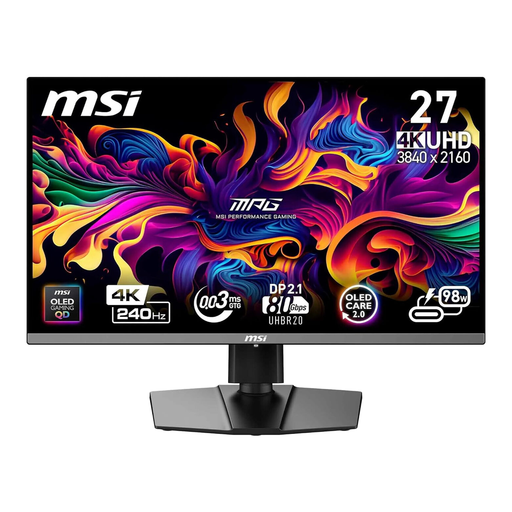
MSI MPG 272URXDE, 26.5 inches, 4K, QD-OLED, 98 W USB-C
An option if you want 4K resolution and the stated 98 W USB-C charging power, and your laptop can also output video through the port.
The product title lists 3840 × 2160 pixels and 98 W Power Delivery. The product description gives 98% Adobe RGB as a product specification, not an independent test result. The monitor still needs its own power connection, and the stated power may not be enough if your laptop needs more.
View at Joybuy
 No image available
MSI MPG 322URXDE QD-OLED, 32 inches, 4K, 98 W USB-C
Could suit a laptop workstation if you need the stated 4K resolution and 98 W USB-C Power Delivery, and have enough room for a 32-inch monitor.
The specifications list 3840 × 2160 pixels, 240 Hz and 98 W Power Delivery over USB-C. The product description gives 98% Adobe RGB as a product specification. Check your laptop’s video output and charging requirements; the monitor still needs its own power connection.
View at Joybuy
 No image available
ASUS ROG Swift OLED PG32UCDMR, 32 inches, 4K, 90 W USB-C
Could be worth considering if you want a 32-inch 4K screen and the stated 90 W USB-C charging power for your laptop workstation.
The product title lists 3840 × 2160 pixels, 90 W USB-C Power Delivery and a USB hub. Check that your laptop outputs video over USB-C and that 90 W is enough to charge it. The monitor will still need its own power socket.
View at Joybuy
 No image available
Philips 276B9, 27 inches, QHD, IPS, 65 W USB-C
A possible choice if you want a 27-inch laptop workstation with USB-C charging and a USB hub, and QHD is enough for your layout work.
Specifications include 2560 × 1440 pixels, 65 W USB-C Power Delivery, a USB hub and a height-adjustable stand. QHD is the stated resolution, so check that it’s enough for your detailed work. Your laptop and the monitor connection need to support both video transmission and charging.
View at Joybuy
Frequently asked questions
Can a USB-C monitor save you a power socket?
It can remove the need for a separate laptop charger if your laptop, cable and monitor input support video transmission and provide enough charging power. The monitor itself will still need a power connection.
How do I set up a monitor to assess printed posters?
Match the colour mode and profiles to your intended print workflow, and consider the calibration method if you regularly work with colour-critical designs. An Adobe RGB percentage on its own does not tell you whether the print will look right.
What should I consider when choosing a colour mode and calibration?
Check brightness and legibility in the mode you’ll actually use, and allow for the calibration you need when working with colour-critical designs. On the ASUS PA279CRV tested by PRAD, brightness in sRGB mode could not be set above 80 cd/m²; this measurement does not automatically apply to other models.
How can I compare the energy consumption of monitors?
According to the European Commission, electronic displays in the EU carry an energy label on a scale from A to G. Compare the label and the specifications for the specific model rather than using them to infer its laptop charging power.
Is a manufacturer’s guarantee the same as your statutory rights?
No. Verbraucherzentrale distinguishes statutory rights relating to faults from an additional guarantee offered by the seller or manufacturer. Check the terms for your specific purchase, and don’t treat an advertised guarantee period as a replacement for your rights if something is faulty.


