What should you look for when buying?
First decide whether you’ll mainly be working for the web or for a specific print process. Then you can more easily match the colour workflow, screen size and connections to your needs.
| What matters when buying |
What to look for |
Who should prioritise it? |
| Colour for web images |
Check for an sRGB mode and options for calibration and profiling within your image workflow. |
If you mainly assess the colour of product photos for online listings, you’ll want to view them as part of a suitable web workflow; around 42% of consumers prioritise web colours. |
| Colour for print |
Compare your intended output with the specific model’s supported colour modes and calibration options. |
If you’re working to a specific print process, you’ll want to match colours to the actual output; around 25% of consumers prioritise a print workflow. |
| Detail and desk space |
Measure the width and depth of your desk, then compare the stand’s dimensions and the resolution at your preferred scaling. |
If you need to see image details clearly but have limited desk space, the screen and stand need to fit the available area; around 17% of consumers prioritise detail and desk space. |
| Laptop connectivity |
Match your laptop’s video output and charging requirements to the monitor’s connection and Power Delivery specification. |
If you want to connect your laptop to the monitor and potentially charge it too, make sure the video and power capabilities are suitable; around 16% of consumers prioritise laptop connectivity. |
Joybuy monitors at a glance
The following Joybuy products are desktop monitors. For product photography, check that the colour workflow, resolution, footprint and connections of each model meet your needs.
 No image available
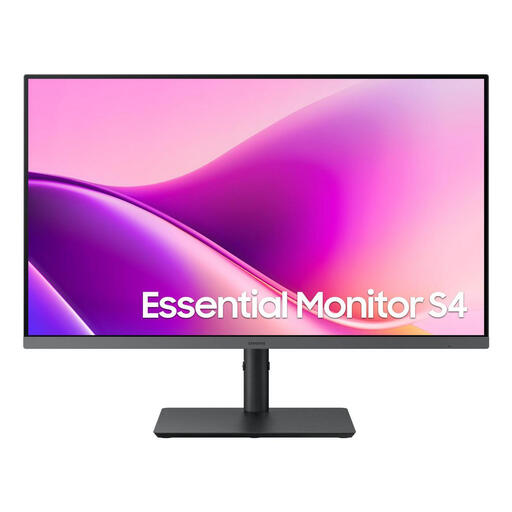
Samsung Essential Monitor S4 S43UF, 27-inch
If you’re looking for a 27-inch desktop monitor, check that its colour workflow is suitable for your intended output, especially if you’re working with colour-critical product photos.
The product name specifies FHD resolution, IPS, 100 Hz and USB-C; the description also lists a height-adjustable stand.
View at Joybuy
 No image available
CRUA CR320QB, 32-inch curved 4K monitor
If you edit product photos for online listings, the stated sRGB coverage may help you choose a monitor, but it doesn’t replace matching your colour workflow to your needs.
The product specifications list 3840 × 2160 pixels, 3000R curvature, a VA display and 100% sRGB. Colour gamut coverage is a product specification, not an independent colour test.
View at Joybuy
 No image available
INNOCN 40C1U, 40-inch ultrawide monitor
If you want to see image details and have several windows open side by side, check that a 40-inch display and its stand will fit on your desk.
The product specifications list 5120 × 2160 pixels, 99% sRGB, DeltaE < 2 and USB-C with 65 W Power Delivery. They also mention an included calibration report and a height-adjustable stand. These specifications don’t prove that the monitor will match your output process.
View at Joybuy
 No image available
INNOCN CB27U1, 27-inch 4K UHD monitor
If you’re looking for a 27-inch display for detailed product images, check its dimensions against the space available on your desk.
The product specifications list 3840 × 2160 pixels, 120 Hz, 100% sRGB and DeltaE < 1, as well as USB-C with 90 W Power Delivery and height adjustment. Colour gamut and DeltaE figures are product specifications, not proof that the monitor will match your output process.
View at Joybuy
 No image available
ASUS ROG Swift OLED PG32UCDMR, 32-inch 4K monitor
If you’re considering a 32-inch display for detailed images, first check that the screen and stand will fit your workspace and that the workflow suits your intended output.
The product specifications list 3840 × 2160 pixels, 10-bit colour depth, 97% Adobe RGB, 99% DCI-P3 and USB-C with 90 W Power Delivery. These are product specifications and don’t, on their own, prove that the colours will be suitable for a particular print process.
View at Joybuy
Frequently asked questions
Is a wide colour gamut on its own enough to make product photos look the same on other devices?
No. A wide colour gamut alone doesn’t guarantee consistent display on other devices. According to the International Color Consortium, calibration and profiling work together to support more consistent display. Also check the image file’s profile and the intended output process.
How can I check whether a monitor will fit on my desk in a student room?
First, measure the available width and depth of your desk, then compare these with the monitor’s dimensions, including the stand. According to ASUS, the ASUS PA279CRV measures 61.22 × 53.81 × 21.50 cm with the stand; BenQ lists a stand depth of 262.6 mm for the SW242Q. These specifications apply to those specific models.
Will any USB-C monitor charge my laptop using the same cable?
No. It depends on your laptop, its port, the cable and its power requirements. Compare your laptop’s video output and charging needs with the specifications of the monitor you’re considering. ASUS lists 96 W Power Delivery for the PA279CRV; BenQ lists DisplayPort Alt Mode and 90 W for the SW242Q.
What rights do I have when buying a monitor online from a trader?
For a qualifying distance purchase, European Union guidance generally provides a 14-day right to cancel from the date of delivery. You may have to pay the return costs under the conditions set out there. If the goods are faulty, you also have statutory rights against the seller, with a minimum period of two years; purchases from private individuals are treated differently.


