What should you look for when buying?
First, think about which content you want to keep side by side. Microsoft Support explains how to arrange multiple displays; for judging print colours, Adobe highlights the importance of an ICC profile that matches the output.
| What you need |
What to check before buying |
Who it matters to |
| Separate workspaces |
Check that your computer and monitor support the setup you have in mind, and that you can arrange windows as you want. |
If you want the booklet and reference to stay on separate screens, the right arrangement matters. Around 29% of consumers prioritise comparing the layout with the reference. |
| Text and grid details |
Compare the native resolution and check how a typical booklet page looks at your preferred scaling. |
If you want to read small text and fine puzzle grids clearly, check the display with your toolbars visible too. Around 23% of consumers focus on checking detail and text. |
| Print colours |
If print colours matter to your decision, check the colour gamut you need and the right output ICC profile. |
If you want to assess colours for a printed booklet, the colour workflow matters just as much as the display specification. Around 18% of consumers prioritise checking print colours. |
| Connections and setup |
Compare video outputs, the number of supported displays, inputs, cables, Power Delivery and the space required. |
If you want two screens to work together at one workstation, connections and positioning are crucial. Around 18% of consumers focus on connections and setup. |
| Total cost and purchase protection |
Check what’s included, any accessories you’ll need, the EU energy label and the terms of the specific offer. |
If you want to keep an eye on the initial and ongoing costs, check what’s included in the box too. Around 12% of consumers prioritise total cost. |
Monitors available at Joybuy
This selection includes extra monitors for separate workspaces, as well as single-screen ultrawide alternatives if two areas on one wide display are enough.
 No image available
INNOCN CB27U1 27-inch 4K monitor
Could be considered as an extra screen for your layout and reference.
Features listed in the product name: 3.840 × 2.160 pixels, IPS, USB-C with 90 W Power Delivery, pivot and PIP/PBP.
A colour gamut specification alone can’t predict the printed result; you’ll need a suitable output ICC profile.
View at Joybuy
 No image available
KTC M27P6 27-inch 4K monitor
Could work as an extra screen if you want to keep your booklet layout and reference separate.
Features listed in the product name: MiniLED, Fast IPS, USB-C with 65 W Power Delivery, KVM, and height, tilt and swivel adjustment.
The stated dual-mode resolution is 4K 160 Hz/FHD 320 Hz.
View at Joybuy
 No image available
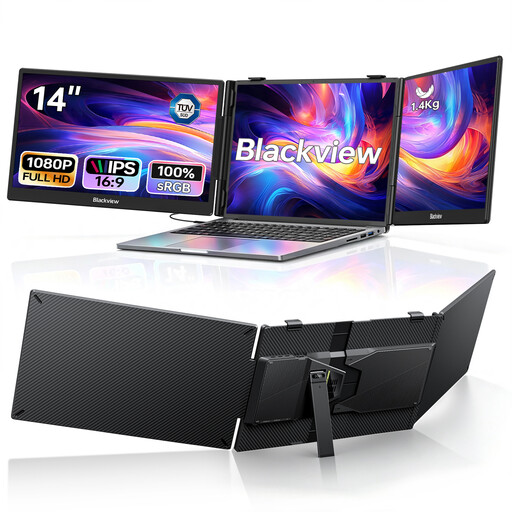
Blackview DCM5 Dual Portable Monitor, 2 × 14-inch FHD
Could suit a mobile setup with two extra screens, if it’s compatible with your devices and intended use.
Features listed in the product name: two 1080p IPS screens, USB-C Plug and Play and 100 W Power Delivery; specified for laptops with screens from 13–17,3 inches.
The stated resolution offers fewer native pixels than the 27-inch 4K models listed here, which may matter when viewing fine grid details.
View at Joybuy
 No image available
CRUA 49-inch DQHD ultrawide monitor
Could be an alternative if you want to use two work areas on one wide screen rather than two separate devices.
Features listed in the product name: 5.120 × 1.440 pixels, 32:9 format, 165 Hz and a height-adjustable stand.
As a single monitor, it can’t give you two physically separate screens that you can position independently.
View at Joybuy
 No image available
Philips 49B2U6900CH 49-inch Dual QHD monitor
Could suit you if you want to view your layout and reference on one wide screen rather than two separate monitors.
Features listed in the product details: 5.120 × 1.440 pixels, USB-C dock with 100 W Power Delivery, PBP/PIP and height adjustment.
An ultrawide monitor can’t be positioned like two separate displays.
View at Joybuy
Frequently asked questions
How do I set up my layout and reference on two screens in Windows?
Once Windows detects both displays, you can identify them in the display settings and drag them into positions that match your actual setup. Microsoft Support explains how to arrange them; whether two external displays are supported also depends on your computer.
Is a wide colour gamut enough to predict the print colours of my puzzle book?
No. To assess the intended print output, you’ll also need a colour or ICC profile that matches the output conditions. Adobe advises that the printer profile should match the output device; a colour gamut specification alone doesn’t describe the finished print.
What should I bear in mind about power consumption and care?
Compare the EU energy label for the specific model and remember to account for both devices if you’re using two displays. Follow the relevant manufacturer’s instructions for cleaning and maintenance rather than assuming the same method works for every panel.
What are my rights if a monitor bought online in Germany is faulty?
For newly purchased goods, consumers can generally exercise their statutory warranty rights with the seller within two years of delivery; this is separate from any voluntary manufacturer’s guarantee. Online consumer purchases also generally come with a 14-day right to cancel from the date you receive the goods, subject to the legal requirements. The Verbraucherzentrale explains these rights.
Does a privately used dual-screen workstation have to comply with ASR A6?
ASR A6 sets out requirements for workplaces and certain designated home-working setups. According to the Federal Institute for Occupational Safety and Health, it doesn’t generally apply to screen use at home outside such home-working arrangements. Its guidance on workstation design may be useful, but it isn’t a blanket requirement for private puzzle-book projects.


