Level designers working with detailed interfaces
If you work with small icons, text and several design windows, start by checking which screen area and image clarity suit your editor and the scaling you usually use.


Choose a monitor based on your main task. For small text and controls, resolution, screen size and scaling matter; for checking colours, look for a documented colour mode; and if you switch between computers, make sure the connections you need are available. At a shared desk, the monitor’s footprint and adjustability are important too. Before you buy, check that both computers and the desk are suited to your chosen model. The model specifications mentioned are based on manufacturers’ information and do not demonstrate how a monitor will display your specific puzzle project.
If you work with small icons, text and several design windows, start by checking which screen area and image clarity suit your editor and the scaling you usually use.
If you assess colours and visual cues in a puzzle, look for a documented colour mode that suits your project workflow rather than focusing on screen size alone.
If several people use the monitor or input devices, or you frequently switch between laptops, suitable connections, a straightforward switching method and an adjustable position are all important things to consider.
First, decide whether readability, colour checking, switching between computers or adjusting the monitor for different seating positions matters most to you.
The table groups the considerations for a shared workstation by the priority that matters most to each individual shopper.
| Buying priority | What to check when buying | Who is this particularly important to? |
|---|---|---|
| Screen space and readability | Compare screen size and native resolution; take the available desk space and your preferred scaling into account. | If I want to read small icons and editor text alongside the preview, I need suitable screen space and scaling. Around 31% of shoppers put readability and room for detail first. |
| Colour reproduction | Check the colour space your workflow requires and the specifications for the specific model. | If I assess coloured puzzle cues, I want a documented colour mode that suits my project. Around 31% of shoppers prioritise colour checking. |
| Connecting and switching | Check the video outputs, USB connections and charging requirements for each computer; if you share peripherals, check for KVM and suitable USB upstream connections. | If I switch between computers at a shared desk and want to use the same keyboard and mouse, the switching method needs to work with both devices. Around 23% of shoppers prioritise switching between devices. |
| Positioning and reflections | Consider height and tilt adjustment, the stand’s footprint and the light sources in your particular workspace. | If several people use the desk, I want to be able to adjust the screen to suit my seating position and viewing angle. Around 15% of shoppers put adjusting the screen’s position first. |
Specifications for one model do not prove that a version with a similar model number has the same connections or features.
Before ordering, compare the full model number with the specification sheet for the exact device on offer.
Video, USB data, power delivery and switching are separate functions. Check which ones are listed for the specific model and which ones your computers support.
Make a note of the video, USB and power connections each computer needs, then compare them with the monitor’s ports.
Depending on your devices, you may need suitable extra cables or a separate dock.
Information about sRGB or calibration applies to specific models and does not, on its own, tell you how a puzzle will look in its final intended environment.
Check which colour space is relevant to your project, and assess important cues in their intended environment as well.
The DesignVue PD2705Q is a specific QHD example for a design workstation, with an sRGB mode and KVM.
The ProArt PA278CV is a specific QHD model for colour-focused design work, with an adjustable stand.
The P2725QE is a specific example of a 27-inch 4K monitor with a USB-C hub for a laptop workstation.
The FlexScan EV2740X is a specific 27-inch 4K office model with docking and KVM specifications.
This selection includes monitors for detailed puzzle design and colour checking, as well as workspaces where desk space or switching between computers is a consideration.
 No image available
The 32-inch screen and 4K UHD specifications offer plenty of space for detailed designs; KVM is useful when switching between multiple devices.
QD-OLED; 3840 × 2160 pixels; USB-C with 90 W Power Delivery; built-in KVM switch; ergonomic stand.
The product description recommends leaving the OLED Care features enabled.
 No image available
This 27-inch model is an option if you want to check small details in 4K and use an sRGB picture mode for your design work.
IPS; 3840 × 2160 pixels; 60 Hz; matte finish; 10-bit colour depth and sRGB picture mode.
The stand can be adjusted for height, swivel, tilt and pivot. If you share the monitor between computers, check the connections required for both devices.
 No image available
The 32-inch 4K specifications and built-in KVM switch may be useful if you want more design space and need to switch between computers.
QD-OLED; 3840 × 2160 pixels; 99% DCI-P3 according to the product description; USB-C with 90 W Power Delivery; USB hub.
The stand is described as ergonomic. Check that the USB-C connection and charging power suit your devices.
 No image available
The 32:9 format and Dual QHD resolution are designed for several work windows side by side; check that the large screen will fit on your shared desk before buying.
49 inches; 5120 × 1440 pixels; SmartKVM; USB-C dock with two USB-C inputs and 100 W Power Delivery; height-adjustable stand.
The stated width with the stand is 1193 mm.
 No image available
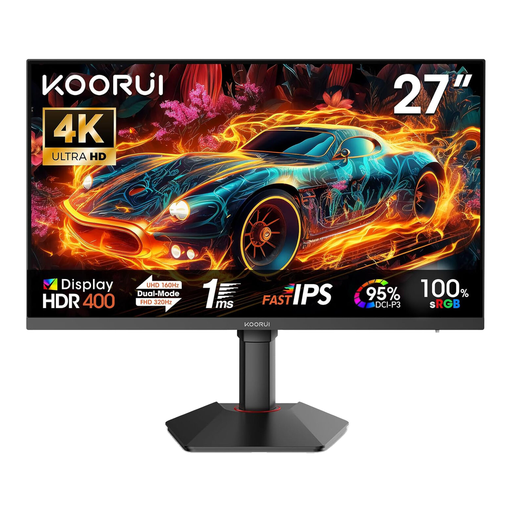
The 27-inch screen and 4K specifications are useful for detailed designs; the stated sRGB figure may help you choose a monitor for colour-focused design work.
Fast IPS; 3840 × 2160 pixels at 160 Hz and FHD at 320 Hz; 100% sRGB and 95% DCI-P3 according to the product description; two HDMI 2.1 ports and DisplayPort 1.4.
The stand offers height adjustment, tilt and pivot. If you share the monitor between computers, check which connections you actually need for the video signal and peripherals.
No, not necessarily. It depends on your editor, the size of its controls, your preferred scaling and the space available on your desk. There are specific examples of both 27-inch QHD and 27-inch 4K models, but that does not mean 4K is essential for everyone.
Not necessarily. Check that the specific monitor supports video, USB data and Power Delivery, and check which features your laptop supports and how much power it needs. BenQ lists DisplayPort Alt Mode, data and 65 W Power Delivery over USB-C for the PD2705Q.
Look for a stand with height and tilt adjustments so you can adapt it to different seating positions, and check the viewing angles and any distracting reflections. The German Federal Institute for Occupational Safety and Health describes the scope of ASR A6 as covering screen-based workstations in workplaces and teleworking workstations; it does not apply generally to private use outside this scope.
No. ASR A6 sets out requirements within its scope, for example for screen-based workstations in workplaces and teleworking workstations. The German Federal Institute for Occupational Safety and Health distinguishes these from private use outside teleworking workstations.