What matters for different users

Worksheet creators

If you write and review longer reading passages, it helps to see more lines at once and have a screen position you can adjust. The Federal Institute for Occupational Safety and Health emphasises the importance of positioning the screen to suit the individual; Lenovo lists a resolution of 1920 × 1200 pixels and an adjustable stand for the ThinkVision T24d-30.

Learners with a small desk

If you need to fit a keyboard, books or paper alongside your monitor, compare the footprint of the whole unit, including the stand. LG lists the 24MS500-B as 539.9 mm wide and 190 mm deep with the stand.

Learners with a laptop set-up

If you connect your laptop regularly, check that its video output and charging requirements are compatible with the monitor. Dell lists up to 90 W Power Delivery for the P2425E, while AOC lists up to 65 W for the 24P3CV; both figures apply to the respective model range.

What to consider when buying

Priority What to look for when buying Who it matters most to
Readability and screen space Consider the resolution and aspect ratio alongside your preferred text size. Lenovo lists 1920 × 1200 pixels for the ThinkVision T24d-30; LG gives a resolution of 1920 × 1080 pixels for the 24MS500-B. When I write or mark longer worksheets, I want to see as much text as possible at once without making the type too small to read. Around 40% of consumers put screen space first.
Desk space and adjustability Measure the available desk width and depth, including the stand, and check whether the specific model’s height and tilt can be adjusted. If I need to keep books and paper on my small desk too, the monitor has to fit the available space and be adjustable to suit my sitting position. Around 30% of consumers focus mainly on footprint and adjustability.
Laptop connection Check your laptop’s video outputs against the monitor’s inputs. For USB-C, also check video output, charging power and the cable. If I connect my laptop regularly, I want to know whether one connection will handle both the picture and, where needed, charging, or whether HDMI will do. Around 20% of consumers prioritise the laptop connection.
Power consumption Compare the energy label and the specifications for the exact display rather than estimating consumption from screen size. If the monitor is on regularly, I want to take its energy use into account when choosing one. Around 10% of consumers place particular importance on running costs. The European Commission explains energy labelling for electronic displays covered by EU rules.

Common misconceptions when buying a monitor

  • Measuring only the screen diagonal

    The stand takes up extra desk space. LG lists a depth of 190 mm for the 24MS500-B with its stand.

    Measure the usable area, including space for your keyboard, books and paper, and compare it with the dimensions of the exact version.

  • Assuming USB-C will automatically charge your laptop

    USB-C charging depends on the laptop, video output, cable and required charging power all being compatible. Dell lists up to 90 W Power Delivery for the P2425E, while AOC lists up to 65 W for the 24P3CV.

    Check your laptop’s USB-C video output and power requirements, as well as the specifications for the exact monitor model you want.

  • Assuming a reading mode is a substitute for good positioning

    The presence of a reading mode alone does not prove that it offers any health benefits. Screen position and your individual visual needs matter too.

    Consider readability, adjustability and positioning together rather than relying on a single mode.

Brands and model ranges to consider

Lenovo

The ThinkVision T24d-30 is an example of a 24-inch 16:10 monitor suited to longer documents.

  • Lenovo lists a resolution of 1920 × 1200 pixels and a highly adjustable stand for this model.
  • The listed connections are VGA, DisplayPort and HDMI. Check the specifications for the exact model if you need USB-C charging.

LG

The 24MS500-B is an example of a 23.8-inch Full HD monitor with listed stand dimensions, making it worth considering for smaller desks.

  • LG lists two HDMI inputs, a reading mode, and dimensions of 539.9 mm wide and 190 mm deep with the stand.
  • A reading mode is not proof of a health benefit. If you expect USB-C charging, check the connections on the exact version.

Dell

The Pro P2425E is an example of a 24-inch 16:10 monitor with a USB-C hub for a compatible laptop set-up.

  • Dell lists up to 90 W Power Delivery and height adjustment for the P2425E.
  • The charging power needs to suit your laptop; these specifications do not automatically apply to similarly named Dell models.

AOC

The 24P3CV is an example of a 23.8-inch Full HD monitor with USB-C for a laptop set-up.

  • AOC lists DP Alt Mode, up to 65 W Power Delivery and built-in speakers.
  • Its resolution of 1920 × 1080 pixels provides fewer vertical pixels than the 16:10 models mentioned. Check that it is compatible with your laptop.

Joybuy monitors for desk-based reading and writing

The following Joybuy products are Full HD monitors; depending on the model, they may also have an adjustable stand or USB-C.

KOORUI MB24V29FS4 24-inch Full HD IPS monitor

KOORUI MB24V29FS4 24-inch Full HD IPS monitor

An option if you’re looking for a Full HD monitor for reading and writing, with an HDMI or VGA connection.

1920 × 1080 pixels; HDMI and VGA; tilt-adjustable stand. Listed depth: 185.1 mm.

View at Joybuy

KTC H24B9S 24-inch Full HD IPS monitor

KTC H24B9S 24-inch Full HD IPS monitor

An option for reading and writing if you want to adjust the screen angle and use HDMI or DisplayPort.

1920 × 1080 pixels; HDMI and DisplayPort; tilt from −5° to 15°.

View at Joybuy

Dell P2425HE 24-inch Full HD IPS monitor with USB-C

Dell P2425HE 24-inch Full HD IPS monitor with USB-C

An option if your laptop supports USB-C video output and the listed charging power meets its requirements.

1920 × 1080 pixels; USB-C with up to 90 W Power Delivery according to the product description; height-adjustable stand.

View at Joybuy

Acer Vero B248YGbemiqprcuzx 24-inch business monitor

Acer Vero B248YGbemiqprcuzx 24-inch business monitor

An option for reading and writing if you want to adjust the screen’s height and orientation.

1920 × 1080 pixels; HDMI and DisplayPort; height adjustment and pivot function. The product title mentions a 5 MP IR webcam with microphone.

View at Joybuy
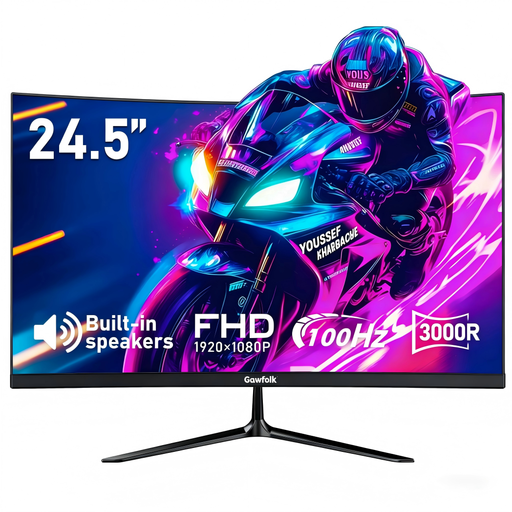
Gawfolk 24.5-inch Full HD curved monitor

Gawfolk 24.5-inch Full HD curved monitor

An option for reading and writing if you’re looking for a tilt-adjustable monitor with HDMI and DisplayPort connections.

1920 × 1080 pixels; 24.5 inches; HDMI and DisplayPort; tilt adjustment.

View at Joybuy

Frequently asked questions

Do I need to buy a monitor with a reading mode for reading practice?

No. A reading mode is not essential, and its presence alone does not prove that it offers any health benefits. LG lists this feature for the 24MS500-B; also consider text size, lighting and a screen position that works for you. The Federal Institute for Occupational Safety and Health’s guidance on screen positioning can help, but it is not a requirement for a home study.

How should I set up a monitor for reading longer texts?

Adjust the text size and brightness so the text is easy for you to read, and position the screen to suit your sitting position and, if applicable, your glasses. Before buying, check that the stand allows the adjustments you need. The Federal Institute for Occupational Safety and Health highlights the importance of positioning the screen to suit the individual.

Which details help me compare power consumption?

Compare the EU energy label and product information for the specific display, if it is covered by EU rules for electronic displays. To estimate your own costs, you’ll also need to know how many hours you use it and your electricity tariff; you can’t work out the energy class from screen size. The European Commission explains energy labelling for electronic displays.

Which markings and documents should I check for a monitor in Germany?

For the specific device on offer, if it is required to carry CE marking, check the CE marking, the manufacturer’s information and the required German-language instructions for use, including usage and warning information. The Federal Network Agency describes these points as part of its market surveillance work. CE marking is based on the manufacturer’s responsibility for conformity; it is not an independent picture-quality test.

Will USB-C charging work with any laptop?

No. The laptop and monitor need to be compatible with the USB-C video output and charging power you want. Check the laptop’s video output and power requirements, along with the cable; the charging figures given apply only to the specific model in each case. If you connect your laptop via HDMI, you don’t need USB-C charging just to transmit a picture.