If you want to keep your papers and keyboard on a small desk, first check the space taken up by the whole setup, including the stand and cables. The screen size in inches alone won’t tell you whether there’ll still be room for your notes. For longer reading sessions, look for a screen position you can adjust to suit you and a clear, easy-to-read display. A portable monitor is worth considering if you can put it away after use and your computer can output the required video signal.
Which monitor is right for you?
A desk covered with papers
If you need space for reading materials, notes and a keyboard alongside your monitor, check the footprint of the whole setup rather than just the screen size. The German Social Accident Insurance’s Institute for Occupational Safety and Health treats display screen equipment as part of workplace design. Dell lists the SE2225HM as having a 21.5-inch screen, but that doesn’t tell you how much room its stand takes up.
Regular text editing
If you read and edit for extended periods, adjust the text display and screen position to suit your eyesight and viewing position. The Federal Institute for Occupational Safety and Health recommends adjusting screen position to individual visual needs and body measurements. Lenovo and Philips list adjustable stands on the models featured here.
A workspace that changes
If you want to clear your desk after preparing your work, a portable monitor could be a good option. First check that your computer can output the required video signal through the connection you plan to use. Lenovo and ASUS list USB-C with DisplayPort Alt Mode for their portable models featured here.
What should you look for when buying?
First measure the usable space on your desk. Then decide whether a permanently set-up or easy-to-store screen better suits the way you work.
Compact monitor with an adjustable stand
Best for: Regularly editing longer texts at a fixed workstation and adjusting the screen position to suit you.
Consider: An adjustable stand doesn’t automatically take up less desk space. Check the dimensions of the stand on the specific model.
Basic monitor with a stand
Best for: When a fixed screen is all you need and tilt adjustment gives you the positioning you want.
Consider: A stand that only tilts won’t let you adjust the screen height, so you may need to find another way to position it.
Portable second monitor
Best for: Taking the screen off your desk after preparing your work or using it in different places.
Consider: Make sure the smaller screen and your computer’s video compatibility meet your needs.
| What matters when buying |
What to check |
Who is it important to? |
| Clear desk space |
Allow room for the desk setup, including the stand, cable connections, keyboard and papers. |
If I want to spread out reading materials and notes beside the screen, I need to know the dimensions of the whole setup. Around 34% of consumers put clear desk space first. |
| Clear text in the right position |
Check the text in the applications you use, as well as the height and tilt adjustments. |
If I read for extended periods, I want to adjust the text and screen position to suit my viewing position. Around 33% of consumers prioritise readability and positioning. |
| Connecting to your computer |
Check the video outputs on both devices. For USB-C, check for DisplayPort Alt Mode. |
If I want to keep using my current computer, the monitor needs to accept its video signal. Around 20% of consumers check connectivity first. |
| Putting it away after use |
Consider the screen size, how it will be set up, the cables and where you’ll store it. |
If I want my desk clear again after reading practice, a portable display could work for me. Around 13% of consumers make easy storage their top priority. |
Avoid common buying mistakes
-
Choosing by screen size alone
The screen diagonal doesn’t tell you how much room the stand takes up or how much desk space will be left for exercises and notes.
Measure the planned setup and, if needed, check the dimensions of the specific stand in the product specifications.
-
Assuming a comfort feature will prevent discomfort
Glare, eyesight issues and the way your workspace is set up can also play a part. A manufacturer’s feature isn’t proof that it’s the right solution for everyone.
Check the display and adjustment options, and arrange your screen and workspace to suit your viewing position.
-
Assuming USB-C is compatible
The portable models featured here specify USB-C with DisplayPort Alt Mode for video. The shape of the port alone doesn’t confirm that a computer can output a compatible video signal.
Check your computer’s video capabilities against the requirements of the specific monitor.
If your computer can’t output a compatible video signal, you may need a different connection solution or another device.
Key brands at a glance
Dell
The SE2225HM is a desktop monitor with a 21.5-inch screen, designed for a fixed setup.
- Dell lists Full HD, 100 Hz and a tilting stand for this model.
- Height adjustment isn’t listed. The screen diagonal doesn’t tell you how much room the stand takes up.
Lenovo
The ThinkVision T22i-30 and portable ThinkVision M14d offer two different setups: a fixed desktop monitor or a second screen you can put away.
- Lenovo lists an adjustable stand and several video connections for the T22i-30.
- The M14d requires USB-C with DisplayPort Alt Mode for video. Its smaller screen won’t replace every fixed workstation setup.
Philips
The S-Line 222S1AE/01 is a 21.5-inch Full HD desktop monitor with SmartErgoBase and EasyRead.
- Philips lists height and tilt adjustments for this model.
- EasyRead and Philips’ claims about eye comfort are manufacturer statements and don’t prove an individual benefit.
ASUS
The ZenScreen MB16ACV is a portable 15.6-inch Full HD display.
- ASUS lists an anti-glare screen and USB-C with DisplayPort Alt Mode.
- Height adjustment isn’t listed. ASUS notes that product specifications may vary by country.
Portable monitors at Joybuy
This selection features portable second monitors for reading practice that you can take off your small desk after use. Before buying, check in particular that your computer can output the required video signal through the connection listed.
 No image available
UPERFECT portable monitor, 18.5 inches
Its portable design is ideal if you want to take the screen off your desk after preparing your work.
- Matte IPS display with 1920 × 1080 pixels
- USB-C and Mini HDMI
- 120 Hz; according to the product listing, the refresh rate you can achieve depends on the device and cable.
View at Joybuy
 No image available
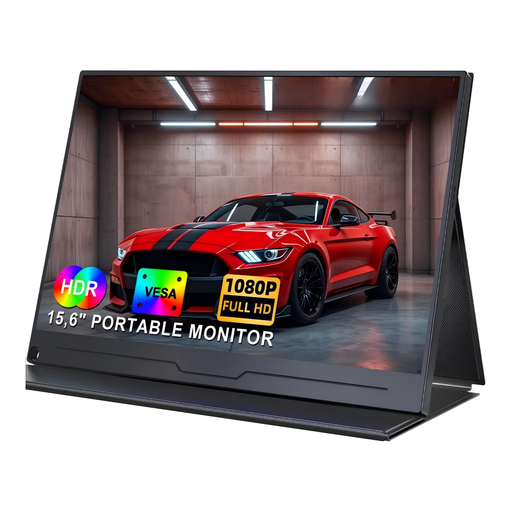
UPERFECT portable monitor, 15.6 inches, Full HD
This portable option is worth considering if you want to put your second screen away after use.
- IPS display with 1920 × 1080 pixels
- USB-C; the connected device must support video output to transmit the picture.
View at Joybuy
 No image available
UPERFECT portable monitor, 15.6 inches, 100% sRGB
This portable monitor has an integrated adjustable stand and is an option if you want to take the screen off your desk later.
- Full HD with 1920 × 1080 pixels
- 100% sRGB, according to the product description
- USB-C and Mini HDMI
- Integrated adjustable stand
View at Joybuy
Frequently asked questions
Will a 21.5-inch monitor definitely fit on my desk?
No. The diagonal measurement describes the screen size, not the footprint of the stand. Also allow space for the stand, cables, keyboard and reading materials.
How should I set up a screen for longer periods of reading and writing?
Adjust the screen position, text display and lighting to suit your viewing position, and take your glasses into account if you wear them. An adjustable stand makes it easier to position the screen, but doesn’t guarantee a comfortable experience.
Will a portable USB-C monitor work with any USB-C port?
No. The shape of the port alone doesn’t tell you whether it supports video. The ThinkVision M14d and ZenScreen MB16ACV featured here specify USB-C with DisplayPort Alt Mode. Check the video output on your particular computer.
How should I dispose of an old monitor?
Electrical and electronic waste shouldn’t go in your household rubbish. The German Environment Agency says it must be collected separately from unsorted household waste. Check where you can return it locally.


