Writers who hot-desk
If you write for long stretches, you may need to adjust the screen and seating before you start work. The DGUV recommends adapting your workstation to your needs when hot-desking.


For long scriptwriting sessions at a shared desk, clear text and a stand that different people can adjust easily are essential. If space is limited, a compact monitor around 24 inches is a sensible choice. If you want to see your script and notes side by side, a 27-inch QHD model can give you more room to work. USB-C docking is only useful if the laptops you use support video output and the charging power you need.
If you write for long stretches, you may need to adjust the screen and seating before you start work. The DGUV recommends adapting your workstation to your needs when hot-desking.
If you use the desk with different computers, check whether each one supports the video output you need and, where applicable, charging through the monitor. Philips and Dell list USB-C features for the specific models mentioned.
If you need room for scripts or notes beside the screen, consider the actual space taken up by the monitor and its stand. PRAD describes the 24-inch size category as an option for smaller desks.
First, check that you can read comfortably at the shared desk and adjust the screen for the next person. Then compare the desk space you have with the connections you need for the laptops you actually use.
| What matters when buying | What to check | Who it matters most to |
|---|---|---|
| Readable text and room for notes | Compare the screen size, native resolution and text scaling on your own computer. TÜV SÜD suggests Full HD up to 24 inches and WQHD for 24 to 32 inches as a guide, not a requirement. | If I want to read script pages and see my notes alongside them, workspace matters more to me than keeping the monitor as narrow as possible. Around 29% of consumers put readability and space for notes first. |
| Adjusting the screen at a shared desk | Check the height adjustment, tilt and swivel of the specific stand. The DGUV recommends adjusting the screen and seating to suit each person before work begins. | If several people use the same desk, I want to be able to adjust the screen quickly to suit my seating position before I start writing. Around 29% of consumers prioritise adjustability at a shared desk. |
| Connections for multiple computers | Check video output and compatible connections on every laptop. For a single-cable setup, also check the charging power and the peripherals you need. | If I switch between laptops, I don’t want the hassle of unplugging and reconnecting my peripherals every time. Around 24% of consumers put easy switching between computers first. |
| Desk space and energy use | Compare the monitor’s width and stand depth with the space available. Check the EU energy label for the specific model to compare efficiency. | If my desk is small, I still need room for paperwork beside the screen. Around 18% of consumers prioritise a small footprint; the European Commission describes the EU energy label for displays as using efficiency classes from A to G. |
Video output and charging also depend on the features supported by the connected laptop and the charging power it needs.
Check the connections on each computer you use against the specifications for the exact monitor model. Depending on your laptop, you may also need a suitable cable or a different connection solution.
A 27-inch monitor takes up more desk space than a more compact model, leaving less room for scripts and notes.
Compare the available width and depth with the dimensions of the monitor and its stand.
Verbraucherzentrale distinguishes your statutory rights against the seller from a voluntary guarantee.
Make a note of who the seller is. If a fault develops, check your statutory rights separately from the guarantee terms.
These notes relate to the specific model ranges mentioned. Before choosing, check that the screen and connections suit your desk and laptops.
The Dell P2725DE is a 27-inch QHD monitor with a USB-C hub.
The 243S1/00 is a 23.8-inch Full HD model with USB-C docking.
The LG 27UP850K-W is a 27-inch 4K model with USB-C.
The FlexScan EV2740X combines a 27-inch 4K display with USB-C docking and a network connection.
These Joybuy monitors offer different features for scriptwriting at a shared desk, including compact dimensions, a larger display area, adjustable stands and connections for switching between laptops.
 No image available
If you want to display your script and other content side by side, this model gives you a large native workspace. Check how text scaling looks on your computer.
27 inches; 3840 × 2160 pixels; 120 Hz; USB-C with 90 W Power Delivery; height-adjustable stand.
Using a single USB-C cable depends on the video and charging features supported by the connected laptop.
 No image available
If you want to leave space on your desk for paperwork, this compact 24-inch model could be a good option.
24 inches; Full HD; IPS; USB-C with up to 90 W; 4-port USB hub; height-adjustable stand.
Using a single USB-C cable depends on the video and charging features supported by the connected laptop.
 No image available
If you want to see your script and notes at the same time and have enough desk space, the 27-inch QHD display could be a good fit.
27 inches; 2560 × 1440 pixels; USB-C with up to 65 W Power Delivery; USB hub; height-adjustable stand.
Using a single USB-C cable depends on the video and charging features supported by the connected laptop.
 No image available
If you switch between two computers and want to display your script and research side by side, the listed docking features and KVM switch are worth considering.
27 inches; 2560 × 1440 pixels; USB-C docking with 98 W Power Delivery; KVM switch; height-, tilt-, swivel- and pivot-adjustable stand.
Using a single USB-C cable depends on the video and charging features supported by the connected laptop.
 No image available
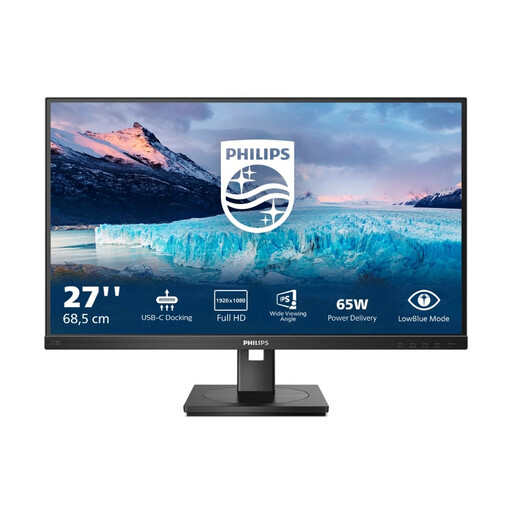
If you want USB-C docking and an adjustable stand, check whether Full HD is enough for your windows when using a 27-inch screen.
27 inches; 1920 × 1080 pixels; USB-C docking with up to 65 W; USB hub; height-, tilt-, swivel- and pivot-adjustable stand.
Full HD offers less native display space for side-by-side windows than a 27-inch QHD model. Single-cable use also depends on the features supported by the connected laptop.
Before you start work, adjust the screen and seating to suit your needs and check whether light is reflecting off the display. The DGUV recommends making this part of your hot-desking routine.
Not necessarily. A docking monitor can combine these functions with a compatible laptop, but check the video output, charging power needed and connections on all the computers you use against the exact model.
If the workstation falls within the scope of health and safety requirements, ASR A6 is relevant. The Federal Institute for Occupational Safety and Health describes it as setting out the requirements for working with display screen equipment in more detail. Whether a particular shared desk is covered depends on the specific workstation.
The EU energy label for displays rates efficiency on a scale from A to G. Compare the label for the specific model rather than judging its energy consumption by screen size or resolution alone.