At a shared desk, start by checking the space available, height adjustment and connections for the devices you use. A 16:10 monitor can offer more vertical screen space for text than a 16:9 model of a similar width. A USB-C hub can make it easier to switch between compatible laptops, provided the video output and charging power meet your devices’ needs.
Which monitor is right for you?
Writers using a hot desk
If you share a desk with others, look for a screen whose height and position can be adjusted. The ASR A6 from the Federal Institute for Occupational Safety and Health sets out requirements for screen-based workstations in workplaces and for remote working.
Writers switching between laptops
If several people connect different laptops, take a close look at the video inputs, USB hub features and charging power. Whether USB-C is enough will also depend on the ports and capabilities of each laptop.
Writers with limited desk space
If you need room for a keyboard and notes alongside your monitor, compare its footprint, including the stand, with the space available. The manufacturer’s dimensions and mounting options can help you plan your set-up.
What should you look for when buying?
Start by measuring the available space and checking how you’ll connect the monitor to your devices. Then compare the screen format and resolution with the way you prefer to view text.
| What to consider |
What to check |
Who it matters most to |
| Screen space for text |
Compare the aspect ratio and native resolution; set the text size to suit you. |
If I write and edit long passages, I want to see as much of the document as possible at a glance. Around 36% of consumers put legible text and usable document space first. |
| Switching between laptops |
Check the video input, USB hub and charging power separately; confirm that the laptop supports video output over USB-C. |
If several people connect their laptops at the same desk, I want to avoid unnecessary cable swapping. Around 29% of consumers prioritise an easy switch between devices. |
| Desk space and adjustability |
Measure the width and depth, including the stand; check the height and tilt adjustments. |
If there needs to be room for a keyboard and notes beside the screen, I want to be able to position the monitor to suit. Around 21% of consumers put available space and adjustability first. |
| Running costs and consumer protection |
Compare the EU energy label for the specific model; distinguish your statutory rights from a voluntary guarantee. |
If the monitor will be used at the shared desk for a long time, I want to take energy consumption and my rights if something goes wrong into account. Around 14% of consumers prioritise running costs and purchase protection. |
The European Commission describes the EU energy label for electronic displays, which uses a scale from A to G. Compare the figures for the specific device rather than estimating its energy consumption based on screen size alone. The Verbraucherzentrale distinguishes your statutory rights against the seller from a voluntary guarantee.
Common buying misconceptions
-
A USB-C port means your laptop is fully docked
What a connection can do depends on the specific monitor. Dell describes the P2425 as having a USB-C downstream port for data at up to 15 W, while the P2425HE is described as a USB-C hub monitor with up to 90 W Power Delivery.
Check the video input, USB data function and Power Delivery separately for the exact model. Make sure each laptop you plan to use supports the video output and charging power listed.
-
Screen size is all you need to compare desk space
The stand takes up extra depth: BenQ gives the GW2490T a depth of 241 mm with the stand. Lenovo also lists VESA mounting as an option for the ThinkVision T24i-30.
Measure the width and depth of the space you’ll be using, and check that your preferred mount is compatible with the monitor before buying it.
-
A manufacturer’s guarantee and your statutory rights are the same thing
Your statutory rights are against the seller; any additional guarantee is voluntary and comes with its own terms. The Verbraucherzentrale explains the difference.
Keep your proof of purchase and, if something goes wrong, first check what your rights are against the seller.
A guide to the key brands
Dell
The P2425 and P2425HE models compared here cater to different priorities: more vertical screen space for text or a USB-C hub for switching between laptops.
- Dell lists a resolution of 1920 × 1200 pixels and a height-adjustable stand for the P2425. The P2425HE has a USB-C hub with up to 90 W Power Delivery.
- The P2425 has a 16:10 display; according to Dell, its USB-C downstream port supports data and up to 15 W. The P2425HE has a 16:9 display with a resolution of 1920 × 1080 pixels. These specifications apply to the models named.
EIZO
The FlexScan EV2490 is an office monitor for a shared workspace where USB-C connectivity and charging are important.
- According to EIZO, the EV2490 receives a video signal over USB-C and provides 70 W charging power.
- According to its specifications, this model has a 23.8-inch screen and a resolution of 1920 × 1080 pixels, so it does not offer more vertical pixels than Full HD.
Lenovo
The ThinkVision T24i-30 is an option if you want to be able to position the monitor flexibly on a shared desk.
- Lenovo lists an adjustable stand and VESA mounting compatibility for this model.
- These specifications don’t confirm USB-C docking support. If you want to connect laptops with a single cable, check the ports on the exact model.
BenQ
The GW2490T can be assessed by looking at its dimensions, adjustable stand and HDMI and DisplayPort inputs.
- BenQ lists 110 mm of height adjustment for the GW2490T. With the stand, it measures 540 mm wide and 241 mm deep, and has two HDMI inputs and one DisplayPort input.
- The connection specifications referenced do not list a USB-C video input. BenQ’s eye-comfort claims are manufacturer statements, not evidence of a health benefit.
Monitors for a shared desk
This selection of monitors is for writers sharing a desk, with different models prioritising text space, connectivity and flexible positioning.
 No image available
Blackview 23.8-inch monitor
The listed resolution of 1920 × 1200 gives you more vertical pixels for longer passages of text than 1920 × 1080.
The product specifications list two USB-C 3.1 ports and Mini HDMI. Check beforehand that the connections are compatible with your devices.
Joybuy
 No image available
Lenovo ThinkVision P27q-30
The QHD resolution and adjustable stand are worth considering if you need more vertical pixels and want to adjust the screen position.
27 inches, 2560 × 1440 pixels and 60 Hz. The stand offers up to 155 mm of height adjustment, as well as tilt, swivel and pivot. With the stand, the monitor is 611.9 mm wide and 204.5 mm deep.
Joybuy
 No image available
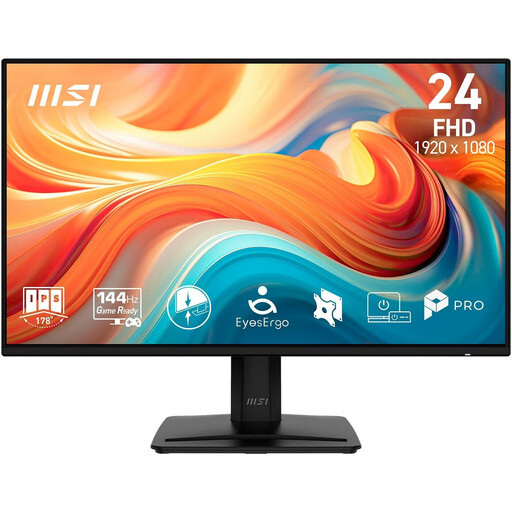
MSI PRO MP242DE E14A 23.8-inch Full HD monitor
The listed video inputs offer flexibility if the computers shared at your desk use HDMI, DisplayPort or VGA.
IPS panel with 1920 × 1080 pixels; HDMI, DisplayPort and VGA. The stand tilts, and VESA mounting at 100 × 100 mm is also specified as an option.
Joybuy
 No image available
KOORUI MB24V29FS4 24-inch Full HD monitor
The listed connections and mounting options are useful to consider if several people will use the monitor.
IPS panel with 1920 × 1080 pixels; HDMI and VGA. The product specifications list tilt adjustment, VESA 100 × 100 mm and dimensions of 541.9 × 185.1 × 424.7 mm.
Joybuy
 No image available
KTC H24B9S 24-inch Full HD monitor
The listed tilt range can be useful when different people share a desk.
IPS panel and 24-inch Full HD display. HDMI and DisplayPort are listed as video inputs; the tilt range is −5° to 15°.
Joybuy
Frequently asked questions
Is 16:10 automatically better for writing?
No. The Dell P2425 has 1920 × 1200 pixels, giving you more vertical pixels than the Full HD models considered here, which have 1920 × 1080 pixels. If you often connect compatible laptops, a USB-C hub may be more important.
What should I check first when setting up at a shared desk?
Measure the available space, including the depth of the stand, and check whether you can adjust the screen height to suit everyone who uses it. The ASR A6 from the Federal Institute for Occupational Safety and Health sets out requirements for screen-based workstations in workplaces and for remote working under the Workplace Ordinance; it does not apply generally to personal screen use.
Can I connect any laptop over USB-C to display video and charge it?
No. Check that the specific laptop port supports video output and that the monitor’s charging power meets your needs. Dell lists up to 90 W Power Delivery for the P2425HE, and EIZO lists 70 W for the EV2490. By contrast, the USB-C downstream port on the Dell P2425 is described as a data connection with up to 15 W.
How do I check energy consumption and my rights if something goes wrong in Germany?
Monitors have an EU energy label with a scale from A to G, so compare the figures for the specific device. If something goes wrong, your statutory rights are against the seller and are not the same as a voluntary guarantee. The Verbraucherzentrale states that purchases are generally covered by a two-year statutory rights period.
Can I return a monitor bought online if it doesn’t fit on my desk?
For online orders in Germany, you generally have 14 days from delivery to notify the seller that you wish to cancel. This is separate from the process for dealing with a faulty product.


