What should you look for when buying?
Start by confirming your output format and the right colour mode. Then compare the connections you’ll need to switch between computers, and check that the screen size and resolution suit your preview, timeline and desk.
| What matters |
What to check before buying |
Who is this important for? |
| Colours suited to the output |
Output format, colour management in your editing software, available Rec.709 or sRGB modes, and calibration options. |
If I’m grading archive footage for SDR output, I want to set the monitor and editing project to that format. Shoppers who prioritise accurate colour representation account for around 33%. |
| Switching between computers and input devices |
Check the video connections and USB upstream connections. If you’ll be sharing a keyboard and mouse, look for an explicitly specified KVM function. |
If several people or computers share the same workstation, I want to be able to connect the devices and input peripherals appropriately. Shoppers who see switching between computers as their main concern account for around 27%. |
| Arranging the preview and timeline |
Compare the resolution, screen size, desk space and window layout available in your editing software. |
If I want to see image details and the timeline at the same time, I need a display area that works well with my software. Shoppers who prioritise screen space account for around 27%. |
| Power consumption and features |
Check the EU energy label and information for comparable monitors, and only consider features you’ll need at your workstation. |
If the monitor will often be used at a shared workstation, I want to weigh up power consumption alongside the features I actually need. Shoppers who prioritise running costs account for around 13%. |
Monitors at Joybuy
The models below range from large workspaces for your preview and timeline to compact second screens. Check that the screen size, connections and resolution suit your editing workstation.
 No image available
INNOCN 40C1U 40-inch 5K IPS monitor
For an editing workstation where you want to fit the preview and timeline side by side on a large screen.
40 inches, 5120 × 2160 pixels, 21:9 and 100 Hz; 99% sRGB coverage. USB-C with 65 W, PIP/PBP and a height-adjustable stand are listed.
View at Joybuy
 No image available
UFYQL M156F04 15.6-inch FHD IPS monitor
A compact second screen for a laptop or mini PC when you need an extra display at a shared workstation.
15.6 inches, 1920 × 1080 pixels and IPS; USB-C and HDMI are listed. The smart cover doubles as a stand, and VESA mounting is also specified. The smaller screen gives you less room for a preview and timeline than a large monitor.
View at Joybuy
 No image available
UPERFECT 18.5-inch 120 Hz FHD IPS monitor
A compact option for an extra preview when you need a portable display to work with your computer.
18.5 inches, 1920 × 1080 pixels and a matte IPS display; USB-C and Mini-HDMI are listed. VESA compatibility is also specified. The smaller screen gives you less room for a preview and timeline than a large monitor.
View at Joybuy
 No image available
MSI PRO MP245PG 23.8-inch Full HD monitor
For a workstation where an adjustable screen is important for changing seating positions.
23.8 inches, 1920 × 1080 pixels and IPS; 100 Hz and 1 ms MPRT are listed in the product name. The stand offers height, tilt, swivel and pivot adjustment; HDMI, DisplayPort and VGA are listed. Its resolution and screen size offer less room for a preview and timeline than a 27-inch 4K monitor.
View at Joybuy
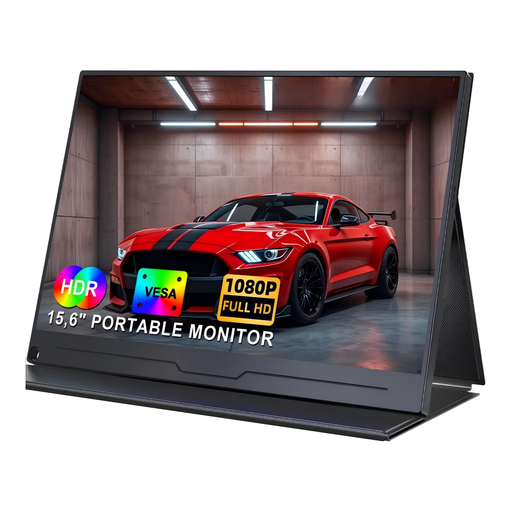 No image available
UPERFECT 15.6-inch FHD IPS monitor with USB-C
A portable second screen for a laptop or PC when a flexible set-up matters more than a large editing area.
15.6 inches and 1920 × 1080 pixels; USB-C and VESA mounting are listed. The product description says that video over USB-C requires a connected device with video output support. Its compact screen gives you less room for a preview and timeline than a large monitor.
View at Joybuy
Frequently asked questions
Do I need a particularly wide colour gamut for old family footage?
No, not just because the footage is old. If you’re exporting your edit as SDR video, first check the source footage, colour management and a suitable SDR mode. A wider colour gamut is an additional consideration and should suit your actual workflow.
Can I use the same keyboard to control two computers with any USB-C monitor?
No. Check whether the specific model explicitly lists a KVM switch and the USB upstream connections you need, and make sure the computers’ video connections are compatible. If you also want to charge a laptop, the specified charging power must meet its requirements.
What should I do after setting up my monitor to get a reliable colour preview?
Set up the monitor and editing project to match your intended output. Adobe recommends a calibrated monitor when making colour decisions during video editing; if you regularly do colour-critical work, plan a suitable calibration routine.
Which consumer rights and energy information are relevant when buying a monitor in Germany?
For online purchases from a trader in the EU, you generally have 14 days from delivery to cancel your order; exceptions and possible return costs may apply. If goods are faulty, you have a statutory guarantee of at least two years against the seller, regardless of any additional manufacturer’s warranty. The EU energy label, with ratings from A to G, also applies to covered electronic displays.


