Writers making lots of changes
When you’re writing a long manual, you’ll want to review the text and revision marks together in a clear, easy-to-read view.


When choosing a monitor for writing a software manual with tracked changes visible, first check whether you can read both the document and the change markings comfortably at your preferred text size. A high resolution or refresh rate alone won’t determine that. Next, consider how adjustable the stand is and, if you use a laptop, whether the video, charging and peripheral connections are suitable. A higher resolution or docking features are only worthwhile if they suit your workspace and device.
When you’re writing a long manual, you’ll want to review the text and revision marks together in a clear, easy-to-read view.
When reading long passages, choosing a font size and screen position that suit you can matter more than squeezing in the smallest possible text.
If you switch between your laptop and a desk-based setup, check that the monitor and computer have compatible video, power and peripheral connections.
First, consider which parts of the document you need to see at the same time. Then compare readability and screen positioning. If you want to dock a laptop, make sure the connections and power delivery meet your computer’s requirements.
| What matters | What to look for | Who will find this most important? |
|---|---|---|
| Room for the document and changes | Consider screen size, aspect ratio and the document view you want to use together. | If I want to keep the document text and change markings in view at the same time, I need a workspace that suits the view I usually use. This is the top priority for roughly 33% of consumers. |
| Readable text | Consider the native resolution alongside your preferred operating system scaling. | When reading long passages, I want the text and markings to remain easy to read with my preferred scaling. Around 27% of consumers put text readability first. |
| Adjusting your workspace | Check the height, tilt and swivel adjustments, as well as the screen positions available. | If you spend long periods working at a screen, you’ll want to adjust the height and tilt to suit your workspace. Around 20% of consumers place the greatest importance on being able to adjust their workspace ergonomically. |
| Laptop connections | Check that the video connection, charging power and peripheral ports meet your needs. | If I connect my laptop at my desk, I want to know whether the monitor and computer are compatible for video, charging and the connections I need. Roughly 20% of consumers prioritise suitable laptop connections and simpler cable management. |
How much text you can see at once also depends on your chosen scaling and font size.
Check a real document page with tracked changes visible, using your preferred text size and the native resolution.
Video transfer, a USB hub and power delivery are separate functions, and their availability can vary by model.
Check the connections and charging power of the specific monitor against your laptop’s requirements.
Depending on your laptop, you may still need a separate power adapter or an additional cable, even when using a monitor dock.
Models with similar names can differ in their model numbers and features.
Before buying, compare the full model name and the product page details that matter for how you’ll use it.
The Dell P2725DE is an example of a 27-inch QHD office monitor with a USB-C hub.
The ThinkVision T27h-30 is a 27-inch QHD example with USB-C docking.
The FlexScan EV2740X is a 27-inch 4K model with a document-focused display mode and docking features.
The Philips 27B2U6903/00 is a 27-inch 4K business monitor with Thunderbolt 4.
The BenQ RD280U has a 3:2 aspect ratio, which differs from conventional screen formats.
The following Joybuy offers include 27-inch QHD and 4K monitors for viewing documents; some models also list USB-C docking.
 No image available
This 4K model is one option to consider if you want to try this resolution for viewing documents.
 No image available
If you’re looking for a 4K display and a USB-C port with power delivery, check your laptop’s power requirements.
 No image available
The QHD resolution and stated USB-C power delivery may suit document work on a laptop; check that the charging power matches your device.
 No image available
The 27-inch QHD format is one option if you want to review a document and its change markings on a single screen.
 No image available
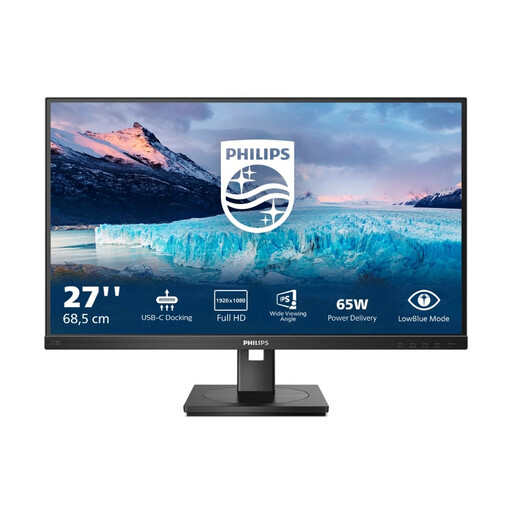
If laptop docking and an adjustable screen position matter to you, also check whether the stated Full HD resolution suits the text view you want.
No. Track Changes and how it appears are features of the word processing software you use, such as Word; the monitor displays the view you’ve selected. Microsoft Support explains how Word marks changes. Check a document page with the markings visible in the view you use.
Start with the native resolution or the one recommended by your operating system, then adjust the scaling. Microsoft Support notes that text can look blurry when the resolution is set below the monitor’s native resolution.
For electronic displays covered by EU energy labelling, the energy label shows a rating from A to G. Compare the energy label and product information sheet for specific models; as the European Commission explains, the stated energy use is given in kWh per 1,000 hours.
For consumer purchases made online in Germany, you generally have 14 days from receiving the goods to cancel the contract; you must notify the other party to the contract. The Verbraucherzentrale explains how this works. Don’t put an old monitor in household waste: the German Environment Agency lists recycling centres and suitable retailer take-back points as disposal options.