Writers working with multiple sources
If you keep your travel feature, research and notes open at the same time, the key is whether both windows remain legible at your usual text size.


For writing a travel feature with your manuscript and research side by side, a 27-inch QHD monitor is a sensible starting point. Dell lists the S2725DC at 2560 × 1440 pixels, but try both windows at your usual text size. A 21:9 model is an alternative if you often arrange content horizontally: LG lists the 29U511A-B at 2560 × 1080 pixels, giving it fewer vertical pixels than the QHD models mentioned. For highly detailed travel photos, consider a 27-inch 4K model; Dell lists the S2725QC at 3840 × 2160 pixels. Check text scaling and your computer’s output resolution, too.
If you keep your travel feature, research and notes open at the same time, the key is whether both windows remain legible at your usual text size.
If you edit longer passages at your desk, consider the screen’s position and how clearly text displays in your own workspace.
If you review or edit travel photos as well as writing, compare your preferred text scaling with the resolution your computer can output.
The right monitor for writing a travel feature depends on whether you prioritise side-by-side windows, long writing sessions, connecting your laptop or viewing photo details.
| Priority | What to check before buying | Who is this especially important to? |
|---|---|---|
| Room for two windows | Try your manuscript and research side by side, including their sidebars, at your usual text size; compare the screen format and vertical space for text. | If I want to read my text and sources at the same time, I need room for both windows while keeping the desk space in mind. For around 36% of consumers in this writing scenario, having enough room for windows is the top priority. |
| Legibility during long sessions | Check the text size, height and tilt adjustment, and any reflections at the desk where you plan to use it. | When editing for long periods, I want to adjust the text size and screen position to suit my seating position, rather than looking at screen size alone. Around 29% of consumers in this scenario put reading comfort during longer writing sessions first. |
| Laptop connection | Check USB-C video output, your laptop’s power requirements, the specific monitor’s charging output and the cables you need. | If I regularly connect my laptop at my writing desk, I want to know that video and power will both work as needed. Easy laptop connectivity is the top priority for around 21% of consumers. |
| Detail in travel photos | View photos and your editor at your planned text scaling; check the monitor’s native resolution and your computer’s output resolution. | If I want to examine travel photos in more detail alongside my text, I need a resolution that suits my computer and scaling. Around 14% of consumers in this writing scenario prioritise photo detail. |
The LG 29U511A-B has 2560 horizontal and 1080 vertical pixels. The 27-inch QHD models mentioned in our research have 1440 vertical pixels, so a wider workspace doesn’t necessarily mean you’ll see more lines of text.
When writing, compare both how well your windows fit side by side and how many lines of text you can see.
The BenQ GW2790QT is listed as providing 65 W of power. Whether that’s enough for your laptop, and whether the connection supports the video output you need, depends on the devices involved.
Before buying, check your laptop’s video output, charging requirements and cables against the specifications of the exact monitor you’re considering.
If the devices’ requirements don’t match, you may need a separate power supply or a different connection.
With the Dell S2725QC, the room available for readable text depends not just on resolution, but also on scaling and your editor layout. A higher pixel count alone doesn’t tell you how many readable windows will fit on screen at your preferred text size.
Compare 4K and QHD at your usual text size rather than choosing on pixel count alone.
In Germany, Dell lists the S2725DC as a 27-inch QHD USB-C monitor, and the S2725QC as a 27-inch 4K USB-C alternative.
BenQ describes the GW2790QT as a 27-inch QHD monitor with USB-C and an adjustable stand.
The LG 29U511A-B is a 29-inch 21:9 alternative for arranging windows horizontally.
The Philips 27B2U4601/00 is a 27-inch QHD monitor with USB-C, designed for a document-focused workspace.
The HP Series 5 Pro 527pm adds conferencing features to a 27-inch QHD monitor.
The Joybuy products below include 27-inch QHD options and wider ultrawide formats for side-by-side text and research windows. Check that the format and setup suit your desk; actual legibility also depends on how you arrange your windows and the text size you use.
 No image available
If you want to arrange several pieces of content horizontally, this model offers a 21:9 format. Check first that its 40-inch screen will fit on your desk.
40 inches; 5120 × 2160 pixels; IPS; 100 Hz; USB-C with 65 W Power Delivery; height-adjustable.
 No image available
This wide format may suit you if you want to arrange several pieces of content side by side. Bear its size and weight in mind when setting it up: the product description says it should be installed and moved by two people.
49 inches; 5120 × 1440 pixels; Dual QHD; 75 Hz; 2 × USB-C; 2 × HDMI; DisplayPort.
 No image available
A 27-inch WQHD option to try out and see whether your manuscript and research fit on one screen at your preferred text size.
27 inches; WQHD; IPS; HDMI; DisplayPort.
 No image available
If you’re comparing 27-inch screens for side-by-side text windows, check legibility at your usual text size and make sure the monitor’s position works for your workspace.
QHD; SS-IPS; 200 Hz, overclocked to 210 Hz; height-adjustable stand.
 No image available
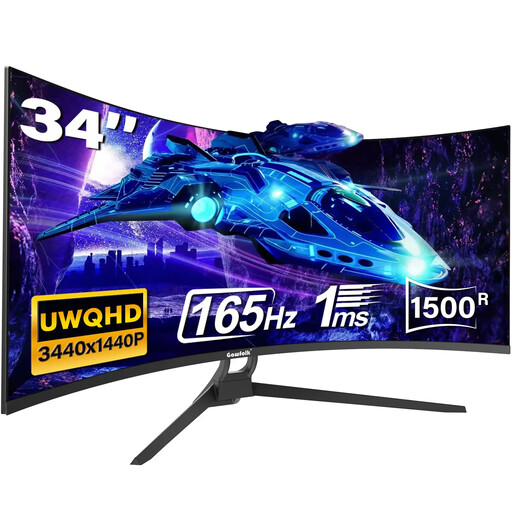
The 21:9 format is an option if you want to arrange text and research horizontally. According to the product description, the stand tilts; you may need a VESA mount for further ergonomic adjustments.
34 inches; UWQHD; 3440 × 1440 pixels; 21:9; 1500R; 165 Hz; HDMI 2.1; DisplayPort 1.4; VESA 75 × 75 mm.
It can be a sensible starting point, but it doesn’t guarantee that your windows will be wide enough. Dell lists the S2725DC at 2560 × 1440 pixels on a 27-inch screen; try both halves of your editor, including sidebars, at your usual text size.
Only if your laptop, connection and cable support the video output you need and provide enough charging power. BenQ lists data transfer and 65 W of power over USB-C for the GW2790QT; this doesn’t guarantee compatibility with every laptop.
Adjust the height and tilt to suit your seating position, check for distracting reflections, and follow the cleaning instructions for the model you buy. The German Federal Institute for Occupational Safety and Health’s ASR A6 applies to screen and teleworking workstations within its scope; it does not generally apply to private writing spaces outside workplaces.
ASR A6 excludes the use of screen equipment outside workplaces, such as in private settings, from its scope. This doesn’t say anything about other possible requirements for screen-based work carried out professionally.