What should you look for when buying?
For a monitor to create a study quiz in a student room, the key considerations are a clear, usable workspace, how much room it takes up, the right connection for your laptop and its energy consumption in everyday use.
| Feature |
What to check before buying |
Who will find this especially important? |
| Clear, usable workspace |
Compare the resolution, aspect ratio and typical window layout at your preferred scaling. |
If I’m working on quiz questions and sources at the same time, I want to see more text without making the font uncomfortably small. Around 40% of consumers say the amount of text visible at once is their top priority. |
| Desk space and positioning |
Compare the available desk width and depth with the monitor’s dimensions, including the stand, and check the adjustment options. |
If I need room on my desk for a keyboard and study materials too, the monitor’s actual depth matters to me. Around 30% of consumers prioritise the space available for their monitor. |
| Laptop connection |
Check the video output, monitor port, USB-C video support, cable and required charging power separately. |
If I regularly connect my laptop at my study space, I want to know whether one cable is enough for both video and power. Around 20% of consumers prioritise connecting their laptop. |
| Power consumption |
Compare the energy label and product information sheet for the specific model. To estimate your own costs, take your usage time and electricity tariff into account. |
If the monitor is on frequently, I want to be able to estimate its energy use based on how I use it. Around 10% of consumers prioritise ongoing energy costs. |
Joybuy monitors for creating quizzes
The Joybuy models below range from portable Full HD secondary screens to a large USB-C monitor for viewing multiple sources. If space is limited in your student room, check the monitor’s dimensions against your desk before buying.
 No image available
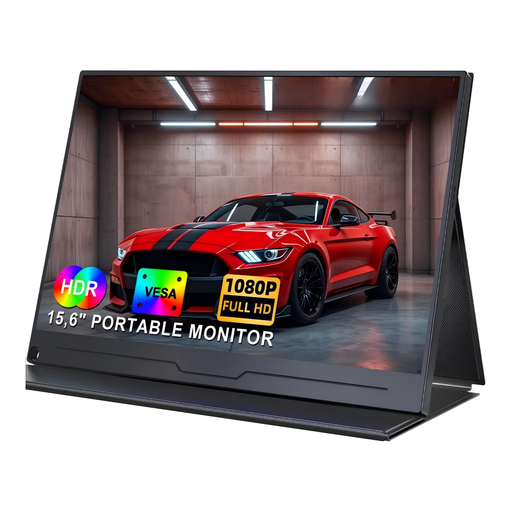
UFYQL M156F04, portable 15.6-inch FHD monitor
This model could be a handy portable second screen for creating quizzes on a laptop.
15.6 inches, 1080p, IPS, USB-C and HDMI; includes a smart cover stand and VESA mounting option.
Joybuy
 No image available
UPERFECT 18.5-inch FHD monitor with 120 Hz
This portable monitor is described as an additional screen for a laptop or PC.
18.5 inches, 1920 × 1080 pixels, USB-C and Mini-HDMI. According to the product description, 120 Hz depends on the device and cable used.
Joybuy
 No image available
UPERFECT 15.6-inch FHD monitor with speakers
This model could work as an external screen for creating quizzes on a laptop or PC.
15.6 inches, 1920 × 1080 pixels, USB-C, VESA mounting option and built-in speakers. The connected device must support video output over USB-C.
Joybuy
 No image available
UPERFECT 15.6-inch monitor with 100% sRGB
This portable model is described as a second screen for a laptop.
1920 × 1080 pixels, 100% sRGB, USB-C and Mini-HDMI; includes an adjustable stand, speakers and VESA mounting option.
Joybuy
 No image available
INNOCN 40C1U, 40-inch monitor with 5120 × 2160 pixels
The product description mentions picture-in-picture and picture-by-picture modes for displaying two sources, which could be useful when working with multiple views.
USB-C with 65 W Power Delivery and a USB hub. The listed dimensions with the stand are 944.1 × 573.5 × 241.1 mm; check that it fits your available space.
Joybuy
Frequently asked questions
Can a monitor create a study quiz by itself?
No. Monitors display the output from a connected device. You’ll also need a computer and a suitable application to create and save your questions. Check how to use and connect your existing quiz application.
Can any laptop output video and charge at the same time over USB-C?
No. Philips describes video and power transfer over USB-C for compatible devices with the 24E1N1300A/00; Dell lists up to 90 W of Power Delivery for the P2425HE. The USB-C downstream port on the Dell P2425, however, is specified for data only. Check your laptop, the monitor port, the cable and the charging power you need.
How should I set up a monitor in my study space?
Measure your desk, allowing room for the stand, keyboard and study materials, and consider possible glare. Make use of the adjustment options available. Guidance from the North Rhine-Westphalia Occupational Health and Safety Administration on screen positioning can be a useful guide, but it is not a general legal requirement for a privately used student room.
How can I estimate a monitor’s electricity costs?
Compare the EU energy label and product information sheet for the specific model. To estimate your own costs, you’ll also need a comparable consumption figure, your usage time and your electricity tariff. The European Commission explains how electronic displays are labelled.
What are your rights when buying a monitor online in Germany?
For a qualifying distance contract with a consumer, there is generally a statutory right of withdrawal. The withdrawal period is generally 14 days, and when it starts is determined by the rules set out in law. The Federal Ministry of Justice and the Federal Office of Justice explain these requirements in the German Civil Code. Statutory rights relating to defects are separate from a voluntary guarantee; claims for defects in goods are generally subject to a two-year limitation period from delivery.


