Who it's for

Comparing tables and charts

If you want to check tide readings, charts and reference sources at the same time, a clear resolution and a layout that suits your windows matter more than gaming features. The Federal Maritime and Hydrographic Agency publishes tide predictions; the monitor sizes and resolutions covered here vary by model.

Students with limited desk space

You need an additional screen that fits on your desk, and are weighing up a compact screen size against the larger work area of a 27-inch model. Dell lists the P2425DE at 23.8 inches, while Philips lists the 27E1N5600AE/00 at 27 inches.

Laptop users who need docking

If you connect your laptop frequently, you may want to combine video, peripherals and, where supported, charging through a suitable USB-C connection. Check the specific features listed for the monitor and make sure your laptop supports them too.

What to look for in a monitor for tide tables

What you need What to check before buying Who it matters most to
Reading tables and charts at the same time Check the native resolution, screen size and window layout together. Dell lists the P2425DE at 23.8 inches and 2560 × 1440 pixels; Philips lists the 27E1N5600AE/00 at 27 inches with the same pixel count. If I’m checking tide readings, charts and reference sources side by side, I need windows that are easy to read and scaled appropriately. Around 33% of consumers prioritise this.
Limited desk space Compare the monitor and stand dimensions with the space available, and check the height and tilt adjustments offered by the specific model. The Dell and Philips models compared here differ in screen size: 23.8 and 27 inches. With a small desk, I want to leave enough room for both the monitor and my study materials. Around 27% of consumers prioritise a setup that fits their space.
Connecting a laptop easily Check that your laptop port supports video, then compare the monitor’s USB-C features, the charging power you need and the cable required. Philips says the 27E1N5600AE/00 can transfer video and data and charge compatible devices over USB-C; EIZO lists DisplayPort Alt Mode for the EV2740X. If I connect my laptop frequently, I don’t want to have to check several connections for video, accessories and charging. Around 20% of consumers prioritise an easy laptop connection.
Only the features you need and ongoing costs Consider how any extra features fit your workflow and compare the EU energy label for the exact model. The European Commission describes the A to G energy efficiency scale for electronic displays. I don’t want to pay for or use features I don’t need for my studies. Around 20% of consumers weigh up the features they need alongside ongoing energy use.

Common monitor-buying mistakes

  • Assuming USB-C means full laptop docking

    The connector shape alone doesn’t guarantee video output or enough charging power for your laptop. The features available vary by monitor.

    Before relying on a single-cable connection, check your laptop port, the monitor specifications and the charging power you need.

    Monitor brands at a glance

    Dell

    Dell lists the P2425D as a 23.8-inch QHD monitor and the P2425DE as a 23.8-inch QHD model with a USB-C hub.

    • The model specifications distinguish between QHD monitors with and without a stated hub.
    • The P2425DE’s features don’t automatically apply to the P2425D or other Dell monitors.

    Philips

    Among the models considered, Philips offers a compact Full HD option in the 24E1N1100A/00 and a 27-inch QHD USB-C model in the 27E1N5600AE/00.

    • The models differ in resolution, screen size and stated USB-C features.
    • The USB-C features listed for the 27-inch model aren’t guaranteed to work with every laptop, or to be available on the 24-inch model.

    LG

    LG lists the 27U631A-B as a 27-inch QHD display with USB-C and 15 W Power Delivery.

    • This model combines the stated QHD resolution with USB-C.
    • The stated 15 W won’t necessarily provide enough charging power for every laptop.

    EIZO

    The EIZO FlexScan EV2740X is a 27-inch 4K model with USB-C docking and KVM, designed for a suitably equipped workstation.

    • EIZO lists DisplayPort Alt Mode and up to 94 W Power Delivery for this model.
    • These extra docking features aren’t necessarily needed for straightforward plotting.

Joybuy monitors for tables and charts

This selection of Joybuy monitors ranges from portable Full HD second screens for viewing individual documents to large displays for working with several windows at once. Above all, check that the screen size, connections and space for your windows suit your desk.

INNOCN 40C1U, 40 inches, 5120 × 2160 pixels

INNOCN 40C1U, 40 inches, 5120 × 2160 pixels

Could suit your workflow if you want to view several things at once and have enough desk space.

The product name lists an IPS display, 21:9, 100 Hz and USB-C with 65 W Power Delivery. A USB hub, PIP and PBP are also listed. The stated width with the stand is 944.1 mm.

View at Joybuy

UFYQL M156F04, portable 15.6-inch Full HD monitor

UFYQL M156F04, portable 15.6-inch Full HD monitor

Could work as a compact second screen for individual documents or charts.

Specifications include a 15.6-inch IPS display and Full HD resolution of 1920 × 1080 pixels; USB-C and HDMI are listed in the product name. A smart-cover stand and VESA mounting are also mentioned.

Full HD gives you less room to view several things at once than the QHD models considered here.

View at Joybuy

UPERFECT, portable 18.5-inch Full HD monitor with 120 Hz

UPERFECT, portable 18.5-inch Full HD monitor with 120 Hz

Could work as a portable second screen for a single document or chart.

The product name lists 1920 × 1080 pixels, a matte IPS display, 120 Hz, USB-C and Mini HDMI. VESA compatibility is also specified.

Full HD gives you less room to view several things at once than the QHD models considered here.

View at Joybuy
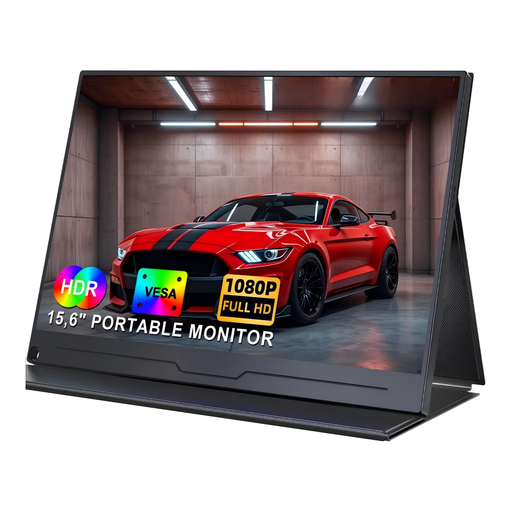
UPERFECT, portable 15.6-inch Full HD IPS monitor

UPERFECT, portable 15.6-inch Full HD IPS monitor

Could work as a portable second screen for individual documents or charts.

The stated specifications include a 15.6-inch screen and 1920 × 1080 pixels. The product name also lists USB-C, VESA and two speakers; the description mentions a built-in stand.

Full HD gives you less room to view several things at once than the QHD models considered here.

View at Joybuy

UPERFECT, portable 15.6-inch Full HD IPS monitor with adjustable stand

UPERFECT, portable 15.6-inch Full HD IPS monitor with adjustable stand

Could suit a flexible desk setup if a second screen for individual documents or charts is all you need.

The product name lists a 15.6-inch IPS display and 100% sRGB. The description specifies Full HD at 1920 × 1080 pixels, USB-C, Mini HDMI, an adjustable stand and VESA compatibility.

Full HD gives you less room to view several things at once than the QHD models considered here.

View at Joybuy

Frequently asked questions

Do I need 4K for tide charts?

No. Start by considering your window layout, readability and available desk space. The QHD models considered here are listed at 2560 × 1440 pixels; the EIZO FlexScan EV2740X is listed at 3840 × 2160 pixels. Whether the extra pixels help in everyday use also depends on your computer’s scaling settings.

Can I connect and charge any laptop with a USB-C monitor using a single cable?

No, the connector shape alone isn’t enough. Check that your laptop port supports video, the specific features listed for the monitor, the charging power you need and the cable. EIZO lists DisplayPort Alt Mode and up to 94 W for the EV2740X; LG specifies 15 W Power Delivery for the 27U631A-B.

What should I consider when setting up a monitor in a student room?

Consider the stand, available desk space and a text size that’s comfortable for you to read, and check the adjustments available on the specific model. The Federal Institute for Occupational Safety and Health covers screen-based workstations in workplaces and teleworking in ASR A6; this regulation does not apply universally to screen use in private homes.

How can I check energy use and consumer rights when shopping online in Germany?

Compare the EU energy label and the EPREL entry for the monitor in question. For an ordinary distance sale to a consumer, there is generally a 14-day right to cancel; for goods, the period normally starts when you receive them. The Federal Ministry of Justice states that claims relating to defects in goods are generally subject to a two-year limitation period from delivery. The right to cancel, statutory rights relating to faulty goods and a voluntary guarantee are separate rights.

Are plotted tide predictions a reliable forecast of the actual water level?

No. A plot of tide predictions doesn’t guarantee the water level that will actually occur. The Federal Maritime and Hydrographic Agency points out that weather, such as offshore or onshore winds, can significantly change the water level. A higher monitor resolution doesn’t alter this limitation of the data.