If you often review a draft, comments and reference materials side by side, start by comparing screen space, resolution and text scaling. A 16:10 monitor may be worth considering for long pages of text. For multiple views, a QHD model could be an option, as long as the text remains easy to read at your preferred scaling. Track Changes is a word-processing feature, not a function of the monitor.
Which working style suits you?
For reviewing drafts side by side
If you regularly compare manual text with feedback and reference materials as you work, look for enough room to display the views you typically use. Microsoft Support explains how Word displays changes and earlier file versions.
For writing at a small desk
If you usually work on one document and space is limited, check that the screen size, text scaling and monitor position are comfortable for reading longer pages. EIZO and Philips list different 23.8-inch and 24.1-inch models.
For working with different laptops
If you connect different laptops, check their video outputs against the ports on the specific monitor. For a single-cable connection, video support and the required charging power must also match. EIZO states that the EV2495 supports up to 70 W through its USB-C upstream port.
What should you look for when buying?
| What you need |
What to check before buying |
Who is it important to? |
| Room for multiple views |
Resolution and screen size; try viewing your draft, comments and reference materials at your usual text scaling. |
If I want to keep my draft, comments and reference materials in view at the same time, I compare readability at my preferred scaling. Around 36% of consumers prioritise having multiple views open side by side. |
| Reading long pages of text |
Aspect ratio and vertical resolution; check that tracked changes are easy to see at your preferred font size. |
If I review long manual pages with tracked changes visible, I look for readable text and a screen position that suits me. Around 29% of consumers put long pages of text first. |
| Connecting a laptop |
Video output, USB-C compatibility and the charging power required by your specific laptop. |
If I use different laptops at my workstation, I first want to know whether video output and, where needed, charging will work. Around 21% of consumers prioritise an easy laptop connection. |
| Space and energy use |
Dimensions with the stand, adjustment options and energy information for the specific model. |
If I need to make the most of limited desk space and compare running energy use, I check the dimensions, adjustment options and energy label. Around 14% of consumers prioritise space and energy use. |
Common buying mistakes
-
Assuming higher resolution automatically means easier-to-read comments
A higher resolution gives you more pixels, but it doesn’t determine on its own how large or easy to read text will appear on screen. Screen size and your chosen scaling also play a part.
Open a typical page with tracked changes enabled and your usual reference windows. Check it at the font size you actually plan to use.
-
Confusing a USB port with full USB-C docking
Lenovo lists conventional video ports and a USB hub for the ThinkVision T24i-30. By contrast, EIZO specifies a USB-C connection for video and power delivery on the EV2495. Features listed for one model don’t automatically apply to another.
Check the ports on the specific monitor against your laptop’s video output and charging requirements.
If video output or charging power isn’t compatible, you may need an extra cable or a separate dock for your workstation.
-
Judging electricity costs by the energy efficiency class alone
The European Commission describes the EU energy label and EPREL as sources of information about electronic displays. The energy efficiency class alone isn’t a substitute for comparing energy consumption figures.
Compare the figures for the models you’re actually considering on a like-for-like basis, and take your usage into account.
Brands to consider
Dell
The Pro Plus models covered here offer different approaches: a 16:10 model for text work and a 23.8-inch model with QHD resolution.
- According to Dell, the P2425E has a 16:10 aspect ratio and USB-C power delivery of up to 90 W. The P2425DE is listed with a resolution of 2560 × 1440 pixels.
- These are different models, so their resolutions and features aren’t interchangeable. Also check that the specific variant is available.
EIZO
The FlexScan EV2495 is a 24.1-inch option for longer texts and a laptop-based workstation.
- EIZO lists a resolution of 1920 × 1200 pixels for this model, along with USB-C docking and up to 70 W through the USB-C upstream port.
- For a single-cable connection, your laptop’s video output and charging requirements must be compatible. These specifications apply to the EV2495.
Lenovo
The ThinkVision T24i-30 is a compact Full HD option with an adjustable stand and conventional video inputs.
- Lenovo lists a 23.8-inch screen, plus HDMI, DisplayPort and VGA. The stand is adjustable.
- The ports listed don’t confirm support for USB-C video. A USB hub isn’t the same as USB-C docking.
Philips
The 24E1N5300AE/00 is a 23.8-inch Full HD option with a USB-C connection for compatible laptops.
- Philips describes video, data and charging over a single USB-C cable for compatible devices.
- USB-C features don’t guarantee universal laptop compatibility. Check the ports on your computer and the specific monitor model.
Joybuy monitors for multiple views
This selection is for reviewing drafts, comments and reference materials side by side. The models vary in screen size, resolution and ports, among other features.
 Image unavailable
Z-Edge AGEX 27-inch QHD monitor
If you want to arrange several text views, check whether a 27-inch screen with QHD suits your desk space and preferred text scaling.
Listed in the product name: 2560 × 1440 pixels, Fast IPS panel, height-adjustable stand, DisplayPort and HDMI.
View at Joybuy
 Image unavailable
INNOCN CB27U1 27-inch 4K UHD monitor
If you review several document views, compare the stated resolution with the text size you can comfortably read at your workstation.
Listed in the product name: 3840 × 2160 pixels, IPS, USB-C with 90 W Power Delivery, plus PIP and PBP.
View at Joybuy
 Image unavailable
KTC H27D9 27-inch QHD monitor
If you want room for a draft, comments and reference materials side by side, check that the stated QHD resolution remains easy to read at your chosen scaling.
Listed in the product name: 2560 × 1440 pixels, IPS panel, HDMI, DisplayPort and VESA compatibility.
View at Joybuy
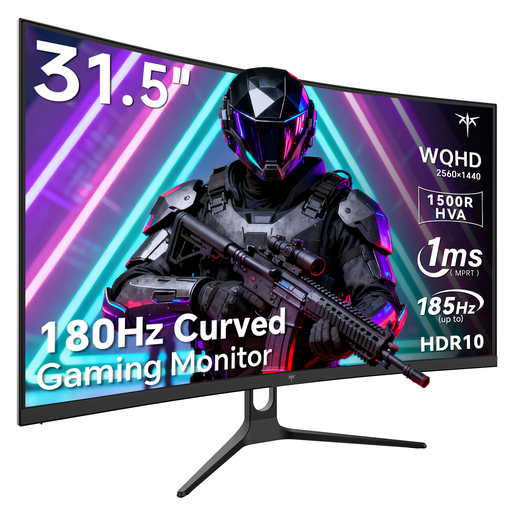 Image unavailable
KTC H32S5 32-inch curved QHD monitor
With a 32-inch screen, check that the monitor and your viewing distance suit your workspace before you buy.
Listed in the product name: 1440p QHD resolution, curved design, DisplayPort, HDMI and tilt adjustment.
View at Joybuy
 Image unavailable
Dell Pro 27 E2726DS 27-inch WQHD monitor
If you want to view several items side by side, check that the screen size suits your desk space and the text is clear at your preferred scaling.
Listed in the product name: WQHD, IPS, HDMI and DisplayPort.
View at Joybuy
Frequently asked questions
Do I need a special monitor for Track Changes?
No. Track Changes is a word-processing feature. Microsoft Support explains how Word displays insertions, deletions and changes made by different authors. When choosing a monitor, what matters is whether you can read this view comfortably at your preferred text size.
Can I connect and charge my laptop with a USB-C cable?
Only if your laptop and the specific monitor variant support the video connection you need and provide sufficient charging power. EIZO lists up to 70 W through the EV2495’s USB-C upstream port. Check the specifications for your laptop and the monitor you’re considering.
How should I set up my screen for reviewing text for longer periods?
Use the available adjustments to position the screen to suit your workspace, and check that reflections aren’t distracting. The Federal Institute for Occupational Safety and Health describes the scope of ASR A6 for screen work in workplaces and at remote workstations. This doesn’t automatically mean that every private workspace used by volunteers is covered.
Which energy figures should I compare when choosing a monitor?
Compare the information on the EU energy label with the model-specific details in EPREL. The European Commission lists electronic displays as a product group covered by energy labelling.
What are my rights if a monitor bought online is faulty?
When you buy faulty new goods as a consumer, you generally have statutory rights against the seller for two years. The Verbraucherzentrale distinguishes these from a voluntary manufacturer’s guarantee. For online consumer purchases, you may also have a 14-day right to cancel from the date you receive the goods, subject to the relevant conditions.


