Which monitor might suit you

Writers who work with lots of text windows

If you switch between an API reference, editor and preview, look for a window layout and text size that you can read comfortably. The example models listed differ in size and resolution; that doesn’t automatically mean one will make you more productive.

Writers with limited space for home working

Check how the monitor, window light and your seating position work together at your desk. Guidance on screen placement depends on the particular workspace.

Laptop users who work in different locations

If you regularly connect your laptop, compare the video output, charging capabilities and ports required with the specifications of both devices. A USB-C port alone doesn’t tell you which functions are available.

What to consider when buying

What matters to you What to look for Who it matters most to
Readability and text layout Compare 27-inch QHD and 27-inch 4K with your usual scaling setting. Check text size and window layout; with larger models, available desk space matters too. If I want to read a reference, editor and preview side by side, the text needs to remain comfortable to read. Around 40% of consumers put readable text views first.
Positioning and reflections Measure your desk and viewing distance. Check for height adjustment, tilt or a monitor arm, and consider the lighting at your intended setup. I want to be able to position the monitor to suit my seating position and the light coming in. Around 30% of consumers prioritise monitor positioning.
Connecting a laptop Check the video output, USB-C functions, power delivery required and ports for peripherals against the specifications of your laptop and monitor. If I connect and disconnect my laptop frequently, I want to know whether the chosen port supports both video and power. Around 20% of consumers put easy laptop connectivity first.
Energy use and costs Compare the energy consumption figures on the EU energy labels for the specific models, and take your usage and electricity tariff into account. Check the current specifications and final price before buying. I want to factor in both the purchase price and running costs. Around 10% of consumers prioritise these costs most.

Common buying mistakes

  • Assuming 4K automatically means more text that’s easy to read

    The 27-inch model examples differ in pixel count. How comfortable text is to read also depends on scaling and how you use the screen.

    Try your preferred text size and typical window layout before deciding on resolution alone.

  • Thinking a matt finish makes suitable positioning unnecessary

    The monitor’s position relative to the window and the lighting conditions also affect distracting reflections.

    Plan the location and adjustment options together. An anti-glare finish doesn’t remove the need to adapt your workspace.

  • Assuming USB-C will give you a one-cable setup without checking your laptop

    A monitor’s features don’t automatically confirm that your connected laptop supports the video and power delivery you need.

    Compare the requirements of both devices and check what’s included in the box. Depending on the devices’ capabilities, you may need a different connection or charging setup.

Brands and suitable product ranges

ASUS

The ProArt PA279CRV is a 27-inch 4K model for a workspace where resolution, an anti-glare finish and adjustability matter.

  • ASUS lists a resolution of 3.840 × 2.160 pixels and an anti-glare finish for this model.
  • These features don’t prove that the display will be easier to read for everyone or in every workspace.

Dell

The 27-inch P2725QE and P2725DE models offer different resolutions and USB-C hub features.

  • Dell lists a resolution of 3.840 × 2.160 pixels at 100 Hz for the P2725QE and 2.560 × 1.440 pixels at 100 Hz for the P2725DE.
  • Check the ports you need and compatibility with your laptop; resolution specifications aren’t an independent test of readability.

Philips

The B-Line 276B9/00 is a 27-inch QHD model with USB-C and an adjustable stand, suited to a laptop-based workspace.

  • Philips describes video and charging over USB-C, as well as an adjustable stand.
  • Information about viewing comfort comes from the manufacturer and doesn’t prove an individual health benefit.

BenQ

The RD320UA is a 32-inch 4K model with a flexible arm, for a workspace with enough room to display several views.

  • BenQ lists a resolution of 3.840 × 2.160 pixels, a flexible arm and a matt finish.
  • Claims that coding modes improve concentration, protect your eyes or boost productivity haven’t been proven here for writing API documentation.

LG

The 27UP850K-W is a 27-inch 4K model with USB-C and an adjustable stand.

  • LG lists a 4K IPS display, with tilt and height adjustment for this model.
  • These features apply to the model listed and can’t be assumed to apply to other LG variants.

Monitors available at Joybuy

The Joybuy monitors below include options for QHD and 4K text views, with a range of workspace sizes and adjustment features.

Z-Edge AGEX 27-inch QHD monitor, 144 Hz, height-adjustable stand

Z-Edge AGEX 27-inch QHD monitor, 144 Hz

A QHD option for documentation and references; check text size and window layout on your computer.

27 inches, 2.560 × 1.440 pixels, 144 Hz and a height-adjustable stand are listed in the product name.

Joybuy

INNOCN 2751S PLUS 27-inch QHD monitor, 275 Hz, height-adjustable stand

INNOCN 2751S PLUS 27-inch QHD monitor, 275 Hz

The QHD resolution is an option for documentation and text views side by side; check readability with your preferred scaling setting.

27 inches, QHD 2K, 275 Hz and a height-adjustable stand are listed in the product name.

Joybuy

INNOCN 40C1U 40-inch ultrawide monitor, 5K, USB-C PD 65 W

INNOCN 40C1U 40-inch ultrawide monitor, 5K

The wide workspace may suit you if you want several areas side by side; measure the available space first.

5.120 × 2.160 pixels, 21:9, 100 Hz and USB-C PD 65 W are listed in the product name. The stated width, including the stand, is around 944 mm.

Joybuy
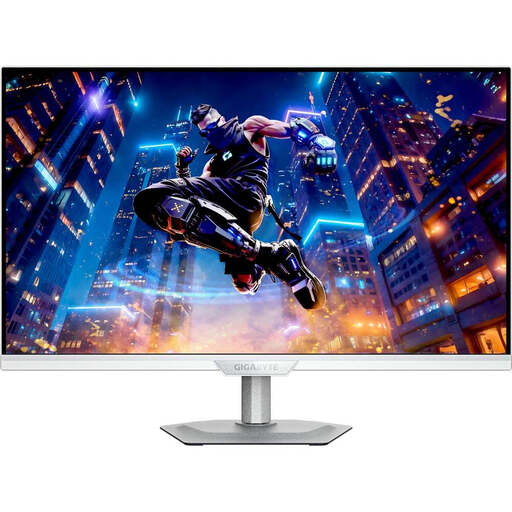
GIGABYTE M27UP ICE 27-inch 4K IPS monitor, 144 Hz

GIGABYTE M27UP ICE 27-inch 4K IPS monitor

A 27-inch 4K option for text; try your preferred text size and scaling on your computer.

4K UHD at 3.840 × 2.160 pixels, IPS and 144 Hz are listed in the product name. USB-C power delivery is listed as 18 W.

Joybuy

Philips 276B9 27-inch QHD IPS monitor with USB-C PD 65 W

Philips 276B9 27-inch QHD IPS monitor

A QHD option for documentation and references; check text size and window layout on your own computer.

2.560 × 1.440 pixels, 75 Hz, USB-C PD 65 W, a USB hub and a height-adjustable stand are listed in the product name. Video and charging over USB-C require a compatible laptop.

Joybuy

Frequently asked questions

Do the same screen-work safety standards apply to every home-working setup in Germany?

No. The term home working alone doesn’t mean that your workspace is a teleworking station formally set up by your employer. ASR A6 covers teleworking stations within its scope and distinguishes them from other work carried out at home. The actual setup and any agreements are what determine how a particular case is classified.

How can I avoid distracting reflections on my monitor?

Plan your screen position and any measures to control light together. The German Social Accident Insurance Institution for the Woodworking and Metalworking Industries recommends positioning your screen so you look parallel to the window front when working at a screen. This is a setup recommendation, not a general minimum distance for every device bought for personal use.

Is USB-C enough for video and charging with one cable?

Not without checking both your monitor and laptop. Philips describes this combination for the 276B9/00; check your own laptop’s supported video output, the power delivery you need and the right cable.

What should I compare when checking a monitor’s energy use?

Compare the energy consumption figures on the EU energy labels for the specific models. The European Commission describes the energy label for electronic displays covered by the scheme. To work out your individual annual costs, you’ll also need your usage hours and electricity price.

What are my rights if my monitor is faulty?

For a consumer purchase in Germany, the retailer’s statutory liability for faulty goods is separate from any additional manufacturer’s guarantee. The consumer advice centre explains that retailers are generally responsible for delivering goods free from faults for two years. Your rights in a particular case depend on the fault and the sales contract.