Which monitor is right for you?

Writers working with lots of revision notes

If you often compare a manuscript with sources and comments, a clear display that lets you view several windows at once can help. EIZO Deutschland and BenQ describe models with connections and screen formats suited to different office tasks and workflows.

Writers working with detailed illustrations

For checking fine lines, captions and illustrations, native resolution matters, as does choosing a scaling level that keeps text comfortable to read. EIZO Deutschland and BenQ’s technical specifications show the different options available for this kind of image work.

Designers preparing work for print

If your illustrations are destined for print, your monitor settings need to work with the output process. BenQ and ASUS list colour spaces and colour modes for certain models, but these specifications alone don’t prove that the results will match a particular print.

What should you look for when buying?

27-inch QHD

A good fit if: you mainly work with text and comments, and QHD gives you enough space to read everything you need at your preferred scaling level.

The trade-off: At the same screen size, there are fewer pixels for fine image details than with 4K.

27-inch 4K

A good fit if: you often check fine lines and image captions, and can arrange your manuscript and notes at a comfortable scaling level.

The trade-off: Higher scaling can reduce the benefit of the extra native pixels when it comes to how many windows you can see at once.

Ultrawide

A good fit if: you want to keep your manuscript, reference material and revision list visible in separate windows, and have enough desk space.

The trade-off: Extra width doesn’t remove the need to check text size or inspect fine image details.

What matters What to look for Who it matters most to
Workspace Check your manuscript, comments and reference images at your preferred scaling level; compare the aspect ratio, screen size and desk space required. If I want to read my manuscript and revision notes at the same time, the window layout needs to work at my chosen text size. Around 33% of consumers are primarily concerned with viewing text and comments side by side.
Image detail Compare a typical illustration, including its legend, on QHD and 4K with text scaled to a comfortable size. I want to check fine lines and small captions clearly without losing sight of text legibility. Around 25% of consumers prioritise checking this kind of image detail.
Colour workflow Confirm the output medium and the colour profiles you need; check the monitor’s colour modes and calibration options. If my illustrations are intended for a particular output, I want to assess their colour in the context of that process. Around 25% of consumers say colour assessment is their main concern.
Connectivity and ergonomics Check the video output, cable and power requirements against your laptop; look at height adjustment and the space the monitor will take up. I want the monitor to work with my laptop and the seating position I prefer. Around 17% of consumers prioritise connectivity and an ergonomic setup.

Common misconceptions

  • 4K automatically means more space that’s easy to read

    More native pixels help with detail, but the number of windows you can read at once also depends on scaling and layout.

    Open your manuscript, comments panel and illustration at your usual text size, then compare QHD, 4K and ultrawide using that view.

  • USB-C guarantees the right laptop charging

    Video transmission and power delivery need to be compatible with your laptop, cable and specific monitor model. The Power Delivery ratings vary between the models mentioned here.

    Check that the video output, cable and charging power you need match the specifications for your laptop and monitor.

    If the stated charging power isn’t suitable for your laptop, you may still need to use its separate power adapter.

  • A wide colour gamut guarantees print-ready colours

    Colour gamut coverage and colour modes describe features of specific models, but don’t prove that they’ll match every print process.

    Decide on the output process first, then check which colour mode and calibration workflow are right for it.

    A colour workflow that isn’t properly matched may require extra correction.

Relevant brands at a glance

EIZO

The FlexScan EV2740X is a 27-inch 4K option for office work, image detail and laptop docking.

  • EIZO Deutschland lists USB-C with DisplayPort Alt Mode, up to 94 W, LAN and KVM.
  • Its connectivity doesn’t prove that the model is right for every illustration or print workflow.

BenQ

The PD2705U offers a 27-inch 4K display with an sRGB mode, while the PD3420Q is a wider 34-inch 21:9 option.

  • BenQ specifies 99% sRGB and 65 W USB-C Power Delivery for the PD2705U; the manufacturer lists USB-C and KVM for the PD3420Q.
  • Manufacturer claims about colour performance and productivity aren’t an independent comparative assessment.

ASUS

The PA278QGV is a 27-inch QHD option, while the PA279CRV offers 27 inches and 4K with listed wide colour gamuts.

  • ASUS lists 99% Adobe RGB, 99% DCI-P3 and 96 W USB-C Power Delivery for the PA279CRV.
  • The PA278QGV has fewer native pixels at QHD; the manufacturer’s colour and accuracy specifications apply to the respective models.

Dell

The Pro P2725QE is a 27-inch 4K office monitor with a USB-C hub.

  • The German product page lists 3840 × 2160 pixels at 100 Hz and a height-adjustable stand.
  • These features alone don’t prove that it’s particularly well suited to colour-critical print preparation.

LG

The UltraFine 27UP850K-W is another 27-inch 4K IPS option with USB-C and an adjustable stand.

  • LG typically lists 95% DCI-P3 and hardware calibration via LG Calibration Studio for this model.
  • Suitability for a particular print output depends on the entire workflow; the manufacturer’s claims about image performance aren’t an independent assessment.

Joybuy products for writing and image work

The Joybuy products below include ultrawide models and 27-inch QHD options for working with writing, comments and images side by side.

INNOCN 40C1U, 40-inch, 5K ultrawide monitor

INNOCN 40C1U, 40-inch, 5K ultrawide monitor

For viewing a manuscript, comments and reference images in side-by-side windows; first check that the 40-inch width will fit on your desk.

40 inches, 21:9, 5120 × 2160, IPS, 100 Hz and USB-C with 65 W Power Delivery.

PIP and PBP are listed for displaying multiple sources.

View at Joybuy

INNOCN 2751S PLUS, 27-inch, QHD monitor

INNOCN 2751S PLUS, 27-inch, QHD monitor

A 27-inch QHD option for checking a manuscript and illustrations on one screen; QHD has fewer native pixels than 4K for fine detail.

QHD, IPS, 275 Hz and 1 ms according to the product name.

The product name lists 99% Adobe RGB (1931) and 99% sRGB.

View at Joybuy
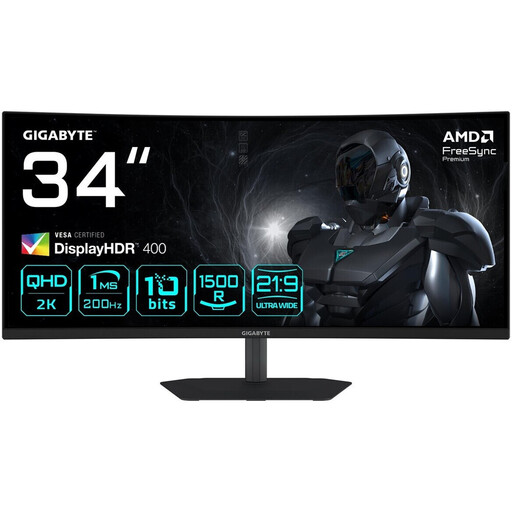
Gigabyte G34WQC2, 34-inch, curved WQHD monitor

Gigabyte G34WQC2, 34-inch, curved WQHD monitor

The 34-inch 21:9 format is suited to side-by-side windows; check that you have enough desk space and that fine image details display clearly.

3440 × 1440, 1500R, 200 Hz, 1 ms and 450 cd/m² according to the product name.

The product name lists AMD FreeSync Premium and DisplayHDR 400.

View at Joybuy

Philips 345B1C, 34-inch, curved ultrawide monitor

Philips 345B1C, 34-inch, curved ultrawide monitor

The 34-inch 21:9 format gives you a wide view of your manuscript and revision notes; WQHD has fewer native pixels than 4K for checking fine details.

3440 × 1440, 100 Hz, VA and 1500R according to the product name.

The product name lists a USB hub and a height-adjustable stand.

View at Joybuy

Philips 276B9, 27-inch, QHD IPS monitor

Philips 276B9, 27-inch, QHD IPS monitor

A compact QHD option for writing and working with comments; check whether the resolution is enough for fine illustration details at your preferred scaling level.

2560 × 1440, 75 Hz and USB-C with 65 W Power Delivery according to the product name.

The product name lists a USB hub and a height-adjustable stand.

View at Joybuy

Frequently asked questions

Do I have to choose 4K rather than QHD for illustrations?

No. The 27-inch ASUS PA278QGV QHD example has a resolution of 2560 × 1440 pixels, while the 27-inch 4K models mentioned have 3840 × 2160 pixels. Choose based on the image details you need to check and a scaling level that keeps text easy to read.

Can a USB-C monitor always run my laptop with just one cable?

No. Check video transmission and charging power separately for your laptop, cable and monitor. The EIZO FlexScan EV2740X is specified with DisplayPort Alt Mode and up to 94 W, while the BenQ PD2705U has DisplayPort Alt Mode and 65 W.

Is a wide colour gamut enough to match what I see on screen to my print?

No. BenQ and ASUS’s colour gamut specifications describe the respective devices; for a particular print job, your monitor settings need to work with the output process. These specifications alone don’t prove that the finished print will match.

What rules apply to screen-based work in Germany?

For workplaces and teleworking locations within its scope, ASR A6 sets out requirements under the Workplace Ordinance. According to the Federal Institute for Occupational Safety and Health, it doesn’t apply generally to private use outside such workplaces; this doesn’t mean there’s a universal minimum resolution for every private monitor purchase.

Can I return a monitor bought online for personal use if I change my mind?

In Germany, consumers generally have a 14-day right of withdrawal for online contracts. The Consumer Advice Centre explains that for ordered goods, the period usually starts when you receive them. You must notify the seller that you’re withdrawing from the contract, as simply sending the goods back isn’t a clear enough statement.