For keeping your manuscript, sources and revision notes side by side, a 27-inch QHD monitor is a sensible starting point, as long as text and windows remain easy to read at your preferred scaling. If you often check historical images or page layouts, you could also compare a 27-inch 4K model. If desk space is limited, a compact Full HD monitor may be an option, but it has fewer native pixels for viewing several windows at once. If you use a laptop, make sure its video output, cable and, where applicable, USB-C charging power are all compatible.
Which monitor is right for you?
Writers who work with lots of sources
If you use your manuscript, references and revision notes at the same time, check that your windows are easy to read when arranged at your chosen scaling. Dell Germany, BenQ Germany and ASUS Germany list different native resolutions for their respective models, including QHD and 4K.
Writers with an image archive
For historical photos and book pages, the resolution and image modes of the specific model are worth considering. ASUS Germany lists 4K and colour modes for the ProArt PA279CRV, but this does not guarantee a particular print result. The Federal Institute for Occupational Safety and Health recommends adjusting screen position to suit your individual visual needs.
Writers with a small desk
If you keep paper sources beside your screen, measure the space needed for the stand and keyboard too. EIZO Germany lists the EV2490 as a more compact configuration, with a 23.8-inch screen and Full HD resolution; it has fewer native pixels than the QHD models mentioned here.
What should you look for when buying?
27-inch QHD
A good fit if: you often have your manuscript, source windows and notes open side by side, and you have enough desk space.
The trade-off: Its native resolution is higher than the Full HD example mentioned here, but lower than the 4K models. The window space you can actually use depends on your scaling settings.
27-inch 4K
A good fit if: you regularly check historical images or fine layout details as well as text, and your computer can output 3840 × 2160 pixels.
The trade-off: More native pixels do not guarantee easy-to-read text at every scaling setting, or a match with the finished printed page.
Compact Full HD
A good fit if: paper sources take up a lot of space and you usually work on one document at a time.
The trade-off: The 23.8-inch Full HD model mentioned here has fewer native pixels for viewing multiple windows at once than the QHD and 4K examples.
| Buying priority |
What to look for |
Who is it important to? |
| Space for text and notes |
Arrange a typical book page, a source window and your notes using your usual font size. Dell Germany and BenQ Germany list 2560 × 1440 pixels for their respective 27-inch models; ASUS Germany lists 3840 × 2160 pixels for the PA279CRV. |
When I’m writing, I want to keep references and revision notes in view at the same time, so a clear, readable window layout matters to me. Around 31% of consumers prioritise having text and source windows side by side. |
| Adjustable screen position |
Check the height and tilt adjustments, and how the screen can be positioned relative to your seat. BenQ Germany lists 110 mm of height adjustment and pivot for the GW2790QT. |
During long editing sessions, I want to be able to adjust the screen to suit my seating position and visual needs. Around 25% of consumers prioritise an adjustable reading position. |
| Images and layout details |
Open typical images and pages in your software, then check the resolution, scaling and colour modes you need. ASUS Germany lists 4K and selectable colour modes for the PA279CRV; this does not establish that it will match print output. |
When I check historical images or book pages, I want to be able to assess the details in the software I normally use. Around 19% of consumers prioritise checking images and layouts. |
| Desk space for your monitor and papers |
Measure the width and depth needed, including the stand, keyboard and papers you use regularly. EIZO Germany lists the EV2490 as a 23.8-inch model with 1920 × 1080 pixels. |
If I want printed sources beside my keyboard, the monitor and stand need to fit on my desk too. Around 13% of consumers prioritise saving desk space. |
| Laptop connection |
Check that your laptop’s video output, cable, monitor input and required charging power are compatible. The models vary: BenQ Germany lists 65 W for the GW2790QT, while EIZO Germany lists up to 70 W for the EV2490. |
If I want to connect my laptop to a monitor, I need to know whether the video connection and, where applicable, charging will work together. Around 12% of consumers prioritise laptop connectivity. |
Avoid common misconceptions
-
4K automatically makes small text easier to read
Native resolution alone doesn’t tell you how easy text and windows will be to read in your software at your chosen scaling.
Check typical book pages and notes using the font size you actually plan to use.
-
USB-C always means one cable does everything
USB-C charging power and supported video connections vary depending on the monitor, laptop and cable.
Before you buy, compare your laptop’s specifications with the cable and monitor input.
If the connection isn’t compatible, you may still need a separate power adapter or another connection.
-
Screen size is all you need to plan for
The stand, keyboard and paper sources need extra space. Screen position and your individual visual needs also matter.
Measure the width and depth needed for the monitor and stand, keyboard and papers you use regularly.
Brands to consider
Dell
The P2725DE is a documented 27-inch QHD example with a USB-C hub, designed for text-based and laptop workstations.
- Dell Germany lists a resolution of 2560 × 1440 pixels and USB-C connectivity for this model.
- Check compatibility with your laptop; this model’s features are not automatically available on other Dell monitors.
BenQ
According to its German data sheet, the GW2790QT combines a 27-inch QHD screen with an adjustable stand and USB-C.
- BenQ Germany lists pivot, 110 mm of height adjustment and 65 W USB-C Power Delivery.
- Check that the charging power meets your laptop’s needs. Manufacturer claims about eye care are not independent evidence of effectiveness.
ASUS
The ProArt PA279CRV is a documented 27-inch 4K example for taking a closer look at images and layouts.
- ASUS Germany lists a resolution of 3840 × 2160 pixels, colour modes and 96 W USB-C Power Delivery.
- Colour specifications do not guarantee a particular print result or establish the suitability of all ProArt models.
EIZO
The documented FlexScan EV2490 and EV2740X models show the difference between a compact Full HD setup and a larger 4K configuration.
- EIZO Germany lists the EV2490 as a 23.8-inch Full HD model with USB-C up to 70 W; the 27-inch EV2740X is listed with 4K and USB-C up to 94 W.
- Features and desk space requirements vary between models and cannot be assumed to carry over.
Lenovo
The ThinkVision T27h-30 is a documented 27-inch QHD example to consider when setting up a laptop workstation.
- Lenovo Germany lists USB-C, a network port and an ergonomic stand for this model.
- These features are specific to this model and say nothing about other ThinkVision models.
Joybuy monitors for writing with multiple windows
The Joybuy products below are 27-inch QHD monitors for writing and checking content side by side. As well as resolution, compare text scaling and the stand; if you use a laptop, check that the connection is compatible too.
 No image available
Z-Edge AGEX 27-inch QHD monitor
The listed QHD resolution may suit you if you want to use your manuscript and source windows side by side; check readability at your usual scaling.
Product details: 27 inches, 2560 × 1440 pixels. The stand described can be adjusted for height, tilt and swivel, and used in pivot mode.
Joybuy
 No image available
TCL 27P2A Mini-LED monitor
The listed QHD resolution is worth considering if you want to check several text views side by side; the right font size depends on your settings.
Product details: 27 inches, QHD with 2560 × 1440 pixels. The product description lists an adjustable stand.
Joybuy
 No image available
KTC H27D9 QHD monitor
The listed QHD resolution is useful for viewing a manuscript and source window side by side; check both at your usual text size.
Product details: 27 inches, 2560 × 1440 pixels and an IPS panel.
Joybuy
 No image available
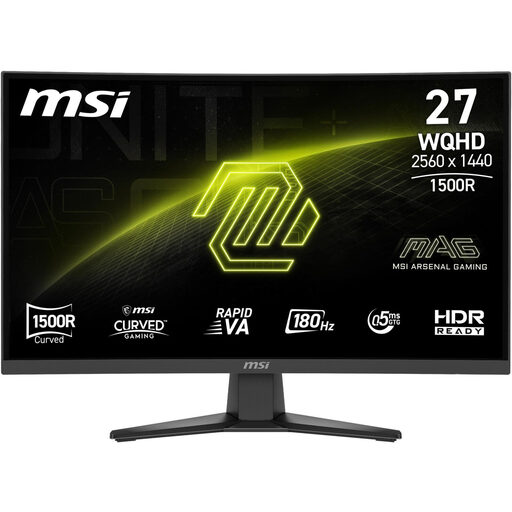
MSI MAG 275CQFDE E18 QHD monitor
The listed QHD resolution may suit you if you want to view several text and source windows at once; check text readability on typical book pages.
Product details: 27 inches, 2560 × 1440 pixels and a Rapid-VA panel. According to the product description, the stand can be tilted.
Joybuy
 No image available
Dell Pro Plus P2725DE QHD monitor
This 27-inch QHD model is an option for viewing your manuscript, references and revision notes side by side; check how it looks at your preferred scaling.
Dell Germany lists a resolution of 2560 × 1440 pixels and USB-C connectivity. The product description lists height, tilt and pivot adjustment; your laptop and cable need to support the connection you want.
Joybuy
Frequently asked questions
Do I need a 4K monitor for writing a book?
No. First check whether you can arrange your manuscript, source and notes clearly on a QHD model at your preferred font size. The documented 27-inch 4K model has more native pixels; how many remain available for additional views after scaling depends on your settings.
How should I set up my monitor for long editing sessions?
Adjust the screen position and tilt to suit your seating position and visual needs, and consider your computer glasses if applicable. The Federal Institute for Occupational Safety and Health recommends matching your glasses and screen position to the task; this does not guarantee that a particular monitor will prevent discomfort.
Can I connect and charge my laptop with a USB-C cable?
It depends on whether your laptop and cable support the required video connection and whether the specific monitor provides enough charging power. Manufacturer specifications vary: BenQ lists 65 W for the GW2790QT, EIZO up to 70 W for the EV2490, and Dell up to 90 W for the P2725DE. Check these figures against your laptop’s requirements.
What should I know about power consumption and faults in Germany?
To compare power consumption, check the EU energy label and EPREL information for the specific monitor; the European Commission includes electronic displays within the scope of energy labelling. For consumer purchases, statutory rights against the seller are separate from a voluntary guarantee. The Verbraucherzentrale (German Consumer Advice Centre) describes an extension of the statutory warranty period to three years, in force since 31 July 2026, if you choose repair rather than replacement to remedy a fault within the first two years.
Do Germany’s rules for computer workstations also apply to my personal book project?
Not simply because you use a screen at home. ASR A6 sets out requirements for employees at screen-based and teleworking workstations, and excludes private use outside such workstations. Its guidance may be useful when setting up your screen, but it does not create a general requirement for private writers to buy a particular monitor.


