If you often have your chapter plan, manuscript and sources open at the same time, an adjustable 27-inch QHD monitor is a sensible starting point. Dell Germany lists the P2725DE as having a 27-inch screen and a resolution of 2560 × 1440 pixels. For a smaller desk, EIZO also suggests considering a 24.1-inch model with a 16:10 aspect ratio. Check the text size, scaling, connections and footprint in your own workspace. There’s no proven added benefit to 4K over QHD for writing alone.
Which monitor suits whom
Writers working with a chapter plan and sources
If you want to keep your manuscript, chapter outline and research materials open side by side, having enough usable screen space is important. Check whether you can arrange the windows comfortably with your preferred text size and scaling.
Writers with a small desk
When desk space is limited, weigh the screen’s width and aspect ratio against the space available. A more compact 16:10 model could be an alternative to a wider monitor.
Writers using a laptop
If you regularly connect a laptop, check that the monitor supports its video output and provides the charging power you need. USB-C alone doesn’t guarantee that both will work with every laptop.
What to consider when choosing
If you want your chapter plan, manuscript and sources visible at the same time, start by checking the usable width for your windows. When desk space is limited, the monitor’s dimensions matter more. After that, consider how it can be positioned and how it connects to your laptop.
| Buying consideration |
What to check before buying |
Who will find this especially important |
| Keeping several windows in view |
Compare the screen size, native resolution and desk width. Check whether two open windows are easy to read with your usual scaling. |
When I’m using my chapter plan, manuscript and sources side by side, I want the text to remain readable at my chosen scaling. Around 36% of consumers mainly look for the ability to use several windows at once. |
| Limited desk space |
Compare the monitor’s width and depth, including its stand, with the space available. Take the aspect ratio into account too. |
I want to keep enough room for my work essentials on a small desk, while still being able to read my outline clearly. Around 29% of consumers mainly prioritise a suitable, compact format when choosing. |
| Adjustable positioning |
Check the height adjustment, tilt and whether the screen can be rotated. Also consider reflections and viewing distance at your desk. |
For longer writing sessions, I want to be able to position the screen to suit my workspace. Around 21% of consumers prioritise an adjustable setup. |
| Laptop connection |
Check USB-C video support, the charging power required in watts and the ports on the specific monitor against your laptop’s capabilities. |
When I connect my laptop at my writing desk, I want to know whether video and power will both work. Around 14% of consumers mainly look for laptop connectivity. |
Common selection mistakes
-
Assuming 4K is automatically the right choice
More pixels don’t make up for unsuitable scaling or text windows that aren’t wide enough. There’s no proven added benefit to 4K over QHD for writing alone.
First decide how you want to arrange your windows and choose your preferred text size. Then compare QHD and 4K with those settings.
-
Assuming USB-C guarantees universal single-cable compatibility
Video and power depend on the capabilities of both the monitor and the connected laptop. For the EIZO EV2495, the manufacturer specifies DisplayPort Alt Mode and up to 70 W via the USB-C upstream port.
Check your laptop’s video capabilities and power requirements against the specifications for the exact monitor model.
Depending on your laptop, you may need an additional power supply, video cable or dock.
-
Comparing screen size alone
A 24.1-inch 16:10 monitor and a 27-inch QHD monitor also differ in screen height, width and the space they take up. Screen size alone won’t tell you how well your windows will fit on your desk.
Consider the aspect ratio, native resolution and available desk space together.
Brands and models to consider
Dell
The Pro Plus P2725DE is an option for writing spaces that need a QHD screen, an adjustable stand and a USB-C hub.
- Dell Germany lists this model as having a 27-inch screen, a resolution of 2560 × 1440 pixels and height adjustment.
- Whether your windows are easy to read on it also depends on the text size and scaling you use.
EIZO
The FlexScan EV2495 combines a more compact 24.1-inch format and 16:10 aspect ratio with USB-C docking.
- According to EIZO, this model has a resolution of 1920 × 1200 pixels and delivers up to 70 W via the USB-C upstream port.
- If you want to use two wide documents side by side, compare the available horizontal space with that of a 27-inch QHD model.
Philips
The 27E1N5600AE/00 is a QHD USB-C option for writers with a compatible laptop.
- Philips describes USB-C as supporting video and data transfer, as well as charging compatible devices.
- Before buying, check that your laptop, connection and charging requirements are all compatible.
LG
The UltraFine 27UP850K-W is a 27-inch 4K option if you’ll be viewing detailed images as well as text.
- LG lists 4K, USB-C and an adjustable stand among this model’s features.
- There’s no proven added benefit to 4K over QHD for writing a biography alone.
ASUS
The ProArt PA279CRV is another 27-inch 4K option for writing spaces where you’ll also be doing more demanding image work.
- This model is worth considering if you want to view detailed images as well as text.
- Being suitable for image work doesn’t prove that 4K offers an added benefit for text work alone.
Joybuy products for writing spaces
This selection includes large ultrawide and 27-inch displays for keeping writing, outlines and sources in separate windows. Check the space available, your preferred scaling and the laptop connections for each model.
 No image available
INNOCN 40C1U 40-inch ultrawide monitor
The wide display could be useful for keeping your manuscript, outline and sources in separate windows, provided you have enough desk space.
40 inches, 5120 × 2160 pixels, IPS, 21:9 and 100 Hz. Its width with the stand is listed as approximately 944 mm. USB-C with 65 W Power Delivery and PIP/PBP are included in the specifications; check compatibility with your laptop.
View at Joybuy
 No image available
INNOCN CB27U1 27-inch 4K UHD monitor
This could suit you if you want to view several items on a 27-inch screen and also work with detailed images.
3840 × 2160 pixels, IPS, 120 Hz and HDR500. USB-C with 90 W Power Delivery and PIP/PBP are listed; check compatibility with your laptop. There’s no proven added benefit to 4K over QHD for text work alone.
View at Joybuy
 No image available
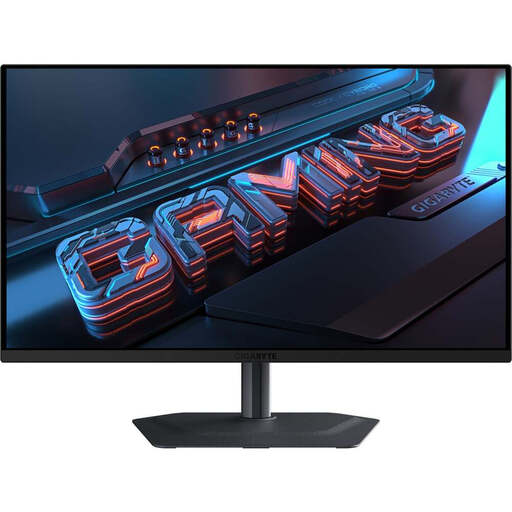
GIGABYTE MO27Q2A 27-inch QHD QD-OLED monitor
A 27-inch QHD screen could be a good starting point if you want to arrange your manuscript and outline on a larger display.
2560 × 1440 pixels, QD-OLED and 240 Hz. The description lists a height-adjustable stand with pivot, tilt and swivel functions. USB-C is rated at 18 W; check this against your laptop’s power requirements.
View at Joybuy
 No image available
MSI PRO MP275QDE 27-inch WQHD monitor
An option for writing spaces where you want to see whether a 27-inch QHD screen works for arranging your manuscript and outline.
2560 × 1440 pixels, IPS and 100 Hz. The stand has tilt adjustment; the listed connections are HDMI 2.0b and DisplayPort.
View at Joybuy
 No image available
Dell Pro Plus P2725DE 27-inch QHD monitor
A possible starting point if you’re looking for a 27-inch QHD screen with adjustable positioning for your writing space.
2560 × 1440 pixels and 27 inches. Dell Germany lists the same specifications for the P2725DE. The product description includes USB-C with up to 90 W Power Delivery, a USB hub, and height, tilt and pivot adjustment.
View at Joybuy
Frequently asked questions
Is QHD enough if I open my outline and manuscript side by side?
A 27-inch QHD model such as the Dell P2725DE has a resolution of 2560 × 1440 pixels. Check whether both windows remain wide enough with your usual text size and scaling. The pixel count alone doesn’t guarantee a particular level of readability or increase in productivity.
Can I connect and charge my laptop with a single USB-C cable?
That depends on both devices. For the EIZO EV2495, the manufacturer specifies DisplayPort Alt Mode and a maximum of 70 W via the USB-C upstream port. Check that these features meet your laptop’s requirements, including its power needs.
Is 4K worth it over QHD for writing?
There’s no proven added benefit to 4K over QHD for text work alone. If you also review detailed photos or scans, check that the resolution, your preferred scaling and your window layout suit the work you do.
What should I consider when positioning my monitor and working at a screen for longer periods?
Adjust the height and tilt to suit your workspace, and check whether reflections are distracting. Germany’s ASR A6 covers screen-based work within its scope. According to the Federal Institute for Occupational Safety and Health, it doesn’t apply universally to private screen use.
How can I compare the energy consumption of different monitors?
Compare the energy label for each monitor variant. The German Environment Agency refers to the EU energy label for electronic displays; screen size and resolution alone don’t tell you what your electricity costs will be.


