Who are the different monitor sizes suited to?

Writers with two text panes open

If you keep a draft, dialogue variations or references open side by side, consider how wide both windows will be at your preferred text scaling. LG Germany and Philips Germany list 34-inch ultrawide models with 3,440 × 1,440 pixels. The width you can actually use will also depend on how you arrange your windows.

Writers with limited desk space

If a very wide screen won’t fit on your desk, compare 27-inch models and check the stand’s dimensions as well as how you plan to arrange your windows. ASUS lists the PA279CRV at 3,840 × 2,160 pixels; EIZO specifies 2,560 × 1,440 pixels for the EV2795.

Writers using a laptop

If you want to connect your screen, charging and, where needed, peripherals through one connection, make sure your laptop’s port supports the required video output and that the monitor provides enough charging power. LG Germany, ASUS Germany and EIZO Germany list different USB-C power outputs for their respective models.

What matters when using a split editor?

34-inch ultrawide

A good fit if: you want to keep two wide editor panes, or your manuscript and references, side by side, and have enough desk space.

Things to consider: The 21:9 format with 3,440 × 1,440 pixels gives you a wide workspace, but check that both windows remain large enough at your preferred text scaling. LG Germany, Philips Germany and Dell Germany list models like these with different connections and features.

27-inch WQHD

A good fit if: a more compact monitor matters more than having as much horizontal space as possible for two text panes.

Things to consider: EIZO lists the EV2795 at 2,560 × 1,440 pixels in a 16:9 format. Set up your usual window layout before deciding whether the width is enough.

27-inch 4K

A good fit if: you want crisp text on a limited amount of desk space and can adjust the scaling on your computer.

Things to consider: ASUS lists the PA279CRV at 3,840 × 2,160 pixels and typically 60 Hz. A higher pixel count doesn’t automatically give you the same horizontal window space as a 21:9 monitor.

Priority What to check before buying Who is this important to?
Width for two editor panes Try your window layout and text size in 21:9 or 16:9 format. When I keep my manuscript and dialogue open at the same time, I need enough horizontal space to avoid constantly switching between windows. Around 36% of consumers prioritise a split text view above all else.
Readability and positioning Check text scaling, height adjustment, desk space and lighting where you plan to use it. For long writing sessions, I want to be able to set the text size and screen position to suit me. Around 29% of consumers prioritise readability and positioning.
Laptop connection Check video output, charging requirements and the connections you need for peripherals. If I want my laptop to display the editor on an external screen and charge at the same time, both devices need to be compatible. Around 21% of consumers prioritise connecting a laptop.
Previewing and occasional gaming Check the resolution and refresh rate of your complete setup against the preview you want. If I want to review game scenes as well as write, the requirements for previewing motion matter too. Around 14% of consumers prioritise previewing or gaming.

Which assumptions should you avoid?

  • Assuming screen size means usable width

    A 27-inch monitor in 16:9 doesn’t give you the same horizontal window layout as a 34-inch ultrawide in 21:9. Text size and how you split your windows also affect how comfortably you can read two text panes.

    Set up your usual window layout at the scaling you want, then compare the format and native resolution.

  • Assuming USB-C automatically provides full laptop docking

    Your laptop’s USB-C port must support the video output you need, and the monitor’s charging power must be suitable for your laptop.

    Check the video output, charging requirements and USB devices you need against the specifications for both devices.

  • Treating manufacturers’ eye-comfort claims as a guarantee

    Product features alone can’t ensure that the text size, screen position and lighting are right for your workspace.

    Check the adjustment options and lighting where you’ll be working. For professional screen-based work, you should also follow the applicable health and safety requirements.

Which brands are worth considering?

LG

The 34BQ77QB-B combines a 34-inch ultrawide format with USB-C docking and KVM, making it worth considering if you use two text panes.

  • LG lists 3,440 × 1,440 pixels, USB-C with DP Alt Mode and up to 90 W, plus Picture-by-Picture and KVM for this model.
  • Whether charging and switching work with your setup also depends on the computers you connect.

Philips

The B-Line includes the 345B1C/00, a 34-inch model specified for a wide workspace.

  • Philips lists 3,440 × 1,440 pixels in a 21:9 format for this model.
  • The manufacturer’s claims about eye comfort or energy savings apply under specific usage conditions; they aren’t a measurement of your writing space.

ASUS

The ProArt PA279CRV is a 27-inch 4K alternative if you also work with images as well as text.

  • ASUS lists 3,840 × 2,160 pixels, USB-C Power Delivery at 96 W and a height-adjustable stand for this model.
  • According to ASUS, the typical maximum refresh rate is 60 Hz. The listed colour modes don’t mean they’re necessary for writing alone.

Dell

The UltraSharp U3425WE is a 34-inch ultrawide option with a Thunderbolt hub.

  • Dell lists 3,440 × 1,440 pixels at 120 Hz, height adjustment and 90 W power delivery.
  • These features are most relevant if you also use docking or motion previews alongside your text work.

EIZO

The FlexScan EV2795 is a 27-inch WQHD option with office docking features.

  • EIZO specifies 2,560 × 1,440 pixels, USB-C with up to 70 W, LAN and KVM for this model.
  • The 16:9 format doesn’t offer the same horizontal workspace as the 34-inch 21:9 models mentioned above.

Joybuy products for split text views

This selection includes 34- and 40-inch ultrawide models for wide window layouts, along with a 27-inch WQHD monitor for more compact workspaces.

INNOCN 40C1U 40-inch ultrawide monitor

INNOCN 40C1U, 40-inch

The 21:9 format is an option if you want to place two text panes side by side with plenty of width.

5,120 × 2,160 pixels; IPS; 100 Hz; USB-C Power Delivery at 65 W; height-adjustable stand.

View at Joybuy
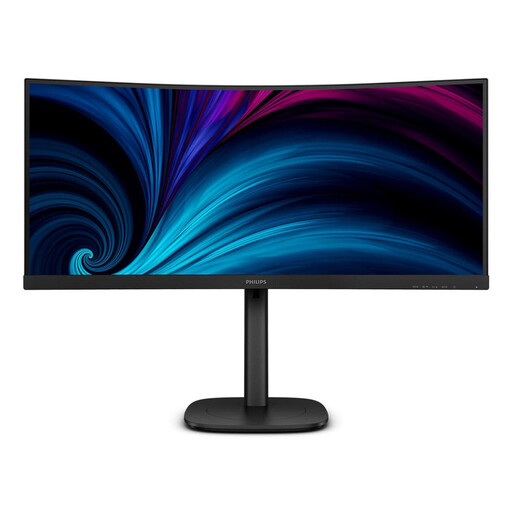
Philips 3000 Series 34B2U3600C/00, 34-inch monitor

Philips 3000 Series 34B2U3600C/00

A 34-inch monitor with 3,440 × 1,440 pixels is worth considering if you want to arrange your manuscript and references across a wide workspace.

34 inches; 3,440 × 1,440 pixels; LCD.

View at Joybuy

AOC Pro-Line CU34P3CV, 34-inch curved ultrawide monitor

AOC Pro-Line CU34P3CV

The 34-inch ultrawide format is an option for two text panes side by side; check that the stand fits on your desk.

21:9; 3,440 × 1,440 pixels; 100 Hz; VA; USB-C with up to 65 W; KVM; RJ45.

View at Joybuy

Philips 345B1C, 34-inch curved ultrawide monitor

Philips 345B1C

If you want to display your manuscript and dialogue variations side by side, the 34-inch ultrawide format gives you a wide workspace.

3,440 × 1,440 pixels; 21:9; 100 Hz; VA; 1500R; USB hub; height-adjustable stand.

View at Joybuy

ASUS ROG Strix WOLED XG27AQWMG, 27-inch WQHD monitor

ASUS ROG Strix WOLED XG27AQWMG

This model is worth considering as a 27-inch WQHD option if you have a more compact desk. Its 16:9 format offers less horizontal workspace than 21:9.

2,560 × 1,440 pixels; 16:9; 280 Hz; USB hub.

View at Joybuy

Frequently asked questions

Is a 27-inch monitor big enough for two editor panes?

It depends on the text size, scaling and how much width you need for each pane. EIZO’s WQHD example is specified at 2,560 × 1,440 pixels. Set up your actual editor layout rather than basing your decision on screen size alone.

Will every USB-C monitor charge my laptop using the same cable?

No. Your laptop’s port needs to support video output, and its charging requirements must match the capabilities of the particular monitor. LG Germany lists up to 90 W for the 34BQ77QB-B, ASUS Germany lists 96 W for the PA279CRV, and EIZO Germany lists up to 70 W for the EV2795.

What should I consider when setting up a monitor for longer writing sessions?

Check that you can position the screen comfortably at your desk and that light sources don’t cause distracting reflections. ASR A6 from the Federal Institute for Occupational Safety and Health covers screen-based workplaces for employees within its scope; it doesn’t apply across the board to every home desk.

What are my rights when buying online or if a product is faulty in Germany?

For an eligible consumer contract, online purchases generally come with a 14-day right of withdrawal, as explained by the Verbraucherzentrale. Your statutory rights if a product is faulty are against the seller and are separate from any voluntary manufacturer’s guarantee.

Is there an energy label for computer monitors?

Yes. The European Commission classifies computer monitors as electronic displays, which are covered by energy labelling rules with a scale from A to G. Compare specific models and their energy consumption figures rather than looking at screen size alone.