Who are the different monitors suited to?

Writers working with notes side by side

If you’re revising longer stories and want to see your manuscript alongside annotations or an outline, compare the screen size and resolution with your preferred text size. Dell lists the P2725D as a 27-inch model with a 2560 × 1440-pixel resolution; EIZO lists the EV2490 as a 23.8-inch Full HD model.

Writers working with image references

If you also review illustrations or historical scans, 4K models such as the LG 27UP850K-W or ASUS ProArt PA279CRV may be worth considering. The manufacturers list both as having a 3840 × 2160-pixel resolution. This does not guarantee any particular colour accuracy for an individual unit or a specific print result.

Writers using a laptop

If you often connect your laptop at your desk, check whether you need USB-C docking and charging power as well as a video connection. Lenovo lists USB-C, a USB hub and Ethernet for the ThinkVision T27h-30. Whether it works with your laptop depends on its ports and power requirements.

What should you look for when choosing?

23.8-inch Full HD

A good fit if: you mainly use one text window, have limited desk space or only occasionally open notes alongside your manuscript.

The trade-off: 1920 × 1080 pixels offer less room for side-by-side windows than the QHD and 4K models mentioned here.

27-inch QHD

A good fit if: you often want your manuscript and revision notes side by side, and have room on your desk for a larger screen.

The trade-off: check how wide your windows are at your preferred text size rather than choosing on pixel count alone.

27-inch 4K

A good fit if: you regularly assess illustrations, scans or fine page details as well as text.

The trade-off: a higher pixel count does not guarantee more usable window space at a comfortably readable scaling level, or accurate print colours.

What matters What to check before buying Who it matters most to
Text windows side by side Check the screen size and native resolution against your preferred text size and window layout. If I want to read my manuscript and revision notes at the same time, I make sure both windows remain easy to read. Around 36% of consumers put side-by-side text windows first when choosing a monitor.
Readability and positioning Check for height and tilt adjustment, and make sure there’s room for the stand. During longer writing sessions, I want to position the screen to suit my seating position and eyesight. Around 29% of consumers prioritise easy-to-read text and an adjustable setup.
Image and layout details If you regularly work with images, consider 4K and scaling; assess colour modes on the specific model. When I review illustrations, scans or fine page elements, how they appear matters as well as the text. Around 21% of consumers put image and layout details first.
Laptop docking Check your laptop’s video output, the charging power you need and the ports on the specific monitor. If I often connect my laptop and peripherals at my desk, a compatible docking solution matters to me. Around 14% of consumers prioritise connecting a laptop.

Which mistakes should you avoid?

  • Buying based only on the highest resolution

    Whether extra detail is useful depends on whether you’ll actually be reviewing images or fine layout details as well as text. Readable scaling still matters.

    Try your usual window layout and text size. Choose 4K specifically if image or layout details matter for your project.

  • Assuming the P2725D and P2725DE are the same

    Dell lists the P2725DE as a separate model with a USB-C hub. The P2725D model name alone does not confirm that it has this feature.

    Before buying, compare the full model number and the ports on the specific device.

  • Assuming USB-C guarantees laptop compatibility

    A USB-C port does not confirm that your laptop can output a video signal through it or be powered by the monitor.

    Check video output, charging requirements and monitor specifications for both devices.

Which monitor brands are worth considering?

Dell

The Pro P2725D and P2725DE are different 27-inch QHD options for text work, with and without a specified USB-C hub respectively.

  • Dell lists the P2725D as having a 2560 × 1440-pixel resolution, height adjustment and tilt adjustment.
  • The P2725DE is a separate hub model. Its ports cannot be assumed to be available on the P2725D; check compatibility with your laptop too.

EIZO

The FlexScan range includes the compact Full HD EV2490 for office use, as well as the separate 27-inch 4K EV2740X docking option.

  • EIZO lists the EV2490 as Full HD and the EV2740X as 4K, with USB-C power delivery of up to 94 W.
  • The compact EV2490 offers fewer pixels for side-by-side windows. The 94 W figure applies to the EV2740X, not the entire FlexScan range.

LG

The 27UP850K-W is a 27-inch 4K option for projects where you need to review image details as well as text.

  • LG lists a 3840 × 2160-pixel resolution, USB-C and an adjustable stand.
  • Manufacturer claims about colour coverage do not prove the colour accuracy of an individual unit or the eventual print result.

Lenovo

The ThinkVision T27h-30 is a QHD office monitor for writers who need USB-C docking and extra ports.

  • Lenovo lists this model as 27 inches, with a 2560 × 1440-pixel resolution, USB-C, a USB hub and Ethernet.
  • Check whether video output and charging will work with your laptop’s port and specific power requirements.

ASUS

The ProArt PA279CRV is a 27-inch 4K option if image and layout work matter as well as writing.

  • ASUS lists a 3840 × 2160-pixel resolution, along with colour modes and colour gamut coverage for this model.
  • These manufacturer claims are not an independent assessment of the colour accuracy of an individual unit or its print results.

Philips

According to Philips, the 27E1N5600HE/00 combines 27-inch QHD and USB-C with an integrated webcam.

  • The webcam may come in handy for additional meetings.
  • A webcam isn’t essential for writing an anthology. USB-C features listed for this model do not apply to all Philips monitors.

Joybuy monitors for manuscripts and notes

This selection includes 27-inch monitors for keeping manuscripts and notes side by side: QHD as a starting point for text work, and 4K if image details matter too. Some models list USB-C docking if you want to connect your laptop at your desk.

INNOCN CB27U1 27-inch 4K UHD monitor

INNOCN CB27U1 27-inch 4K UHD monitor

Could be a good fit if you want to arrange your manuscript and other content on a 27-inch screen, while also reviewing image details.

3840 × 2160 pixels; USB-C with 90 W Power Delivery; height-adjustable; PIP/PBP for viewing content side by side.

USB-C video and charging require a compatible laptop port and suitable power requirements.

View at Joybuy
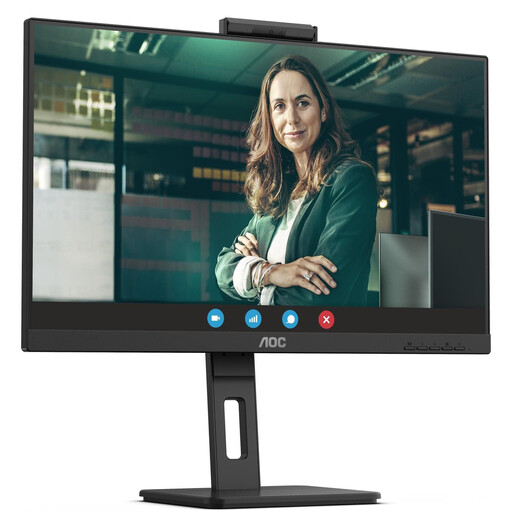
AOC Pro-Line Q27P3CW 27-inch QHD monitor

AOC Pro-Line Q27P3CW 27-inch QHD monitor

A possible choice if you want your manuscript and notes side by side on a QHD screen and need to connect a laptop and peripherals.

This model is listed with USB-C offering up to 90 W Power Delivery, a USB hub and a height-adjustable stand.

Docking and charging require a compatible laptop port and suitable power requirements.

View at Joybuy

Dell Pro 27 E2726DS QHD monitor

Dell Pro 27 E2726DS QHD monitor

Could suit longer writing sessions if you want to arrange your manuscript and notes on a 27-inch QHD screen.

2560 × 1440 pixels; IPS panel; stand adjusts for height, tilt, swivel and pivot.

View at Joybuy

GIGABYTE G27Q20 27-inch QHD monitor

GIGABYTE G27Q20 27-inch QHD monitor

A possible option if you’re looking for a 27-inch QHD screen for your manuscript and notes.

2560 × 1440 pixels; stand adjusts for height, tilt, swivel and pivot.

View at Joybuy

Dell Pro Plus P2725DE 27-inch QHD monitor with USB-C hub

Dell Pro Plus P2725DE 27-inch QHD monitor

Could be a good fit if you want your manuscript and notes side by side and connect a compatible laptop at your desk.

2560 × 1440 pixels; USB-C with DisplayPort and 90 W Power Delivery; USB hub; height, tilt and pivot adjustment.

Docking and charging require a compatible laptop port and suitable power requirements.

View at Joybuy

Frequently asked questions

Do I need to buy a 4K monitor for my manuscript and revision notes?

No. First check whether both windows fit on a QHD monitor at your preferred text size. 4K is an additional option if you review fine images or page details; choosing a suitable scaling level is still important.

Can I connect and charge my laptop with a USB-C cable?

Only if the specific monitor supports video over USB-C and your laptop can output a video signal through that port. If you also want the monitor to charge your laptop, its stated power delivery must meet your laptop’s requirements; a USB-C connector alone doesn’t confirm this.

How should I set up my monitor for longer revision sessions?

Adjust the text size, height, tilt and screen position to suit your eyesight and workspace, and look out for distracting reflections. The German Federal Institute for Occupational Safety and Health describes screen position and individual visual characteristics as related factors. The ASR A6 applies to workplaces within its scope and does not create a general purchase requirement for people writing at home.

How do I compare monitor energy use?

Compare the EU energy label and stated consumption of the specific models. To estimate your own costs, you’ll also need to know how long you use the monitor and your electricity tariff.

What are my rights if a newly bought monitor is faulty?

When you buy from a business seller in the EU, consumers are entitled to a minimum two-year legal guarantee from the date they receive the goods. This is a claim against the seller; an additional manufacturer’s guarantee does not replace it. These EU consumer rules do not apply in the same way to private sales.