Choose your monitor based on whether your moon landing simulation makes good use of a wider format, or whether you want to see small instruments in exceptional detail. An ultrawide screen can show more of your surroundings, while 4K in a 16:9 format focuses on fine detail. Also check that your PC can run your chosen resolution at the frame rate you want, that the screen and your seating position will fit in your room, and – if you choose OLED – how you’ll manage instruments that stay on screen for long periods.
Which option is right for you?
Sim pilot who likes to take in the surroundings
If you want to see as much of your surroundings as possible on approach, first check whether your simulation supports a wider aspect ratio and whether a wide screen will fit in your room. LG and Samsung offer models in wide formats, but monitor specifications don’t confirm support in the specific game you play.
Focused on reading the instruments
If small readouts are your priority, resolution, screen size and viewing distance all matter. TÜV SÜD also points out that high frame rates require a sufficiently powerful PC.
For long cockpit sessions
If instruments stay on screen unchanged for long periods, or you use the same monitor for other games, consider the panel type, motion handling and OLED care guidance. Protective features don’t eliminate the risk of burn-in.
What should you look for when buying?
21:9 ultrawide
A good fit if: Your simulation makes good use of 21:9 and you value a wider view of your surroundings more than 4K sharpness. The LG 34GS95QE-B is one example, with a resolution of 3440 × 1440 pixels and a 240 Hz refresh rate.
Consider: The screen width and 800R curvature need to suit your available space and seating position. The monitor specifications don’t tell you whether your game supports the format.
32:9 super ultrawide
A good fit if: Your game and its interface support 32:9 appropriately, and you have room for an extra-wide display. The Samsung Odyssey OLED G9 G95SD is a 49-inch example with a resolution of 5120 × 1440 pixels.
Consider: Its width doesn’t give you the same picture height as a 4K display. How useful it is for landing depends on how your specific game presents the image.
16:9 4K OLED
A good fit if: Fine cockpit readouts and dark scenes matter to you, and your PC can deliver your desired frame rate at 3840 × 2160 pixels. The MSI MPG 322URXDE is one example, with a maximum monitor refresh rate of 240 Hz.
Consider: A monitor’s maximum refresh rate doesn’t guarantee the same frame rate in your game. If you’ll have static readouts on screen, check the care guidance and the terms of the specific manufacturer’s warranty too.
16:9 4K IPS LCD
A good fit if: You want 4K resolution and are considering an LCD rather than OLED. The Gigabyte M32U is a documented 31.5-inch example, with a maximum refresh rate of 144 Hz on PC.
Consider: Even with an LCD, your PC needs to deliver your desired frame rate at 4K. The M32U has a quoted typical contrast ratio of 1000:1.
27-inch WQHD
A good fit if: You’d rather play at 2560 × 1440 pixels than 4K and want to limit the graphics load compared with 4K. The MSI MPG 271QRXDE is one example, with a maximum refresh rate of 360 Hz.
Consider: Fine instrument details won’t be as sharp as they are at 4K. High monitor refresh rates also require your PC to output enough frames.
| Priority |
What to check |
Who it matters to |
| Wider field of view |
Check 21:9 or 32:9 support in your specific game, and make sure you have enough room for the screen. |
If you want to see more of your surroundings on approach, the game and interface need to display the format appropriately. This is the top priority for around 25% of consumers who value a wider field of view most. |
| Sharper instruments |
Match the resolution to the screen size, viewing distance and your PC’s performance. |
If you want small readouts to be easy to read, don’t choose 4K without considering your viewing distance and available graphics performance. Around 25% of consumers put instrument sharpness first. |
| Dark scenes |
Consider the panel and screen finish in your room; don’t treat HDR labels as an independent test of picture quality. |
Picture quality can be a key consideration for dark space scenes. Around 19% of consumers say dark-scene contrast matters most to them. |
| Smooth motion |
Consider the resolution, frame rate you want and your PC’s performance together. |
If smooth motion on your current PC is your priority, the frame rate it can actually achieve matters more than a high maximum refresh rate on its own. This is the main priority for around 19% of consumers. |
| Static readouts |
For OLED, read the care guidance and warranty terms for the exact model. |
If cockpit instruments often stay on screen for long periods, panel care should be part of your decision. Around 12% of consumers put this first. |
Avoiding common buying mistakes
-
Assuming the maximum refresh rate is your guaranteed in-game frame rate
Your monitor can only display the frames your connected PC outputs at the chosen resolution. TÜV SÜD points out that a high frame rate requires a sufficiently powerful PC.
Check the frame rate your simulation achieves on your PC and which connection you need before treating a higher maximum monitor refresh rate as a reason to buy.
-
Assuming a wider format guarantees a wider usable view in the game
21:9 and 32:9 describe the monitor’s aspect ratio. The game and its interface need to display the format appropriately, and wide screens also need more space.
Check how your specific simulation displays the image, and measure the space for the screen and your seating position. Compare the vertical pixel count too.
-
Comparing response times measured in different ways as if they were the same
For the Gigabyte M32U, the specification sheet explicitly describes the 1 ms figure as MPRT. This isn’t the same as GtG.
Check the measurement method before comparing response times in milliseconds.
-
Confusing a manufacturer’s warranty with your statutory rights
A voluntary manufacturer’s warranty and your statutory rights against the retailer are different things. Whether burn-in is covered depends on the terms of the specific warranty.
Read the OLED and burn-in terms for your exact model, and keep your proof of purchase. Use the protective features as described in the instructions.
Key brands at a glance
MSI
The MPG range includes documented 4K and WQHD QD-OLED models.
- The MPG 322URXDE is listed at 3840 × 2160 pixels and 240 Hz; the MPG 271QRXDE is listed at 2560 × 1440 pixels and 360 Hz.
- MSI describes OLED Care and model-specific OLED coverage. Protective features and warranty terms don’t rule out burn-in; check the terms for the specific model.
LG
UltraGear offers documented OLED models in wide formats.
- The 34GS95QE-B is a 21:9 model with 800R curvature and a 240 Hz refresh rate. LG lists the 45GX950A-B at up to 165 Hz at 5K2K resolution, or 330 Hz in a lower-resolution mode.
- The 45GX950A-B’s resolution and refresh-rate modes aren’t available at the same time. Make sure the format and curvature suit your room.
Samsung
The Odyssey OLED G9 G95SD is a 49-inch, 32:9 display.
- Samsung lists a resolution of 5120 × 1440 pixels, OLED, a 240 Hz refresh rate and an anti-reflective screen finish for this model.
- The wide format is only useful for your simulation if the game and interface make good use of it. Its resolution doesn’t provide the picture height of a 4K display.
Gigabyte
The M32U is a documented 31.5-inch 4K IPS LCD.
- The manufacturer’s specification sheet lists a maximum refresh rate of 144 Hz on PC, Adaptive Sync and height adjustment.
- The typical contrast ratio is listed as 1000:1. The advertised 1 ms response time is explicitly MPRT, not GtG.
BenQ
The MOBIUZ EX271UZ is a more compact 27-inch 4K QD-OLED option.
- BenQ lists a 240 Hz refresh rate and 166 PPI for this model.
- A 27-inch display has less physical screen area than larger alternatives. The manufacturer’s claims about colour and game worlds aren’t independent evidence of how your simulation will look.
Joybuy products
This Joybuy selection includes 4K LCD and OLED models, WQHD, and wide 21:9 and 32:9 formats to suit different priorities, from instrument sharpness and dark scenes to a wider field of view.
 No image available
MSI MAG 274UPDFDE E16M, 27-inch, UHD, Mini-LED Rapid IPS
For 4K-sharp cockpit instruments on an LCD rather than OLED panel. This model is listed as a 27-inch gaming monitor.
UHD at 160 Hz; according to the product title, the separate FHD mode reaches 320 Hz. This doesn’t mean you can get 4K at 320 Hz.
View at Joybuy
 No image available
MSI MAG 272QPDE QD-OLED X24, 27-inch, QHD
For consumers considering WQHD rather than 4K, with a QD-OLED panel for dark gaming scenes.
2560 × 1440 pixels and 240 Hz. In-game frame rate also depends on your PC and chosen resolution.
View at Joybuy
 No image available
MSI MAG 341CQPDE QD-OLED, 34-inch, UWQHD, 21:9
For a wide 21:9 view, provided your simulation and its interface display the format appropriately.
3440 × 1440 pixels, 175 Hz and 1800R curvature. If you spend long sessions with static cockpit readouts, follow the OLED care guidance; it doesn’t rule out burn-in.
View at Joybuy
 No image available
MSI MPG 322URXDE QD-OLED, 4K UHD
For consumers who prioritise fine readouts in a 16:9 format and a QD-OLED panel for dark gaming scenes.
3840 × 2160 pixels and a maximum monitor refresh rate of 240 Hz. Follow the OLED care guidance if you display static instruments; the maximum refresh rate doesn’t guarantee the frame rate your simulation will achieve.
View at Joybuy
 No image available
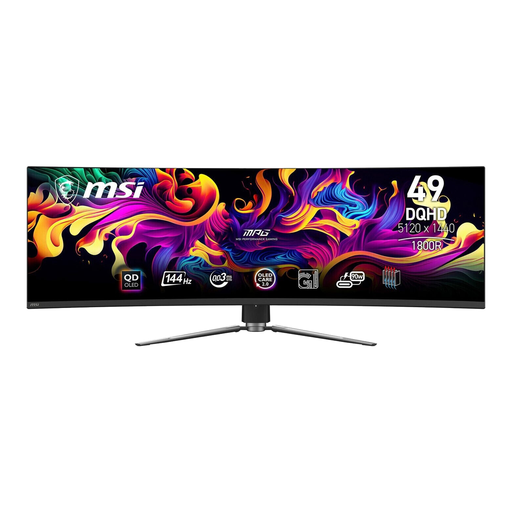
MSI MPG 491CQPDE QD-OLED, 49-inch, 32:9
For an especially wide view, if your game and interface support 32:9 appropriately and you have enough room for the screen.
5120 × 1440 pixels and 144 Hz. The format doesn’t provide the picture height of a 4K display; its usefulness for your simulation depends on how the game displays the image.
View at Joybuy
Frequently asked questions
Does my simulation need to support 21:9 or 32:9?
Yes, if you’re buying a wider format to get a wider usable view in the game. Check how your specific game and its readouts display the format; the monitor specifications alone don’t confirm game support.
How can I position my monitor sensibly in my gaming room?
Consider the screen width, stand depth and viewing distance together. TÜV SÜD gives around 1.2 to 1.5 times the screen diagonal as a general guide, and notes that ultrawide and curved models may call for a different distance. This rule of thumb isn’t a requirement for every set-up.
Do static cockpit instruments mean I need to take special care of an OLED screen?
Follow the instructions and use the protective features of your chosen OLED model. MSI describes OLED Care 2.0 on the MPG 322URXDE as a measure to reduce the risk of burn-in. Check the terms for your specific model to see whether burn-in is covered by a voluntary manufacturer’s warranty, and under what conditions.
How can I compare energy use and my rights when buying in Germany?
For monitors sold in the EU, compare the energy label and the model information in EPREL. The European Commission notes that the label also takes HDR energy consumption into account. If you buy as a consumer from a retailer, EU consumer information states that you’re entitled to a legal guarantee of at least two years from receipt of the goods, separate from any voluntary manufacturer’s warranty. For distance purchases, you generally have a 14-day right to cancel from the date of delivery, although exceptions may apply.
Can I put my old monitor in the household bin?
No. The German Environment Agency explains that old electrical equipment must be collected separately; taking it to a recycling centre is one option. Retailer take-back options depend on the applicable conditions.


