
Lieferung heute & morgen

Qualitätsgarantie

Willkommens-Angebote freischalten: KOSTENLOSE Lieferung | Bis zu 80 % RABATT | Kostenlose 30-Tage-JoyPlus-Testphase
App herunterladen
Choosing the right motherboard is the foundation of any PC build. It determines your system's compatibility, performance limits, and future upgrade paths. However, the market is flooded with technical specs and marketing jargon that make an informed decision difficult. Many users invest in over-specced features they will never use or overlook critical details that limit day-to-day use. This guide focuses on the essential criteria to help you make a knowledgeable choice and avoid common pitfalls.
Before we dive into the technical details, it's important to be aware of two common missteps that often lead to unnecessary expenses or premature upgrades.
Over-investing in the Voltage Regulation Module (VRM): Many marketing campaigns highlight a high number of power phases (e.g., 18+2+1) as a hallmark of quality. While robust power delivery is crucial for stability, especially with high-end CPUs and overclocking, the VRM configurations on mid-range motherboards are more than sufficient for most standard use and gaming scenarios. An extreme configuration designed for liquid nitrogen overclocking offers no tangible benefit for the average user but significantly drives up the price.
Neglecting I/O Connectivity: Often, the focus is solely on CPU compatibility and PCIe speed, while day-to-day ports are overlooked. An insufficient number of USB ports, a slow LAN port, or the lack of an integrated Wi-Fi module (motherboard with Wi-Fi) can lead to frustration down the line and the need for extra adapters or expansion cards. Therefore, a careful inspection of the rear I/O panel and internal headers is essential.
To make a suitable purchasing decision, you should check three fundamental technical parameters. These define the compatibility and functionality of your entire system.
The socket is the physical interface where the processor is installed. It must match your CPU exactly. The two dominant platforms are:
AM5 motherboard is the basis for modern AMD systems and exclusively supports DDR5 RAM. The accompanying chipsets, such as X870 and B850, offer different feature sets, with X-series typically providing more connectivity and overclocking options.LGA 1700 motherboard offers flexibility, as it is available with either DDR4 or DDR5 motherboard slots, depending on the model.Always check the official CPU compatibility list on the motherboard manufacturer's website before buying an Intel motherboard or AMD motherboard.
The form factor determines the physical dimensions of the motherboard and, consequently, which PC case it will fit into. The most common formats are:
gaming motherboard configurations or workstations.The future-proof features of your motherboard depend on the available slots:
PCIe 5.0 motherboard offers double the bandwidth of PCIe 4.0.motherboard with Wi-Fi (Wi-Fi 6E or the newer Wi-Fi 7) is a convenient integrated solution.Here are some recommendations tailored to different user profiles and their specific needs.

Why it fits the profile: This board offers a cost-effective entry point into AMD's modern AM5 platform. It's ideal for users seeking a solid foundation for gaming or everyday applications without paying for high-end overclocking features they don't need.
It avoids over-investing in an over-specced power delivery system. The A620 chipset and VRM configuration are designed for efficiency and reliability with standard CPUs.
Offers support for the current AMD AM5 socket and DDR5 RAM, providing a great foundation for future upgrades without breaking the bank.
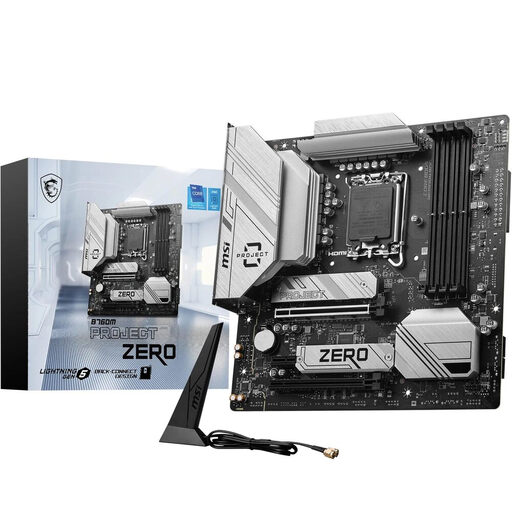
Why it fits the profile: For users where clean cable management and a flawless look are the top priority. The innovative design moves all connectors to the back, enabling an extremely clean interior.
It sidesteps the pitfall of neglected connectivity in a clever way: It offers modern connectivity like Wi-Fi 6E and 2.5G LAN, but relocates the connectors for superior aesthetics. It requires a compatible case.
The Back-Connect design is its unique selling proposition, enabling an unparalleled clean PC build. At the same time, it provides a high-performance foundation with PCIe 5.0 and DDR5 support.

Why it fits the profile: This board hits the "sweet spot" for demanding users. It combines future-proof technologies like PCIe 5.0 and Wi-Fi 7 with strong power delivery for the latest AMD CPUs, without reaching the price point of a high-end X870 model.
It offers a balanced feature set. The 12+2+2 phase VRM is more than sufficient for demanding CPUs without pushing into extreme territory. This avoids over-investing in unused overclocking capabilities.
The combination of a PCIe 5.0 x16 slot, a Gen5 M.2 slot, and cutting-edge connectivity (Wi-Fi 7, 5G LAN) on the new B850 chipset offers an excellent balance of performance and future-proofing.
We have compiled a complete, real-time updated list of products that fully meet these strict selection criteria and quality standards.
1. Do I need to update my BIOS to use a new CPU? Yes, this is often necessary, especially if you want to use a newer CPU generation on an older motherboard model (e.g., an AMD Ryzen 9000 CPU on an older AM5 board). Many modern motherboards feature a "BIOS Flashback" function that allows the BIOS to be updated even without a CPU installed. Before purchasing, check the manufacturer's specifications for "out of the box" CPU compatibility.
2. Is a PCIe 5.0 motherboard worth it in 2026? For future-focused users, yes. While PCIe 4.0 is still sufficient for current graphics cards and SSDs, upcoming generations of high-end components will increasingly benefit from the double bandwidth of PCIe 5.0. If you plan to upgrade your system with the fastest available hardware in the coming years, a PCIe 5.0 motherboard is a wise investment to avoid a performance bottleneck.
3. How many M.2 slots are practical for a gaming motherboard? For most gamers and standard users, two M.2 slots are a good compromise. One for the operating system and essential programs (a fast NVMe SSD) and a second for the game library. Power users or content creators who work with large files can benefit from three or more slots to avoid storage bottlenecks and to separate drives for projects, games, and the system.