
Lieferung heute & morgen

Qualitätsgarantie

Willkommens-Angebote freischalten: KOSTENLOSE Lieferung | Bis zu 80 % RABATT | Kostenlose 30-Tage-JoyPlus-Testphase
App herunterladen
A motherboard connects the processor, RAM, graphics card, SSD, network and other components. Your choice therefore determines not only the features you get, but also what upgrades are possible later on. Costly mistakes often happen when buyers focus solely on chipset names, high RAM speeds or flashy gaming labels.
An Intel and an AMD processor will not fit on the same motherboard. For supported generations of Intel systems, you will need an LGA1700 motherboard, for example. For current AMD Ryzen processors from the 7000, 8000 and 9000 series, an AM5 motherboard is required.
Even within a single platform, CPU support can vary. So check the following before you buy:
A DDR4 motherboard will only accept DDR4 modules. A DDR5 motherboard requires DDR5 RAM. The slots are mechanically different, so incompatible modules simply cannot be fitted.
High figures such as "up to 7,200+ MHz" or "up to 8,400+ MT/s" usually refer to overclocked profiles. The actual speed you can achieve depends on factors including the processor, RAM kit, BIOS and how the slots are populated. For a reliable configuration, the specifications from both the motherboard and RAM manufacturers need to match.
A PCIe 5.0 motherboard offers higher bandwidth for compatible expansion cards and SSDs. However, a PCIe 5.0 slot will not automatically speed up a PCIe 4.0 graphics card. What matters is which devices you actually install.
Also pay attention to the number and type of M.2 slots. An M.2 motherboard might have one fast PCIe slot and other connectors of a lower generation. If you plan to use several NVMe SSDs, check whether any slots share bandwidth with SATA ports or expansion slots.
The socket must match your CPU. An Intel motherboard with LGA1700 is designed for compatible Intel processors, while an AMD motherboard with an AM5 socket is intended for the corresponding AMD Ryzen models.
The chipset determines, among other things:
A budget H610 board focuses on basic functionality. A B760 or Z790 motherboard offers more ports and expansion options, depending on the model.
An ATX motherboard measures 30.5 × 24.4 cm and typically offers more slots and a more generous layout of connectors. A Micro-ATX motherboard is more compact and suits smaller cases. Before you buy, make sure the mounting holes, standoffs and maximum graphics card or cooler size are compatible with your case.
Special solutions such as the MSI B760M PROJECT ZERO, which has connectors on the reverse side, require a compatible back-connect case. A standard Micro-ATX case will not automatically work.
Four DIMM slots make it easier to expand your memory later. Two slots may be enough for a simple everyday PC, but they limit your upgrade options. For gaming, video editing and virtual machines, capacity, dual-channel operation and the manufacturer's approval of the RAM kit are more important than a maximum advertised figure.
A motherboard with Wi-Fi reduces the need for a separate wireless card. Even so, check the Wi-Fi standard, Bluetooth version, antenna connections and the speed of the wired LAN. For large local file transfers, 2.5GbE or 5GbE LAN could be relevant.
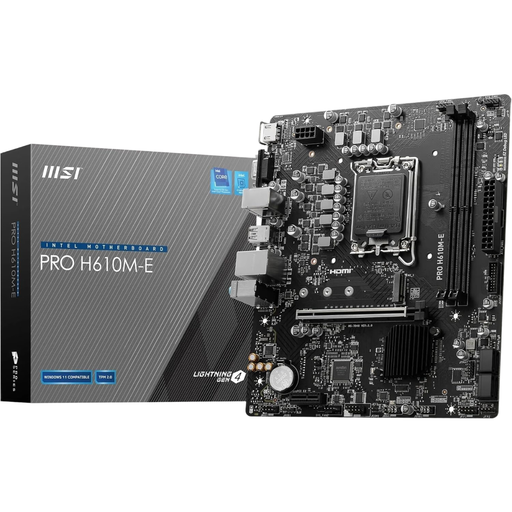
Why this product suits the profile: The compact platform is designed for Intel processors with LGA1700 and everyday PC tasks. DDR4 memory can keep the initial cost lower than a full DDR5 platform, especially if you already have compatible modules.
DDR4 compatibility is clearly stated. Two DIMM slots and a maximum of 64 GB should be checked against your planned upgrade needs before purchase.
Micro-ATX form factor, PCIe 4.0 x16, one M.2 slot and HDMI, DisplayPort and VGA outputs.
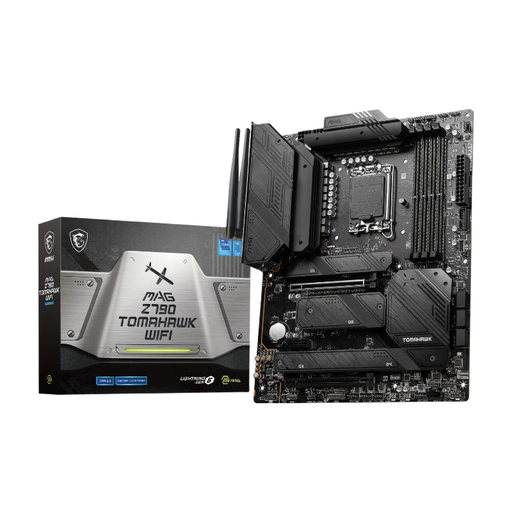
Why this product suits the profile: This ATX motherboard is aimed at users who need multiple storage drives, modern networking features and plenty of ports in an Intel system.
Four M.2 slots and DDR5 support are clearly specified. The CPU list covers Intel Core 12th and 13th Gen; BIOS compatibility should be checked before ordering.
PCIe 5.0 x16, four M.2 slots, Wi-Fi 6E, Bluetooth 5.3 and 2.5 Gigabit LAN.
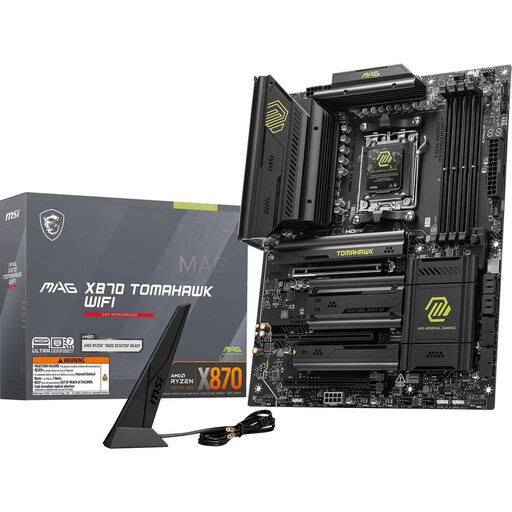
Why this product suits the profile: For AMD PCs with several fast SSDs, extensive networking and long-term expansion plans, this AM5 board provides a comprehensive connectivity base.
Socket AM5, DDR5 and the AMD X870 chipset are clearly stated. The generous storage and PCIe provision is only worthwhile if your CPU, SSDs and case support that level of use.
Two M.2 Gen5 slots, PCIe 5.0 x16, Wi-Fi 7, 5 Gigabit LAN and USB4 Type C at 40 Gbit/s.
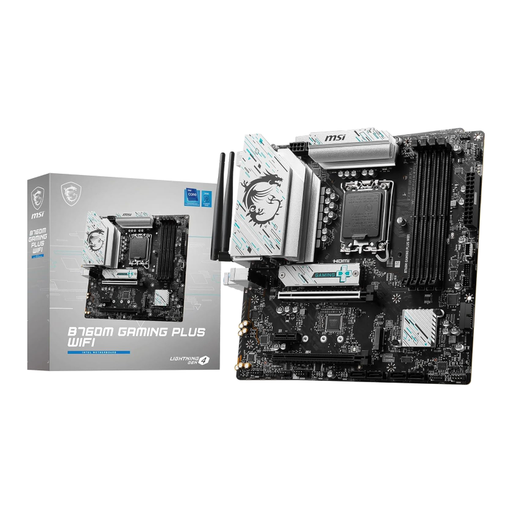
Why this product suits the profile: This Micro-ATX motherboard combines LGA1700 compatibility with DDR5, Wi-Fi and two M.2 slots. It is ideal for compact gaming or productivity systems built around an Intel processor.
The specification lists the B760 chipset, four DDR5 DIMM slots and one PCIe 4.0 x16 slot. This means you can check the configuration against your specific needs before buying.
Wi-Fi 6E, Bluetooth 5.3, 2.5 Gigabit LAN and two M.2 Gen4 x4 slots.
We have put together a full, regularly updated list of products that fully meet these strict selection criteria and the safety regulations in force in the EU.
The lifespan depends on the workload, environment, power supply and your upgrade plans. A motherboard can serve across several PC generations, as long as the CPU socket, BIOS, RAM and ports remain compatible. Before swapping the CPU, check the official compatibility list.
When choosing, the processor, graphics card, RAM and storage are more important than the "gaming" label. A suitable gaming motherboard should offer adequate VRM cooling, at least one appropriate graphics card slot, enough M.2 slots and the networking features you need. The PCIe version must match your planned hardware, but it is not the sole factor determining gaming performance.
A motherboard with Wi-Fi is handy if your PC is not right next to the router or you cannot run a network cable. For consistent transfer speeds and low latency, a wired LAN connection can still be a good idea. Check the range, Wi-Fi standard, antennas and Bluetooth support on the specific model.