
Lieferung heute & morgen

Qualitätsgarantie

Willkommens-Angebote freischalten: KOSTENLOSE Lieferung | Bis zu 80 % RABATT | Kostenlose 30-Tage-JoyPlus-Testphase
App herunterladen
A motherboard connects the processor, memory, graphics card, SSD and other components. So when buying a motherboard, the chipset and a high memory speed rating aren’t the only things that matter. The key is whether the board is compatible with your existing components, case and intended use.
An AMD Ryzen motherboard generally needs a compatible AM5 socket, while an Intel Core motherboard uses either LGA1700 or LGA1851, depending on the platform. Checking the chipset name alone isn’t enough. Before you buy, check the socket, supported processor generation and BIOS version against the manufacturer’s list.
Another common mistake is pairing an LGA1700 processor with an Intel LGA1851 motherboard. The two platforms aren’t automatically compatible.
DDR4 and DDR5 memory use different slots. You can’t upgrade a DDR4 motherboard with DDR5 modules, or vice versa. If you want to keep using your existing memory, check the memory technology before placing your order.
High ratings such as “DDR5-8000 (OC)” also refer to overclocking profiles and don’t necessarily indicate standard operating speeds. Actual compatibility depends on the processor, memory kit, BIOS and motherboard layout.
A PCIe 5.0 motherboard or Wi-Fi 7 motherboard offers the relevant interfaces, but won’t automatically deliver a practical benefit in every setup. The connected SSD, graphics card, router and operating system also need to support the relevant standard.
For Wi-Fi, it’s also worth noting that, according to the product details, the COLORFUL COLORFIRE B850M-MEOW WIFI7 V14 offers full Wi-Fi 7 functionality on Windows 11 version 24H2 or later. The same details state that compatible drivers aren’t provided for Windows 10.
For an AMD Ryzen motherboard, the AM5 socket and a compatible AMD chipset are important. According to the product details, the COLORFUL B850 models support AMD Ryzen 7000, 8000 and 9000 Series processors with an AM5 socket. Even so, check the manufacturer’s latest CPU support list before installation.
An Intel Core motherboard with LGA1700, for example, is suitable for compatible Intel processors on the relevant platform. The MSI PRO B760M-P DDR4 lists support for various generations of Intel Core, Pentium and Celeron processors. A BIOS update may be needed for newer processors. LGA1851 models such as the MSI PRO Z890-S WIFI, on the other hand, are designed for Intel Core Ultra processors with this socket.
A Micro-ATX motherboard often measures around 244 × 244 mm and fits many compact cases, but usually offers fewer expansion slots than an ATX model. An ATX motherboard provides more room for additional cards, drives and connections, but needs a correspondingly larger case.
Before buying, check the following:
The MSI B760M PROJECT ZERO, for example, uses a back-connect design. The cable connections are on the back of the board, so you’ll need a compatible case with suitable cable routing.
A motherboard with an M.2 slot is suitable for compact NVMe SSDs. If you plan to install multiple drives, check the number of M.2 slots and SATA connectors. According to the product details, the MSI PRO Z890-S WIFI has three M.2 slots, including one Gen5 and two Gen4 connections.
A fast LAN connection can be useful for gaming, downloads and local networks. Wi-Fi is handy if you can’t run a network cable. Actual transfer speeds depend on your router, distance, wireless environment and broadband package. You should also consider the Bluetooth version, antenna connections and regional requirements for the 6 GHz band.
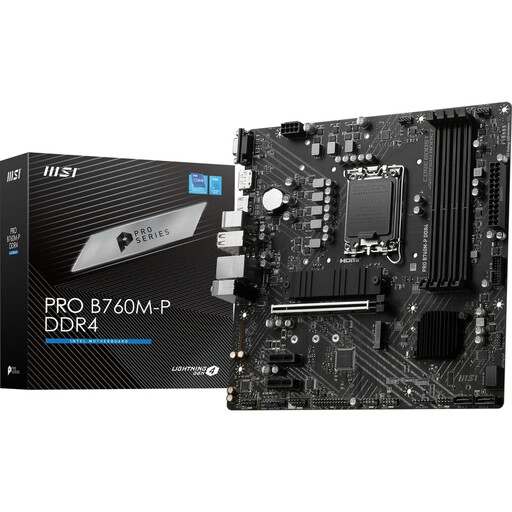
Why this product suits this profile: This Micro-ATX model uses DDR4, making it a good option if you want to keep using your existing memory.
DDR4 support is clearly specified, helping you avoid accidentally buying DDR5 memory for an incompatible platform.
LGA1700, four DDR4 slots, two M.2 connections and PCIe 4.0 x16 in a compact Micro-ATX form factor.
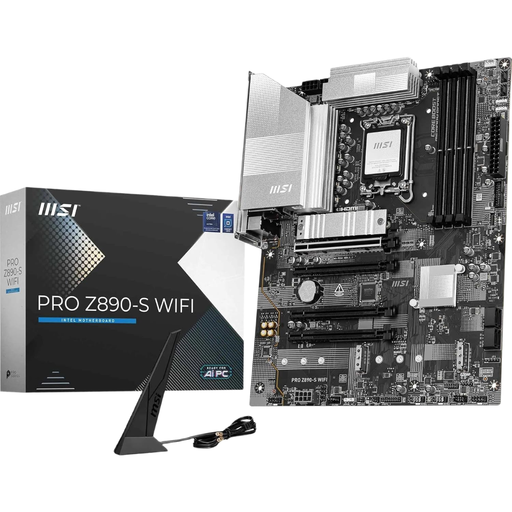
Why this product suits this profile: This ATX motherboard offers plenty of connections for high-performance systems, content creation and extensive storage setups.
The product details list the LGA1851 socket, DDR5 and three M.2 connections separately. You should also check the CPU support list before buying.
PCIe 5.0 x16, Wi-Fi 7, 2.5GbE LAN, Thunderbolt 4 Type-C and support for up to 256 GB DDR5, according to the product description.
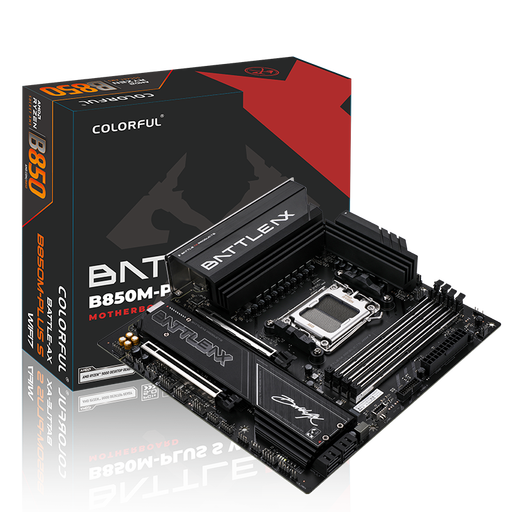
Why this product suits this profile: A good fit for compact AMD systems with fast networking, multiple drives and DDR5 memory.
The Micro-ATX form factor combines AM5, DDR5 and two M.2 slots, making it easier to check that the case size and expansion needs are right for you.
AMD B850 chipset, PCIe 5.0 x16, Wi-Fi 7, Bluetooth 5.4, 5 Gbit LAN and four DDR5 slots, according to the product details.
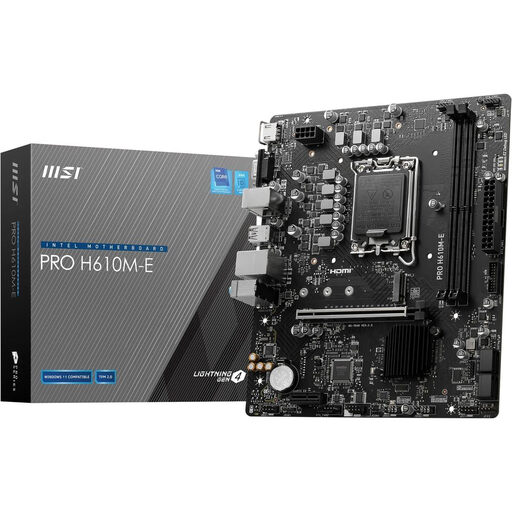
Why this product suits this profile: A compact platform for compatible Intel processors, DDR5 memory, a graphics card and an NVMe SSD.
The board is clearly specified as a Micro-ATX model with DDR5 and LGA1700. This reduces the risk of mixing up memory or case standards.
Support for up to 64 GB of DDR5, PCIe 4.0 x16, an M.2 Gen3 slot, and HDMI and VGA outputs, according to the product details.
We’ve put together a complete, regularly updated list of products that meet these strict selection criteria and fully comply with the safety regulations applicable in the EU.
First, check the CPU socket, then the chipset and the manufacturer’s CPU support list. An AM5 Ryzen motherboard isn’t compatible with an Intel processor. For LGA1700 and LGA1851 platforms, make sure the socket designation matches exactly.
For office tasks, two or four memory slots with a moderate total capacity are often enough. Gaming, video editing and virtual machines benefit from having more headroom. It’s not just the maximum capacity that matters: make sure you choose the right technology, as DDR4 and DDR5 aren’t interchangeable.
Its lifespan depends on workload, cooling, power supply and upgrade plans. A motherboard with several M.2 slots, up-to-date USB connections and enough RAM slots can remain useful for longer. Check BIOS support and the availability of compatible processors before buying.