
Lieferung heute & morgen

Qualitätsgarantie

Willkommens-Angebote freischalten: KOSTENLOSE Lieferung | Bis zu 80 % RABATT | Kostenlose 30-Tage-JoyPlus-Testphase
App herunterladen
A motherboard for your gaming PC connects the processor, RAM, graphics card, SSDs and peripherals. So your choice shouldn't be based solely on chipset name or lighting. What really matters is whether the board fits your existing or planned system.
Three common buying mistakes often lead to unnecessary spending:
With an AMD AM4 motherboard, depending on the model, Ryzen processors from the 3000 and 5000 series may be suitable. The GIGABYTE A520M DS3H V2 uses the AM4 socket and, according to product specifications, supports Ryzen 3000 and Ryzen 5000. This makes it an interesting option for an existing AM4 PC or a budget-conscious new build.
An AMD AM5 motherboard is designed for Ryzen processors from the 7000, 8000 and 9000 series. When buying, you should also check the official CPU support list and BIOS version. This is particularly important with newer processors.
An Intel LGA 1700 motherboard is designed for Intel Core processors from the 12th, 13th and 14th generations. An Intel LGA 1851 motherboard, on the other hand, belongs to a different platform. Product data should be checked particularly carefully here: with some offers, the title and technical description may differ. If the socket, chipset and CPU support list don't clearly match, it's not worth buying until this has been clarified.
A DDR4 motherboard can be fitted with DDR4 memory, while a DDR5 motherboard requires DDR5 modules. The generation can't be changed through a BIOS update.
For existing DDR4 RAM, options might include the GIGABYTE A520M DS3H V2 or the MSI PRO H610M-G DDR4. The GIGABYTE model offers four DIMM slots and, according to product specifications, up to 128 GB of DDR4. The MSI model has two DDR4 slots and supports up to 64 GB.
With a new AM5 system, DDR5 is standard. Models such as the ASUS PRIME A620M-K or the GIGABYTE B650M AORUS ELITE AX ICE offer DDR5 support. High memory speeds marked with "OC" should be understood as overclocking values. Whether they can be achieved stably depends on the memory kit, CPU, BIOS and configuration.
A motherboard with M.2 makes fitting modern NVMe SSDs easier. Check whether the slot uses PCIe 3.0, PCIe 4.0 or PCIe 5.0, and whether certain SATA or PCIe ports are disabled when M.2 slots are occupied. A PCIe 5.0 motherboard is ready for compatible SSDs and expansion cards, but doesn't automatically deliver higher speed with every piece of hardware.
The networking features also count: a motherboard with Wi-Fi can save you from running cables. With offers featuring Wi-Fi 6E or a motherboard with Wi-Fi 7, you should consider your router, operating system, drivers and regional frequency regulations. According to the product information provided, Wi-Fi 7 on certain models requires Windows 11 version 24H2 or later for full functionality.
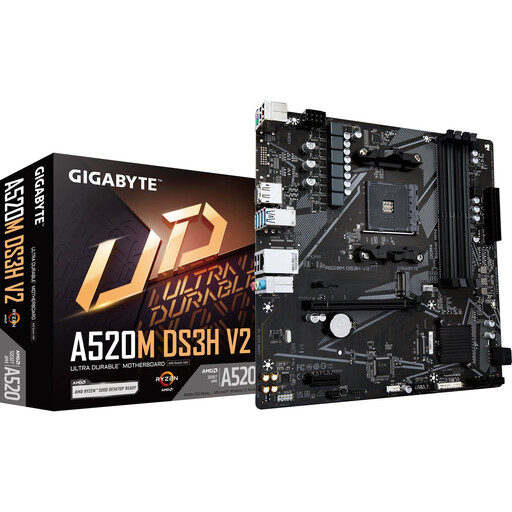
Why this product fits the profile: This Micro-ATX motherboard is aimed at compact AM4 systems with a Ryzen 3000 or Ryzen 5000 processor and DDR4 memory.
Socket AM4 and DDR4 support are clearly stated. This means you can check the platform against your existing CPU and RAM before buying.
Four DIMM slots, Gigabit LAN, PCIe 3.0 x16, plus HDMI and DisplayPort outputs.
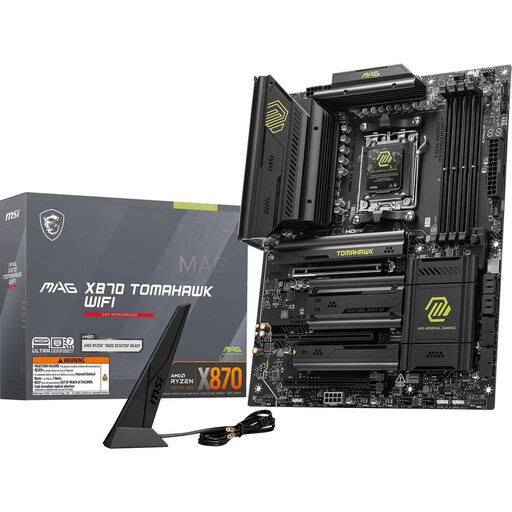
Why this product fits the profile: For a performance-oriented AM5 system, you get four DDR5 slots, multiple M.2 connections and modern networking options.
The relevant platform details are clearly stated: AM5, DDR5, PCIe 5.0, M.2 Gen5, Wi-Fi 7 and 5G LAN.
ATX form factor, up to four M.2 slots according to the description, 5G LAN and USB4 Type-C with up to 40 Gbit/s.
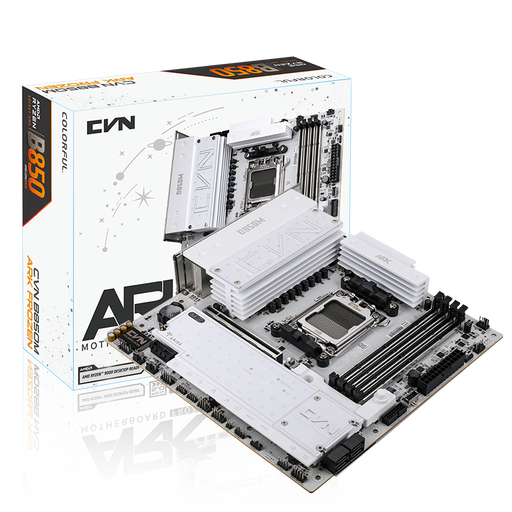
Why this product fits the profile: This Micro-ATX motherboard combines AM5, DDR5, multiple M.2 slots and Wi-Fi 7 for compact work, gaming and creator PCs.
The Wi-Fi 7 specification is accompanied by concrete notes about the operating system, drivers and regional 6 GHz regulations.
Three M.2 slots, PCIe 5.0 x16, 2.5 Gbit networking, Wi-Fi 7 and four DDR5 DIMM slots.
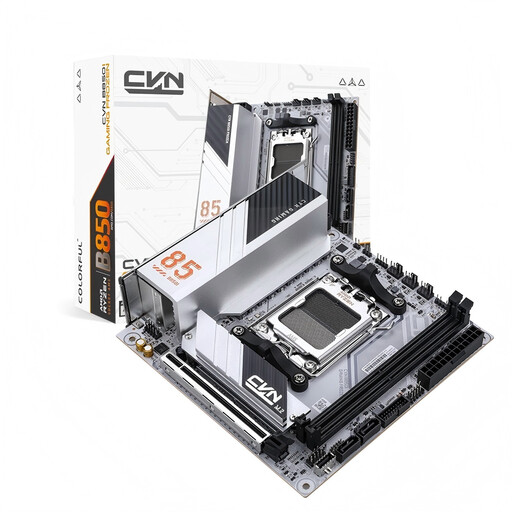
Why this product fits the profile: This ITX motherboard measuring 170 × 170 mm is designed for particularly small AM5 cases and systems with limited space.
The ITX form factor is clearly stated. Before buying, you can specifically check case compatibility, cooler height and graphics card dimensions.
Two M.2 slots, PCIe 5.0 x16, 2.5 Gbit LAN, plus Wi-Fi 6E and Bluetooth 5.3.
We've put together a complete, regularly updated list of products that fully meet these strict selection criteria and the safety regulations in force in the EU.
Before installation, make sure the power supply and mains connection are disconnected. The motherboard should be mounted on suitable standoffs. Don't use force when inserting the CPU, RAM or M.2 SSD. The pins on an AM5 or LGA socket are particularly delicate.
After the first boot, it's worth checking the UEFI:
That depends on the CPU, memory and case. For an existing Ryzen processor on the AM4 platform, an AMD AM4 motherboard with DDR4 makes sense. For newer Ryzen systems, choose an AMD AM5 motherboard with DDR5. With Intel, the socket, processor generation and chipset must all match.
It's not possible to give a reliable fixed lifespan. It depends on factors including operating hours, temperature, dust, power supply quality and mechanical stress. Choosing a board with enough M.2, SATA, USB and DIMM connections can extend the useful life of your entire PC, but it doesn't replace a compatibility check when you later change the CPU.
A motherboard with Wi-Fi 7 is mainly worthwhile if you have a compatible router, suitable devices and a supported operating system. For many households, Gigabit LAN or Wi-Fi 6 is sufficient. So the decision should be based on your actual network setup, not just the name of the technology.