
Lieferung heute & morgen

Qualitätsgarantie

Willkommens-Angebote freischalten: KOSTENLOSE Lieferung | Bis zu 80 % RABATT | Kostenlose 30-Tage-JoyPlus-Testphase
App herunterladen
A motorcycle CarPlay screen can bring smartphone navigation, music, calls and voice assistance together in a clear display on your handlebars. To make sure it’s right for everyday riding in the UK, don’t focus solely on screen size or buzzwords such as “wireless”. Power supply, mounting, water resistance and connection to your Bluetooth motorcycle headset or motorcycle intercom are all key considerations.
The description “waterproof motorcycle display” isn’t enough to make an informed choice. Look for a specific IP rating, such as IP67. The first digit indicates protection against dust, while the second indicates protection against temporary immersion under specified test conditions. This doesn’t automatically mean the device is suitable for pressure washing, permanent immersion or every installation setup.
Connectors, cable entries and the back of the mount must also be installed so they’re protected from splashes. After a ride, don’t cover the display while it’s still wet.
A wireless Apple CarPlay motorcycle system still needs a compatible iPhone and usually a Bluetooth and Wi-Fi connection between the phone and the screen. The display doesn’t replace your smartphone. Maps, voice assistance and many media features still depend on your phone, the app and network coverage.
The same applies to Android Auto for motorcycles: check your Android phone’s compatibility before you buy. Not every app can be used on the screen while riding. Available features are limited by Apple CarPlay, Android Auto and the relevant safety requirements.
“Dual Bluetooth” can mean different things depending on the model. Check whether it means you can connect a smartphone and headset at the same time, or whether you can actually pair two helmets or two headsets. The available operating modes are also important.
A motorcycle intercom isn’t automatically included with every CarPlay display. Some systems transmit music or voice over Bluetooth Trans to one or two helmets, while others only support audio output to a single headset.
A five-inch motorcycle touchscreen takes up less space on the handlebars and suits riders who want to keep the display area as compact as possible. A seven-inch screen gives you a larger map view, but takes up more room and may affect your view of the instruments or warning lights.
Where possible, adjust the settings before you set off. Voice commands through Siri or Google Assistant, along with your headset controls, are usually more practical while riding. Check that the mount is secure and that the display remains easy to read from your preferred viewing angle.
A device can be powered from the motorcycle’s electrical system or via a USB port. According to the product information, the Carpuride W502PRO requires 12 V/1 A from the motorcycle power supply, or 5 V/2.5 A or more via USB. Before installation, check that your existing USB socket provides enough power.
A hardwired setup may suit commuters and frequent riders, but it needs to be properly fused and professionally installed. With a USB setup, make sure the cable won’t get caught when you turn the handlebars or obstruct the brake or clutch lines.
As well as IP67, the mechanical fixing and available handlebar diameter are important. Check the following before ordering:
If you’d rather use your smartphone than a separate display, a motorcycle smartphone mount may be worth considering. The Segway-Ninebot mount is designed for devices 58 to 90 mm wide and up to 10 mm thick. According to the product information, it fits handlebars with a diameter of 20 to 22.2 mm.
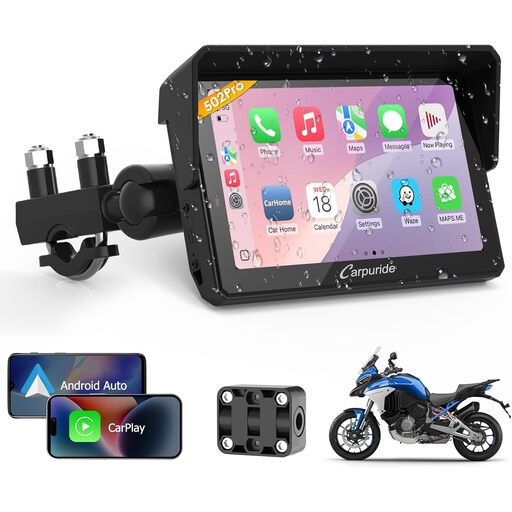
Why it suits this type of rider: The compact 5-inch screen combines wireless Apple CarPlay, Android Auto and GPS navigation with a handlebar mount that takes up relatively little space.
The product information specifies IP67, two power options and Dual Bluetooth. This makes it easy to check the protection rating, power supply and audio connections before you buy.
5-inch touchscreen, IP67 rating, wireless CarPlay and Android Auto, plus support for a single or dual headset connection.
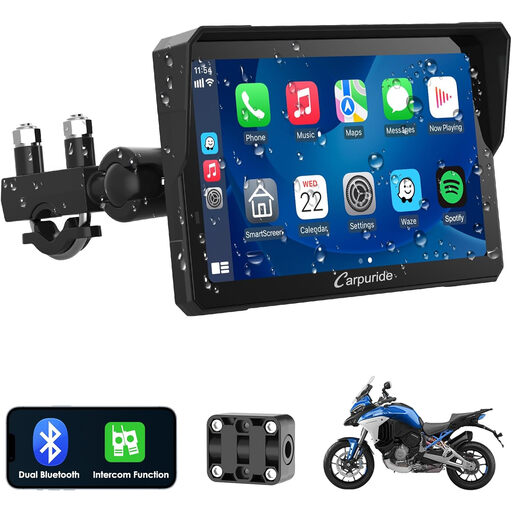
Why it suits this type of rider: The larger screen is designed for touring riders who want to view maps on a more spacious display and have enough room in the cockpit.
Before buying, check whether the 7-inch screen will fit your motorcycle without obstructing your view, taking up too much handlebar space or interfering with the mount.
7-inch touchscreen, wireless Apple CarPlay and Android Auto, a water-resistant casing according to the product name, plus Dual Bluetooth and intercom features.
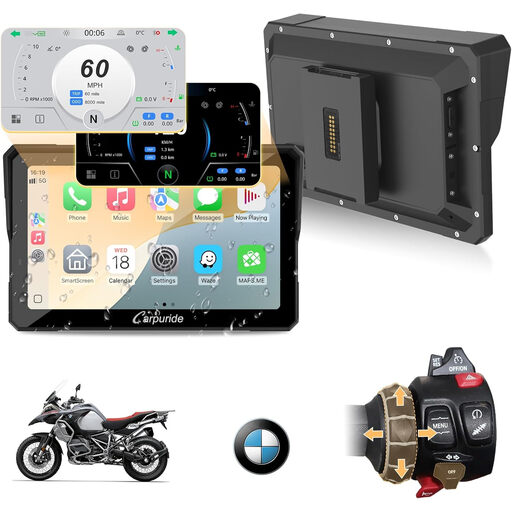
Why it suits this type of rider: The model name specifies BMW motorcycles, making it a suitable option for riders looking for a vehicle-specific product rather than a general solution.
Before buying, check that the BMW compatibility matches your model, year of manufacture and existing connectors. This helps you avoid choosing an unsuitable mount or power solution.
7-inch screen, wireless CarPlay and Android Auto, Dual Bluetooth, and a product name specifically aimed at BMW motorcycles.
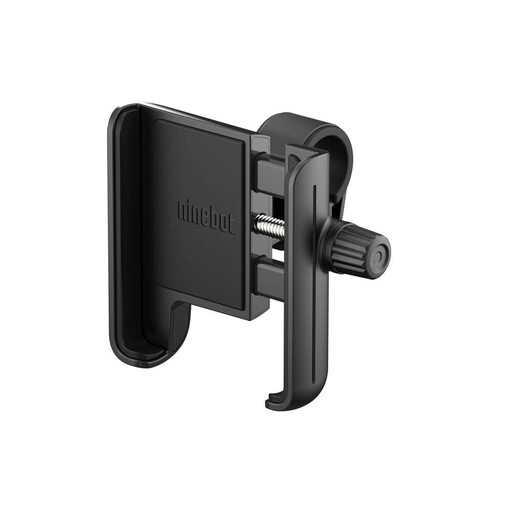
Why it suits this type of rider: For short commutes or if you want to keep using your existing smartphone navigation, a simple mount is an alternative to a separate display.
The specified dimensions — device width of 58–90 mm, thickness up to 10 mm and handlebar diameter of 20–22.2 mm — give you clear measurements to check before installation.
360-degree rotation, non-slip pads, water-resistant material according to the product information, and portrait or landscape orientation.
We’ve put together a complete, regularly updated list of products that meet these strict selection criteria and fully comply with the safety regulations in force in the EU.
Fit the screen so it doesn’t obstruct your view of the road, mirrors or instruments. Adjust settings and enter your destination before setting off; avoid manually using the touchscreen while riding. On the move, only use features that don’t require you to take your eyes off the road for long. Also follow the requirements of the Highway Code, particularly those concerning distraction and maintaining proper control of your vehicle.
It’s worth carrying out a quick check before every ride:
CarPlay can display some content stored locally. However, you’ll usually need an active data connection for live traffic updates, online searches, streaming and many navigation features. Check the offline features available in your preferred navigation app.
Depending on the model, it’s powered either from a 12-volt motorcycle supply or a USB port with sufficient output. You then usually pair your smartphone via Bluetooth and Wi-Fi for Wireless CarPlay or Android Auto. To play audio, you’ll also need to pair your Bluetooth headset or helmet.
No. Even with IP67, keep connector covers closed and don’t clean the device with a pressure washer. Check the mount, cables, seals and connectors regularly. The actual lifespan depends on factors including vibration, UV exposure, temperature, installation and maintenance.