For long observation lists and wide spreadsheets, first check whether the mouse supports the scrolling you need and feels comfortable in your hand while working with your computer. A basic wired mouse may be enough for a fixed workstation; a quiet wireless mouse or a more specialised model offers different features, but each has its own requirements for connectivity, power or software. A particular shape alone is no guarantee of health benefits.
Which mouse is right for you?
Students working with long observation lists
If you’re reviewing lots of entries, fast scrolling can be useful, as can horizontal scrolling for wide spreadsheets. Logitech describes different scrolling modes for the Signature M650, while CHERRY specifically lists horizontal scrolling for the MC 2000.
Students with a small desk
For longer sessions, consider your hand size, mouse position and the space available for your hand and forearm together. The Federal Institute for Occupational Safety and Health recommends allowing enough room for your mouse, keyboard and a hand-and-arm rest; Logitech recommends different M650 versions depending on hand size and whether you’re left- or right-handed.
Students in a quiet or shared room
If clicks could disturb others, look for a version specifically described as quiet, and check that its connection works with your computer. Logitech lists SilentTouch and Bluetooth Low Energy or Logi Bolt for the Signature M650.
What should you look for?
First check the scrolling features and how the mouse connects to your computer. Then consider how it fits your hand, how loud the clicks are and which power option suits you.
| What matters |
What to check before buying |
Who is it important to? |
| Scrolling and spreadsheets |
Check for fast scrolling and, if needed, explicit support for horizontal scrolling. |
When I’m analysing long observation lists and wide spreadsheets, I want to move easily between entries and columns; around 27% of consumers place particular importance on this when carrying out this kind of analysis. |
| Fit and working position |
Consider the size, whether it suits your dominant hand, and the room available for your hand and forearm; if possible, try an unfamiliar shape before buying. |
For longer sessions, I want a mouse that suits my hand and desk setup. Around 20% of consumers prioritise this fit when making their choice. |
| Click noise |
Look for a version specifically described as quiet and check which buttons this applies to. |
When I’m working in a quiet or shared room, I want to keep repeated clicks as unobtrusive as possible; around 20% of consumers pay particular attention to this when carrying out this kind of analysis. |
| Power |
Check whether the mouse is powered by cable, battery or rechargeable battery, and whether that suits your daily routine. |
If I want to avoid changing batteries or plan when to recharge, the power source is an important factor for me. Around 20% of consumers base their choice mainly on the effort involved in powering the mouse. |
| Connectivity and space |
Check for USB-A, Bluetooth support and any receiver required; with a wired mouse, make sure there’s enough room for the cable to move. |
At a small desk, I want a connection that works with my computer without taking up unnecessary space; around 13% of consumers give this factor particular weight when choosing. |
Common misconceptions when buying a mouse
-
“Ergonomic” doesn’t automatically mean pain-free
Your hand size, posture and desk setup also matter. A vertical shape won’t necessarily suit everyone.
Choose a mouse that fits your hand and workspace, and try an unfamiliar shape before buying if you can. The Federal Institute for Occupational Safety and Health also highlights the importance of having enough space and a suitable hand-and-arm rest.
-
A wireless mouse won’t necessarily work with every computer
Bluetooth and USB receivers are different ways to connect, and depending on the model, the mouse may need a replaceable or rechargeable battery.
Check that the connection used by the specific model works with your computer, and make sure batteries or a charging cable suit your daily routine.
-
Fast vertical scrolling doesn’t replace horizontal scrolling
A scroll wheel designed for long pages won’t necessarily work for wide spreadsheets.
If your analysis spreadsheet has lots of columns, check whether the specific model explicitly supports horizontal scrolling.
Key brands to consider
Logitech
The Signature M650 comes in versions for different hand sizes and handedness; the MX Master 4 is aimed at users who want extra scrolling and customisation features.
- Logitech lists SmartWheel and Bluetooth Low Energy or Logi Bolt for the M650. The MX Master 4 features MagSpeed and haptic feedback.
- Some MX Master 4 customisation features require Logi Options+ on Windows or macOS. Having more features doesn’t mean every model is better for every type of analysis.
CHERRY
The MC 2000 is a wired mouse with a tilt wheel; the MW 2310 2.0 is a wireless alternative.
- CHERRY lists four-way scrolling for the MC 2000, including horizontal scrolling.
- The MC 2000 requires Windows and USB-A. The MW 2310 2.0 needs a nano USB receiver and two AA batteries; battery life depends on usage.
Trust
The Bayo II is a vertical wireless mouse, while the Fyda is a wired mouse with a contoured shape.
- Trust lists a 57-degree angle, a USB receiver and a rechargeable battery for the Bayo II.
- A particular hand position doesn’t guarantee individual comfort or relief. If you’re considering a vertical mouse, decide for yourself whether the shape suits you.
HP
According to the manufacturer, the HP 430 Wireless Mouse is designed to work with two devices and offers Bluetooth or a USB-A dongle.
- HP lists customisable buttons, fast scrolling and an AA battery.
- Check the operating system and device-switching features for the specific model. “Up to 24 months” is the manufacturer’s stated battery life.
Joybuy products for analysing data
This selection includes quiet wireless mice, a vertical wireless mouse, a model with extra scrolling features and wired options for a fixed workstation.
 No image available
HOFOTEK M311 2.4G+BT Silent Office Mouse
Worth considering if you’re looking for a wireless mouse described as quiet, with Bluetooth or 2.4 GHz wireless connectivity.
The product title lists adjustable DPI settings and an AA battery. Colour option: White-Grey.
View product on Joybuy
 No image available
Logitech MX Vertical
An option if you’re looking for a vertical mouse that connects via Bluetooth or a USB receiver.
The product title lists a 4000-DPI sensor, a rechargeable battery and compatibility with Windows, macOS and iPadOS.
View product on Joybuy
 No image available
Logitech MX Master 3S Bluetooth Edition
A good fit if you’re looking for extra scrolling features and a Bluetooth mouse with clicks described as quiet.
The product title lists an 8K-DPI sensor, MagSpeed scrolling and multi-device use.
View product on Joybuy
 No image available
Logitech Signature M650 L
A wireless mouse described as quiet; according to the product title, the L version is designed for large hands.
The title lists Bluetooth, customisable side buttons and multi-device use. Logitech also lists Bluetooth Low Energy or Logi Bolt as connectivity options for the M650 range.
View product on Joybuy
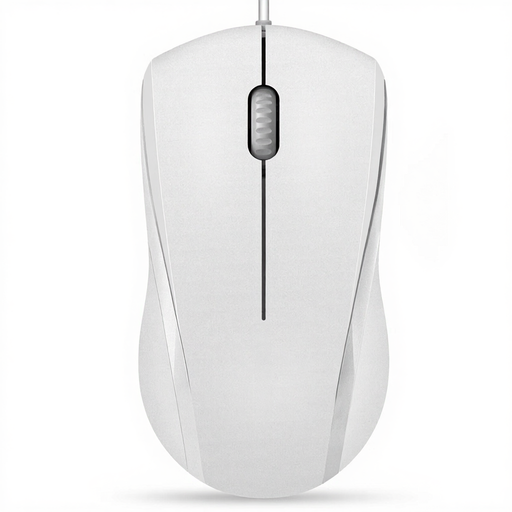 No image available
RAPOO N1600 Wired Mouse
A wired option for a fixed workstation; the product title says it’s suitable for left- or right-handed use.
The title lists 1000 DPI, three buttons, USB and a 5 ft cable. According to the product information, the left and right buttons are quiet, but the middle click isn’t.
View product on Joybuy
Frequently asked questions
Do I need a particularly high DPI for wide bird-count spreadsheets?
Not for that reason alone. First check whether you can scroll horizontally and whether the mouse feels comfortable to use. CHERRY specifically lists a tilt wheel for wide documents on the MC 2000; DPI doesn’t describe this feature.
How should I set up my mouse for longer analysis sessions?
Leave enough room beside your keyboard for the mouse and a hand-and-arm rest, and avoid staying in a rigid position for too long. The Federal Institute for Occupational Safety and Health gives this advice for setting up a workstation; it isn’t a guarantee against discomfort.
What if a mouse bought online doesn’t suit me or is faulty?
Online consumer purchases generally come with a right to cancel; the consumer advice centre says this is usually 14 days from receiving the goods. The terms and exceptions for your specific purchase should be checked. Your statutory rights if goods are faulty are separate from this; a manufacturer’s guarantee is voluntary.
Can an old mouse go in household waste in Germany?
No. The German Environment Agency says that old electrical equipment must be collected separately. If you can easily remove any batteries, take them out before handing the mouse in and return them separately.


