What to consider when buying
Compact conventional mouse
A good fit if: there’s room to move it beside your keyboard and you prefer familiar mouse controls for working with spreadsheets.
Trade-off: A small mouse doesn’t necessarily take up less room when you factor in the space needed to move it and rest your hand.
Stationary trackball
A good fit if: there’s hardly any room to move a mouse and you find a ball-operated trackball comfortable to use.
Trade-off: The device stays in place as you use it, but it still needs its own space and may need room for a hand rest.
Vertical mouse
A good fit if: you’d like to try a different grip and can find a design that suits your hand size and preferred hand.
Trade-off: You still need to move a vertical mouse, and its shape doesn’t guarantee relief from discomfort.
When analysing bird-count data at a small desk, the main things to consider are clear desk space, controlled navigation, a comfortable fit and how the mouse connects to your computer.
| What matters |
What to check before buying |
Who is it important to? |
| Space for the mouse and your hand |
Measure the clear space available in your usual working set-up. A conventional mouse needs room to move; a trackball stays in place as you use it but still needs its own space. |
When there’s hardly any room beside my keyboard and papers, I want to know that there’s still enough space for the mouse and my hand. Around 31% of consumers say space is their main concern. |
| Selecting and scrolling |
Try the pointer speed and scrolling with your own spreadsheets. Extra buttons are only useful if they suit the way you work. |
When I’m working with long spreadsheets, I want to select entries accurately and move through different views with ease. Around 25% of consumers prioritise navigating data. |
| Hand fit and handedness |
Check your hand size, preferred hand, grip and how easily you can reach the buttons. A manufacturer’s description of a design does not prove that it will have a medical benefit for you. |
When I’m working for long periods, I want a mouse that suits my hand and the hand I prefer to use. Fit is the main concern for around 25% of consumers. |
| Connectivity and accessories |
Check Bluetooth support, available USB ports and what’s included with the exact model. Receivers and charging cables vary by model. |
If my computer needs a particular connection, I want to know in advance how I can connect and charge the mouse. Around 19% of consumers prioritise suitable connectivity and ease of use. |
Joybuy products
This selection includes conventional mice for pointer control, as well as a vertical mouse for anyone who’d like to try a different grip.
 No image available
HOFOTEK M308 2.4G silent office mouse
The product description lists several adjustable DPI settings, which can be useful when selecting different targets.
According to the product details, it connects via a 2.4 GHz USB receiver.
View at Joybuy
 No image available
HOFOTEK M311 2.4G+BT silent office mouse, White-Grey, 1xAA battery
If you’d like to choose between connection types, the product description lists Bluetooth and 2.4 GHz wireless.
The product details list adjustable DPI settings and a 1xAA battery.
View at Joybuy
 No image available
Logitech MX Vertical wireless ergonomic mouse, Graphite
If you’d like to try a vertical grip, this model is described as a wireless vertical mouse. Check that its shape and size suit your hand.
The product name lists Bluetooth and a USB receiver, a 4000 DPI sensor, a rechargeable battery, and compatibility with Windows, macOS and iPadOS.
View at Joybuy
 No image available
AJAZZ AJ200 AI MC wireless gaming mouse with charging dock, 24,000 DPI
If you prefer to have a choice of connection types, the product name lists Bluetooth, 2.4 GHz wireless and USB-C.
The product details list a PAW3311 sensor with 24,000 DPI, a charging dock and a weight of 63 g.
View at Joybuy
 No image available
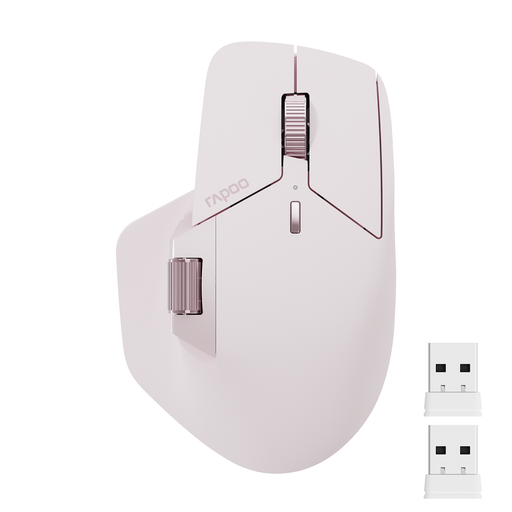
Rapoo MT760Mini Bluetooth wireless mouse, Pink
For use with multiple devices, the product description lists Bluetooth and 2.4 GHz wireless.
The product details list Bluetooth 5.0, support for up to four devices and 11 programmable buttons.
View at Joybuy
Frequently asked questions
How can I test a mouse with my bird-count spreadsheets?
Set up your keyboard and papers as usual, then check whether you can move the mouse, select targets and scroll through long views. If lack of room to move it is the main issue, you could also try a stationary trackball.
Do I always need a USB receiver for a wireless mouse or trackball?
No. Connection options vary by model and computer. CHERRY lists Bluetooth or a 2.4 GHz receiver for the MW 9100, while Kensington lists both options for the Orbit Wireless. Check whether your computer supports Bluetooth or has the required port, and what accessories come with the version you choose.
What should I know about cleaning and using the mouse while it’s charging?
Check the power requirements and what’s included beforehand, and follow the care instructions for the model you buy. CHERRY says the MW 9100 can be used while charging with the supplied USB-C cable; according to the manufacturer, the Logitech MX Ergo S doesn’t include one.
What are my rights if my mouse is faulty?
For a consumer purchase from a seller in the EU, Your Europe, the European Union’s information service, says you’re entitled to a legal guarantee of at least two years from the date you receive the goods. The seller is generally responsible for putting things right; this is separate from any additional manufacturer’s guarantee. These rules don’t apply in the same way to purchases made by private individuals.
Can I put an old mouse in my household rubbish in Germany?
No. The German Environment Agency says that waste electrical equipment must be collected separately. Take your old mouse to a recycling centre or an appropriate collection point, for example, and dispose of any removable batteries separately.


