Spreadsheet navigators
You often work with long result lists and wide data tables, and want to navigate vertically and horizontally with ease.


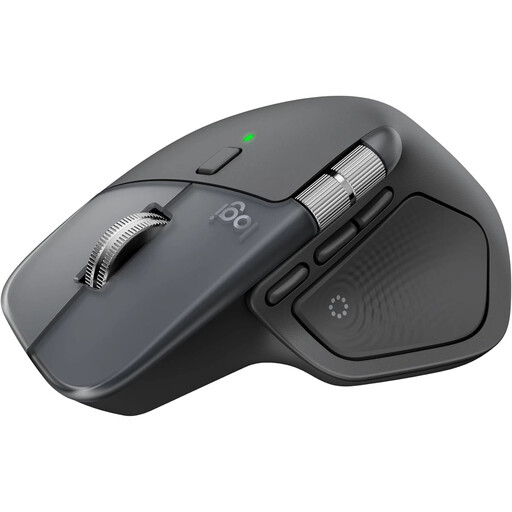
For long, wide data tables, a mouse with easy-to-reach horizontal controls is a sensible place to start. Logitech lists a MagSpeed scroll wheel and a thumb wheel on the MX Master 4. If hand fit or limited desk space matters more, you could consider a vertical mouse or a stationary trackball – each offers a different way of working. Before you buy, check that the mouse’s handedness, connectivity and button functions suit your computer and spreadsheet application.
You often work with long result lists and wide data tables, and want to navigate vertically and horizontally with ease.
For longer sessions, hand size, handedness and comfortable controls matter more to you than having as many buttons as possible. A mouse is not a treatment for discomfort.
You have little room to move a mouse, or you switch between computers. A stationary trackball or flexible connectivity options could therefore be important.
A good fit if: You regularly work with long lists and wide tables, and want dedicated controls for navigation. Logitech lists a MagSpeed scroll wheel and a thumb wheel on the MX Master 4.
Things to consider: Extra wheels are no substitute for a comfortable hand fit. Check that the controls work with your spreadsheet application.
A good fit if: Hand fit and handedness matter more to you than having a separate thumb wheel. Logitech makes the Lift for small to medium-sized hands, as well as a dedicated left-handed version. CHERRY offers the MW 4500 and MW 4500 LEFT.
Things to consider: The unfamiliar shape may take some getting used to. Choose a version for your dominant hand and judge the fit for yourself.
A good fit if: There’s little room on your desk to move a mouse. The Kensington SlimBlade Pro stays in place and, according to Kensington, can be used with either hand.
Things to consider: On the SlimBlade Pro, you scroll by turning the ball. This works differently from a conventional mouse wheel.
A good fit if: You switch between computers and want to use Bluetooth or a USB-A receiver. According to HP, the HP 430 offers both connection options.
Things to consider: The HP 430 uses an AA battery. A separate horizontal scroll wheel is not listed for this model.
When working with data tables, start by comparing the scroll controls and how they work with your application. For longer sessions, hand size and handedness should also inform your choice. The German Social Accident Insurance (DGUV) notes that intensive computer use can be associated with discomfort in the hand, arm, shoulder or neck. This does not mean that any particular mouse shape will have a specific effect for you.
| What to consider | What to check before buying | Who it matters most to |
|---|---|---|
| Spreadsheet navigation | Check the vertical scroll wheel, horizontal scrolling and button mapping in your spreadsheet application separately. | If I work with long result lists and wide tables, I want to navigate in both directions without awkward workarounds. Around 36% of consumers who put this type of navigation first would fall into this group. |
| Hand fit | Consider hand size, right- or left-handed design, and how easy the buttons are to reach. | For longer sessions, I want a mouse that suits my hand and dominant hand. Around 29% of consumers who prioritise this fit would fall into this group. |
| Space and connectivity | Check how much room you have to move the mouse, whether you need Bluetooth and whether you need a USB-A port. | If my desk has little room for movement or I switch between computers, I need a suitable solution for space and connectivity. Around 21% of consumers would put this need first. |
| Ease of use and maintenance | Check the click noise, battery or rechargeable battery type, and whether software is needed to customise the buttons. | If I prefer quiet operation and straightforward day-to-day use, I want to know about these points in advance. Around 14% of consumers would put them first. |
Sensor resolution doesn’t tell you whether horizontal scrolling, hand fit and button mapping will suit the way you work.
Check the scroll controls and fit first. Logitech’s 8K DPI rating for the MX Master 4 is a model specification, not proof that it will help you work more productively with data sets.
The Logitech Lift Left and CHERRY MW 4500 LEFT are dedicated left-handed versions, not simply right-handed models with different button settings.
Before ordering, check the full model name, the intended hand and whether it fits you.
The Kensington SlimBlade Pro stays on your desk, and you also scroll by turning the ball. This works differently from a conventional mouse.
Choose it based on the space you have and the controls you want, not on broad claims about ergonomics.
According to HP, the HP 430 uses an AA battery. Some other models may require additional software to customise certain buttons.
Before deciding, check the power source, what’s included and the software requirements for your operating system.
The MX Master 4 is aimed at users looking for additional scroll controls, while the Lift is a vertical mouse with a dedicated left-handed version.
The MW 4500 and MW 4500 LEFT are separate vertical mouse versions designed for different hands.
The SlimBlade Pro is a stationary trackball for users who don’t want to move the device across their desk.
The HP 430 is a conventional mouse for users who want to choose between Bluetooth and a USB-A receiver.
The following Joybuy mouse options are suited to navigating data and longer working sessions at home.
 No image available
An option for long lists and wide tables if you want dedicated controls for scrolling.
MagSpeed scroll wheel and thumb wheel; Bluetooth or Logi Bolt; USB-C charging; Graphite. According to the description, full customisation requires Logi Options+.
 No image available
A vertical mouse to consider if you’re looking for a different hand position during longer working sessions.
Bluetooth and 2.4 GHz connectivity; three DPI settings: 800, 1200 and 1600; USB-C charging. Check that the shape suits your hand and dominant hand.
 No image available
A wireless vertical mouse to consider if you’re looking for this shape and a USB receiver.
2.4 GHz USB receiver; five programmable buttons; adjustable DPI from 800 to 4800; USB-C charging. Check the fit and whether the buttons are easy to reach.
 No image available
An option if you’re looking for several connection types and programmable buttons. Check whether the features are useful for your office workflow.
2.4 GHz, Bluetooth and USB-C; five programmable buttons; optical sensor with 22,000 DPI; 62 g.
 No image available
An office mouse to consider if you’re looking for a compact wireless design and adjustable pointer speed.
2.4 GHz wireless with USB receiver; several DPI settings; AA battery. Factor in the battery type when choosing.
No. A separate thumb wheel is one option if you often scroll sideways. Other ways of doing this depend on the application and its button mapping. Check how it works in your spreadsheet application.
For the Kensington SlimBlade Pro, the manufacturer lists Bluetooth, a 2.4 GHz receiver and a cable. The HP 430 offers Bluetooth or a USB-A nano receiver. Choose a connection supported by your computer, and check the software requirements too if you want to customise the buttons.
Follow the instructions for your model and check whether it has a built-in rechargeable battery or uses replaceable batteries. According to HP, the HP 430 uses an AA battery. The German Environment Agency recommends removing batteries where possible and disposing of them separately from the old device.
In Germany, consumers who buy online generally have a 14-day right to cancel from the date they receive the goods. You must notify the retailer that you wish to cancel. The German consumer advice centre recommends checking the terms of the specific purchase, including any return postage costs. The statutory right to cancel is separate from any voluntary returns service offered by the retailer.
No. Dispose of the mouse separately as waste electrical and electronic equipment, for example at a suitable local collection point or in a shop. Where possible, remove any batteries and take them to a battery collection point separately.