Students at a quiet shared desk
If you’re making flashcards while other people are working within earshot, quiet buttons may be particularly important to you.


If other people are working within earshot, a mouse with quiet buttons is a sensible place to start. Then check that its connection and shape suit your device, hand and available space. Bluetooth keeps USB ports free, while a wired mouse needs no wireless pairing or battery changes. For long study sessions, a good fit for your hand matters more than an especially slim design. Manufacturers’ noise-reduction claims are not measured against a single, standard benchmark.
If you’re making flashcards while other people are working within earshot, quiet buttons may be particularly important to you.
If you regularly clear your shared workspace or use several devices, the mouse’s size, connection and pairing method should suit your routine.
If you work on lots of flashcards in one sitting, look for a mouse shape that suits your hand and enough space to position your mouse and keyboard flexibly.
For people making flashcards at a shared desk, the main thing to look for will depend on their situation.
| Priority | What to check before buying | Who is it important to? |
|---|---|---|
| Quiet buttons | Check the button noise and scroll wheel separately, and consider the desk surface too. | If I’m studying right next to other people, I mainly want the buttons to be quiet. Around 36% of consumers prioritise quiet clicks at this desk. |
| Space and connection | Check for Bluetooth support and available USB ports; using a receiver requires a compatible port. | If space is limited at the shared desk or I switch between devices, the mouse needs to suit the available space and ports. Around 29% of consumers prioritise space and connection. |
| Fit for your hand | Consider your hand size and whether the mouse is designed for right- or left-handed use; leave room to position your arm comfortably. | For long study sessions, I want a shape that suits my hand and the way my keyboard and mouse are arranged. Around 21% of consumers prioritise a good fit for their hand. |
| No batteries required | Check for a USB-A connection and compatibility with your operating system; also consider how the cable will fit into your workspace. | If I want to get started without wireless pairing or changing batteries, a suitable wired mouse could be right for me. Around 14% of consumers prioritise hassle-free use without battery changes. |
A claim about clicking noise doesn’t automatically tell you how loud the scroll wheel is or how much noise the mouse makes as it moves across the desk.
When comparing options, check the buttons, scroll wheel and performance on your desk surface separately.
A small or slim mouse can save space, but it still needs to fit your hand during longer sessions. It’s also important to have enough room for your mouse, keyboard and arm support.
Check how the mouse fits your hand and how it works with your actual desk set-up, rather than focusing only on its size.
Bluetooth, a USB wireless receiver and a cable each have different requirements for your device, ports and power supply.
Check that Bluetooth is supported, USB ports are available and the battery or rechargeable battery suits how you’ll use the mouse.
Options for this use include the M240 Silent Bluetooth Mouse, the slim Pebble Mouse 2 M350s and the vertical Lift.
The GENTIX SILENT is a wired option for a fixed workspace with a USB-A port.
Trust says the Ozaa Compact combines a compact design and quiet buttons with several connection options.
The M200 Silent is a wireless mouse with Bluetooth and a 2.4 GHz receiver.
This selection includes quiet wireless mice for a shared desk, with Bluetooth and/or USB receiver options, as well as a trackball.
 No image available
This trackball is a good fit if you want to move the cursor at a shared desk without sliding the mouse across the surface. You control it with your thumb.
 No image available
An option if you’re looking for quiet clicks and a choice of Bluetooth or 2.4 GHz wireless. It requires an AA battery.
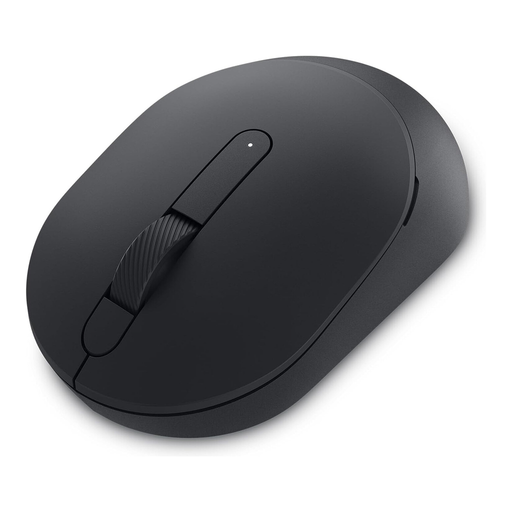 No image available
Consider this if you want to choose between Bluetooth and 2.4 GHz wireless. Using the receiver requires a USB-A port. The product specifications list an AA battery as the power source.
 No image available
If you’re looking for a wireless mouse described as having silent clicks, this model could be worth considering. Its 2.4 GHz connection uses a USB receiver; the specifications list 1600 DPI and the EU version.
 No image available
The L version is described as being for large hands, and could be an option if you’re looking for a mouse with quiet clicks. Check that the size suits your hand; the specifications list an AA battery as the power source.
First, check which connections are available. According to Logitech, the M240 Silent connects via Bluetooth without a USB dongle, while the CHERRY GENTIX SILENT requires USB-A. Leave enough space beside the keyboard for your mouse and a comfortable place to rest your hand and arm.
If your mouse runs on batteries, you’ll need to factor in replacing them. Germany’s Federal Environment Agency advises against putting old electrical appliances in household waste. Where possible, remove any batteries and dispose of them separately at a battery collection point.
Under the EU consumer rules outlined by Your Europe, purchases from a business seller come with a legal guarantee of at least two years from the date you receive the goods. If an item is faulty, the seller is generally required to put things right. This is separate from any voluntary manufacturer’s guarantee.
As part of its market surveillance, Germany’s Federal Network Agency checks for things including CE marking, product and manufacturer details, German-language instructions and a declaration of conformity. Check these details for the specific model; a product name alone doesn’t prove that the requirements have been met.