What should you look for when buying?
First, check whether your screens are connected to one computer or two. Then compare scrolling, hand fit and the extra features you actually need.
| What matters when buying |
What to look for |
Who is it important for? |
| Navigation and pointer control |
Try the scrolling and accessible controls with your screen and software setup; check whether you can adjust the pointer speed. |
When I’m moving between long pages, design elements and a large workspace, I want to scroll quickly while keeping the pointer under control. Around 36% of consumers put navigation and pointer control first. |
| Hand size and handedness |
Check the specific size and handedness option, as well as how easy the buttons are to reach. |
For longer sessions, I want a mouse that suits my hand and preferred position, rather than having to adapt to a shape that doesn’t fit. Around 29% of consumers prioritise a fit that suits their hand and working position. |
| Switching between computers |
Check whether you’ll be using two computers; then look at the connection, receiver and any software requirements. |
If my two screens are connected to separate computers, I want to be able to switch between them with one mouse. Around 21% of consumers put switching between computers first. |
| Ease of use and purchase terms |
Check that the extras, power supply and any required software suit the way you work, and read the terms for the specific offer. |
When I’m looking for a straightforward mouse, I don’t want to pay for or set up features I won’t use. Around 14% of consumers prioritise ease of use and suitable purchase terms. |
Joybuy products for this type of work
This selection includes vertical mice and models with extra scrolling and navigation features for working on landing pages across two screens.
 No image available
KINSI Ergonomic Vertical Wireless Mouse, 2.4G
The vertical design may be worth considering if you’d like to try a different hand position; first check whether it suits your hand and the way you use a mouse.
The title lists five buttons, five adjustable DPI settings from 800 to 4.800, a rechargeable battery and a 2,4-GHz USB wireless connection.
View at Joybuy
 No image available
Razer Naga V2 HyperSpeed
This could suit you if you’ll make practical use of the programmable buttons and different scrolling modes in your workflow.
The product title lists 19 programmable buttons, 2,4-GHz wireless and Bluetooth, a Focus Pro 30K sensor and a stated battery life of up to 250 hours. The product description says it uses one AA battery.
View at Joybuy
 No image available
Logitech MX Vertical
The vertical shape is an option if you’d like to try a different hand position; it’s still important to check whether the mouse fits your hand.
The product title lists a 57° design, a 4.000-DPI sensor, rechargeable operation and connections via Bluetooth or USB receiver. The title lists Windows, macOS and iPadOS as compatible systems.
View at Joybuy
 No image available
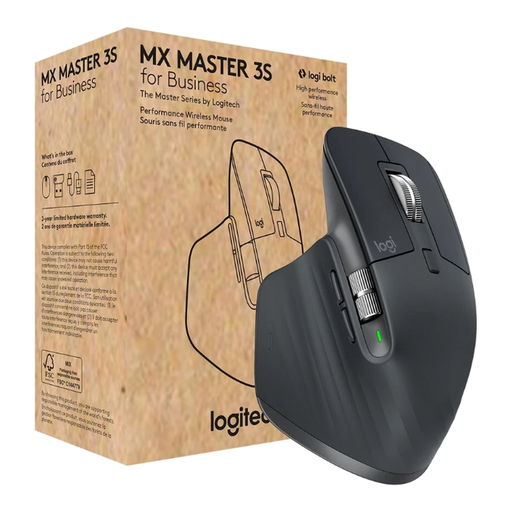
Logitech MX Master 3S for Business
This could suit you if you’ll make use of the extra navigation features for long pages and precise scrolling tasks.
The product title lists an 8.000-DPI sensor, MagSpeed scrolling, Bluetooth and a Logi Bolt USB receiver. The product description identifies this as a right-handed model and says it supports up to three devices.
View at Joybuy
 No image available
Logitech MX Master 3S Bluetooth Edition
This model may suit you if you want to use the extra scroll wheel and adjustable pointer movement when working on long or wide pages.
The product title lists an 8K-DPI sensor, MagSpeed scrolling and Quiet Clicks. According to the product description, the model supports connections to up to three devices.
View at Joybuy
Frequently asked questions
Do I need a mouse with a multi-device feature for two screens?
No, not just because you’re using two screens, if they’re both connected to the same computer. Logitech describes Flow as a way to switch between separate computers, not as a requirement for using a second screen.
How should I position my mouse for longer work sessions?
Position your mouse and keyboard so you can keep your shoulders relaxed and rest your forearms from time to time. For a home workstation, the Chartered Institute of Ergonomics & Human Factors recommends leaving around 10 to 15 cm between you and the edge of the desk; this isn’t a compulsory measurement for buying a mouse.
Do I need software to switch between two computers?
It depends on how you want to switch. CHERRY says you can use a switch to change the MW 8C ERGO between Bluetooth and USB wireless; moving the cursor between separate computers using Logitech Flow requires Logi Options+.
What if the mouse I bought online doesn’t fit or is faulty?
For a consumer purchase in Germany, statutory consumer rights and a voluntary manufacturer’s warranty are separate. For online purchases, the Verbraucherzentrale generally points to a 14-day right to cancel, starting from receipt of the goods; conditions and exceptions apply. Faults should be considered separately under your statutory rights.
Do German workplace regulations require a particular ergonomic mouse?
The ASR A6 from the Federal Institute for Occupational Safety and Health covers display screen workstations within its specified scope for workplaces and teleworking; it does not create a general requirement for private buyers to choose a particular type of mouse. The relevant scope and the conditions set out in the regulation apply.


