The key is whether you have enough room on your desk to move the mouse, and whether its shape suits your hand. A compact mouse offers familiar control, while a trackball can be an alternative when there’s very little room to move. For longer sessions, a good fit may matter more than having the smallest possible casing. Also check the scrolling, connection and adjustment options for your work.
Which mouse might suit you?
Designers with limited room to move a mouse
If there’s little room alongside your keyboard and work materials, consider both the space the mouse takes up and the room it needs to move. A compact mouse and a stationary trackball address these needs in different ways.
Designers working on details for longer sessions
If you regularly work on small page elements, check that the pointer speed, scrolling and fit suit your work rather than focusing solely on finding the most compact shape.
Designers who use several devices
If you switch between different computers, connection type, supported operating systems and whether a USB receiver is included are important factors to consider.
What should you look for when buying?
First check how much room you have to move the mouse, then consider fit and control. The connection and power supply should also suit your devices and workflow.
| What matters |
What to check before buying |
Who should pay particular attention? |
| Room to move |
Measure the space beside your keyboard and check whether you can move your hand there too. CHERRY lists the MW 9100 casing dimensions as 99 × 62,5 × 33,5 mm; a compact casing alone doesn’t tell you how much room you’ll need to move it. |
If there’s hardly any room on my desk, I want to know whether a smaller mouse will be enough or whether I need to keep sideways movement to a minimum. Around 31% of consumers therefore put available movement space first. |
| Pointer control and navigation |
Check whether you can adjust pointer speed and scrolling to suit your design work. CHERRY lists three settings for the MW 9100: 1.000, 1.600 and 2.400 dpi. This doesn’t guarantee a better design result. |
When placing small page elements, I want to set the pointer speed to suit me and scroll through long pages with control. Around 25% of consumers prioritise pointer control. |
| Fit |
Check your hand size, whether you’re left- or right-handed, how easily you can reach the buttons and how you hold the mouse. Logitech says the Lift is suitable for small to medium-sized hands and offers a separate left-handed version. |
For longer sessions, I want a shape that suits my hand and handedness rather than simply looking for a small casing. Around 19% of consumers put fit first. |
| Connection and switching between devices |
Compare the operating system, Bluetooth support, available USB ports and what’s included with the specific version. According to Logitech, the standard MX Anywhere 3S connects to up to three devices via Bluetooth; a compatible Logi Bolt receiver isn’t included. |
If I use several devices or only have certain ports available, I want to know in advance whether the mouse will work without any extra accessories I don’t need. Around 13% of consumers put finding the right connection first. |
| Power and accessories |
Check the power supply, charging cable or battery, and whether a receiver is included with the exact version. CHERRY says the MW 9100’s battery can be charged via USB-C while the mouse is in use. |
If I’m considering accessories and ongoing use, I want to know what comes with the model I’ve chosen and how it’s charged or powered. Around 12% of consumers look at power and accessories first. |
Common assumptions to avoid when buying
-
“Compact” doesn’t automatically mean it will fit your hand
A smaller casing won’t solve your space problem if the grip or buttons don’t suit your hand. The DGUV treats mice and trackballs as input devices whose ergonomic suitability should be assessed if you experience discomfort.
Consider the casing dimensions and fit separately. If you experience discomfort, you should also look at how your workstation is set up.
-
An optional receiver is always included
According to Logitech, a compatible Logi Bolt receiver isn’t included with the standard MX Anywhere 3S.
Check the connection and what’s included with the exact version before planning to use a USB receiver with your setup.
-
A trackball works just like a conventional mouse
With the Kensington Orbit K72337EU, you control the pointer using a ball instead of moving the casing across the desk. This is different from the way you’d normally use a mouse.
Consider whether controlling the ball will suit tasks such as placing small elements and scrolling through long pages.
Key brands to consider
Logitech
The range includes compact, vertical and feature-rich mice to suit different space, fit and navigation needs.
- Logitech lists Bluetooth and MagSpeed for the standard MX Anywhere 3S. The manufacturer recommends the Lift for small to medium-sized hands, and a left-handed version is also available.
- A compatible Logi Bolt receiver isn’t included with the standard MX Anywhere 3S. These features don’t apply to every Logitech mouse.
CHERRY
The MW 9100 is a compact option with adjustable DPI settings and two wireless connection methods.
- CHERRY says this model comes with a USB receiver and can be charged while in use.
- Check that the documented system and hardware requirements for the exact version suit your computer. This information doesn’t establish the ergonomic features of other CHERRY models.
Kensington
The wired Orbit K72337EU offers a trackball alternative if there’s little room for sideways mouse movement.
- Kensington lists a scroll ring, ambidextrous design and adjustable pointer and scrolling speeds for this model.
- Controlling the ball works differently from using a conventional mouse, and the USB cable is part of the setup.
Microsoft
According to Microsoft, the Surface Arc Mouse is a Bluetooth mouse that folds flat for storage.
- Microsoft lists vertical and horizontal scrolling for this model. Its flat shape when folded may be useful if you work in different locations.
- Its flat shape when folded doesn’t tell you how much room you’ll need to move it while designing at your desk.
Joybuy products for limited desk space
This selection includes compact, conventional mice for design work in limited desk space, with different connection options and adjustment features.
 No image available
HOFOTEK M308 2.4G Silent Office Mouse
A compact conventional mouse with adjustable pointer speed for detailed work.
Four DPI settings from 800 to 1.600; dimensions: 103,9 × 76,4 × 42,1 mm; weight: 55 ± 5 g.
A USB receiver is included, according to the product description.
View at Joybuy
 No image available
HOFOTEK M311 2.4G+BT Silent Office Mouse, White-Grey
A compact mouse for setups where Bluetooth or 2.4 GHz wireless may be suitable.
Five DPI settings; Bluetooth and 2.4 GHz wireless; switches between up to three devices. Dimensions: 104,74 × 68,24 × 39,3 mm; weight: 62 ± 5 g.
The product name specifies an AA battery.
View at Joybuy
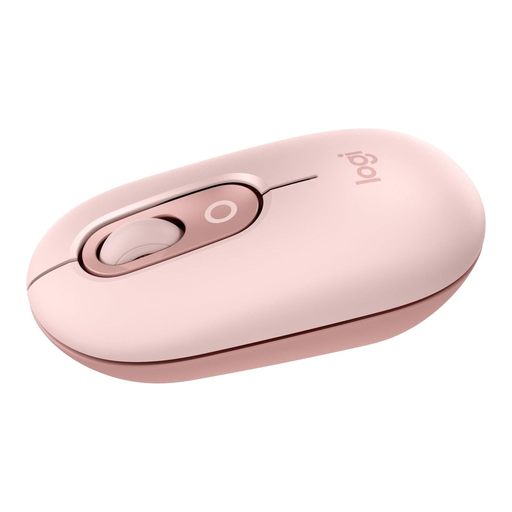 No image available
Logitech POP Mouse, Pink
A compact Bluetooth mouse with a scroll wheel for navigation and connectivity to multiple devices.
Bluetooth for up to three devices; programmable buttons; dimensions: 104,8 × 59,4 × 34,7 mm; weight: 82 g.
View at Joybuy
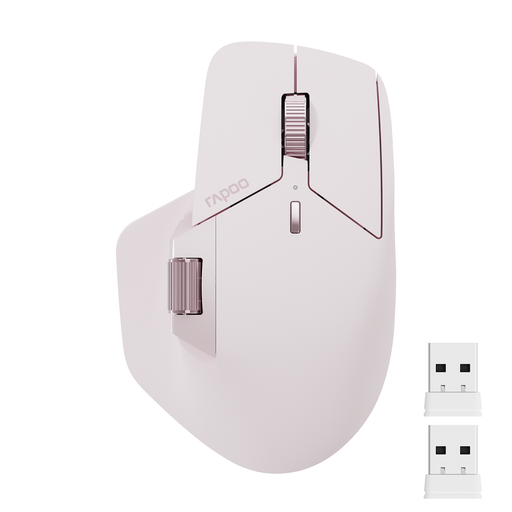 No image available
Rapoo MT760Mini Bluetooth Wireless Mouse, Pink
A wireless mouse with several connection options and adjustable pointer speed.
Bluetooth 5.0 and 2.4 GHz wireless; supports up to four devices; seven DPI settings; eleven programmable buttons. Dimensions: 115 × 74 × 42 mm.
According to the product description, the M+ cross-computer feature requires a driver and a shared Wi-Fi or Ethernet connection.
View at Joybuy
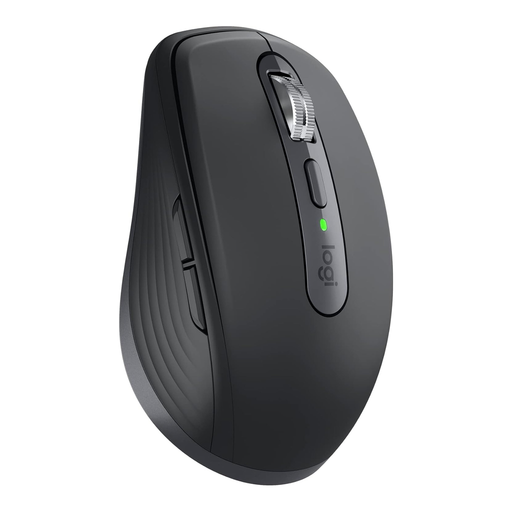 No image available
Logitech MX Anywhere 3S for Business
A compact mouse for anyone looking for adjustable sensitivity and scrolling for longer pages.
Bluetooth and Logi Bolt USB receiver; connects to multiple devices; 8.000 DPI Darkfield sensor. Dimensions: 100,5 × 65 × 34,4 mm; weight: 99 g.
View at Joybuy
Frequently asked questions
Do I need the highest DPI for precise landing page design?
No. The highest possible maximum setting doesn’t guarantee a better design result. Instead, check whether you can set the pointer speed comfortably for small targets; CHERRY lists selectable settings for the MW 9100.
How can I connect a mouse if my laptop doesn’t have a free USB-A port?
Compare the connection options for the exact version and check whether your computer supports Bluetooth. According to Logitech, the standard MX Anywhere 3S connects via Bluetooth; its compatible Logi Bolt receiver isn’t included. The CHERRY MW 9100 offers Bluetooth or a USB receiver included in the box.
What should I know about the battery and disposing of an old mouse?
According to the manufacturer, the CHERRY MW 9100 can be charged via USB-C while in use. The German Environment Agency advises against disposing of electrical devices with household waste. Remove batteries before returning a device where this can be done easily.
What are my rights when buying online in Germany if the shape or function isn’t right for me?
For online purchases by consumers, you generally have a 14-day right to cancel, starting when you receive the goods; exceptions should be checked on a case-by-case basis. For faulty new goods, you generally have statutory rights against the seller for two years. The Verbraucherzentrale distinguishes these rights from a voluntary guarantee.


