Quiet writers
If you work close to other people, quiet clicks can make a difference. For long writing sessions, it’s also worth considering how easily you can navigate with the scroll wheel.


If you write close to other people, start by looking for quiet buttons, a mouse that fits your hand and a scroll wheel that makes it easy to move through long documents. A vertical mouse could be an option if you prefer a different hand position; if you often change desks or devices, the exact connection options and what’s included in the box are key. Before buying, also check whether your devices support Bluetooth or have the USB port you need.
If you work close to other people, quiet clicks can make a difference. For long writing sessions, it’s also worth considering how easily you can navigate with the scroll wheel.
For long research and writing sessions, consider your hand size, the shape of the mouse and the space available for your hand and forearm on the desk. The Federal Institute for Occupational Safety and Health highlights the importance of having enough room for your mouse, keyboard and a surface to rest your hand and arm on.
If you move between desks or computers, check whether the mouse can connect to the devices you actually use, and whether you’d prefer Bluetooth, a receiver or a cable.
| What matters | What to check before buying | Who it matters most to |
|---|---|---|
| Noise and navigating text | Check the specifications for quiet buttons and the scroll wheel on the exact model. | If you want to minimise disruption to others at the desk and move easily through long texts, quiet clicks and controlled scrolling are top priorities. Around 36% of consumers in this scenario say noise and text navigation matter most. |
| Fit and hand position | Consider your hand size, whether you’re left- or right-handed, and the space available for your mouse and forearm. | If you spend long periods at a computer, the shape of the mouse should feel right for your hand; a vertical design may take some getting used to. Around 29% of consumers focus primarily on fit and hand position. |
| Connectivity and switching devices | Compare Bluetooth, available USB ports, what’s included in the box and the number of supported devices. | If you switch between workspaces or computers, the mouse needs to connect to your devices and be practical to switch between in everyday use. Around 21% of consumers prioritise switching between locations and devices. |
| Power and ongoing costs | Check the battery or rechargeable battery type, included accessories and the connection you need. | If you want to avoid buying extra accessories or dealing with batteries as much as possible, power and what’s included in the box will be deciding factors. Around 14% of consumers prioritise ease of use and keeping ongoing costs manageable. |
Noise and fit are separate features. The Logitech Signature M650 is available in versions for different hand sizes, including a separate left-handed version.
First check the size and handedness of the specific version, then look at its button and scroll wheel specifications.
According to Logitech, the compatible Logi Bolt receiver is not included with the Logitech MX Anywhere 3S.
Check whether your computers support Bluetooth and whether you actually need the receiver.
If you need a compatible receiver, bear in mind that you may have to buy one separately.
Your hand size, how long it takes to get used to the mouse and the layout of your workspace all affect which one is right for you. A manufacturer’s claims about a different hand position don’t prove that it will work for you personally.
Consider the shape of the mouse alongside the space available, and check the returns policy for the specific product before you buy.
The wired Perixx PERIMICE-513L doesn’t need a mouse battery, but it does need a spare USB-A port and room for its 1.8 m cable.
If you usually work at one fixed computer, compare this trade-off with the wireless options.
The product ranges mentioned here cater for different needs: Signature M650 offers quiet clicks and text navigation, Lift has a vertical design, and MX Anywhere 3S is compact for use across multiple devices.
The HP 430 is an option if you want to choose between Bluetooth and a USB-A receiver, and use the mouse with up to two devices.
The MW 4500 and MW 4500 LEFT are wireless mice with a 45° tilt and separate versions for left- and right-handed users.
The PERIMICE-513L is a wired vertical mouse for left-handed users; the PERIMICE-719L is a small wireless mouse for left-handed users.
These models offer quiet clicks, text navigation and connectivity for switching between devices at a shared desk.
 No image available
The description mentions quiet clicks and a connection to up to three devices, handy if you switch between workspaces.
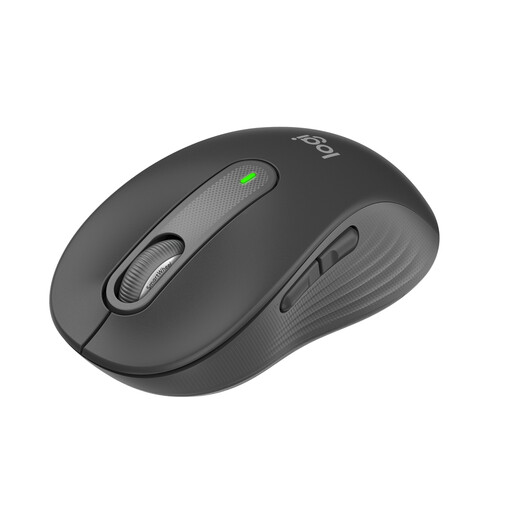
Bluetooth 5.1 and 2.4 GHz wireless; multiple DPI settings; 62 g; 1 AA battery according to the product name.
 No image available
If quiet clicks and navigating long texts matter to you, this version combines SilentTouch clicks with the SmartWheel.
Bluetooth and Logi Bolt receiver; AA battery. The stated fit is designed for small to medium-sized hands.
 No image available
For long texts and switching between several devices, the product description highlights a scroll wheel, quiet clicks and a connection to up to three devices.
Bluetooth; USB-C charging; MagSpeed scroll wheel; 8K DPI sensor. The described shape is for right-handed users.
 No image available
The product description mentions quiet clicks and an ambidextrous design for a shared workspace.
2.4 GHz wireless with USB receiver; 1600 DPI.
 No image available
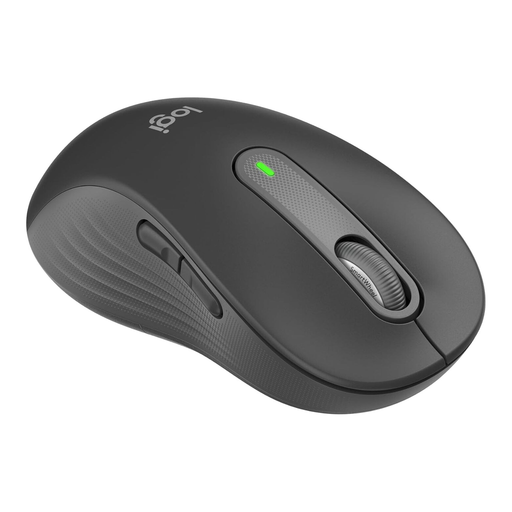
If you’re left-handed and want quiet clicks and easy scrolling through long documents, this version is specifically designed for larger left hands.
SilentTouch clicks and SmartWheel; Bluetooth and Logi Bolt receiver; AA battery.
No. What matters is whether the hand size, mouse shape and positioning suit your workspace. A vertical mouse is one possible alternative, but it isn’t a proven treatment for discomfort.
A Bluetooth mouse pairs directly with a compatible computer; a USB receiver needs a suitable free port. Check how many devices the specific model supports and how you switch between them.
Check the power source and what’s included with the specific model. The HP 430 uses an AA battery, while the wired PERIMICE-513L doesn’t need a mouse battery. If you need a wireless receiver, keep it somewhere safe when moving between desks so you don’t lose it.
For online purchases by consumers, you generally have the right to cancel the contract, usually within 14 days of receiving the goods; you must notify the seller that you wish to cancel. If newly purchased goods are faulty, you generally have statutory rights to remedies from the seller for two years. A voluntary guarantee is separate from these rights.
Wireless devices must meet EU requirements, including those for safety and electromagnetic compatibility. The Federal Network Agency explains that products covered by the relevant harmonisation legislation and placed on the EU market must carry the CE marking. This marking doesn’t tell you which mouse will suit you ergonomically.