
Lieferung heute & morgen

Qualitätsgarantie

Willkommens-Angebote freischalten: KOSTENLOSE Lieferung | Bis zu 80 % RABATT | Kostenlose 30-Tage-JoyPlus-Testphase
App herunterladen
Anyone who spends many hours a day at the computer knows the feeling: a strained hand, an aching wrist, or an imprecise cursor that needlessly slows down your work. An ergonomic mouse promises relief, but the market is flooded with products whose claims quickly turn out to be empty marketing buzzwords. As a Joybuy Product Recommendation Officer, I'll help you cut through the noise and make a purchasing decision based on facts.
Many users invest in a supposedly ergonomic mouse only to find that it doesn't deliver the desired comfort or efficiency boost. This is often due to three common pitfalls:
To avoid these bad buys, it's crucial to understand the technical features that truly matter.
Instead of being swayed by marketing terms, you should base your choice on objective criteria. Three core parameters are decisive for comfort, durability, and productivity.
A mouse can only be ergonomic if it fits your hand size and grip style. There are two main designs:
Check the dimensions of the mouse and compare them to your hand. A mouse that is too small or too large will inevitably lead to an unnatural posture and tension.
For a clean and flexible workspace, a wireless office mouse is ideal. Pay attention to the following features:
The performance of a mouse is revealed in the details:
Based on these objective criteria, we have identified several models that are particularly well-suited for specific user groups.
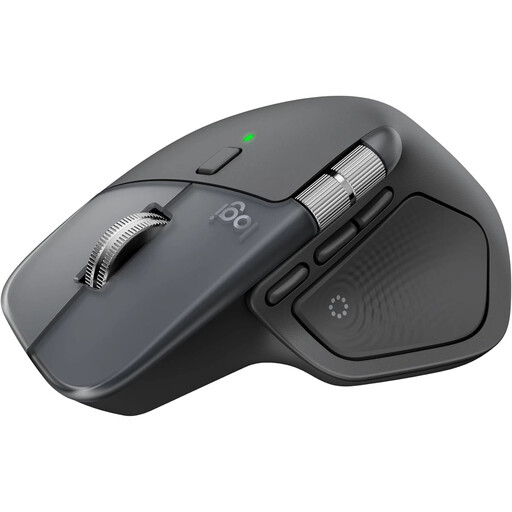
Why This Fits Their Persona: Ideal for users who seamlessly switch between complex spreadsheets, design software, and documents. The combination of a sophisticated ergonomic shape, the MagSpeed scroll wheel, and a thumb wheel for horizontal scrolling supports demanding workflows.
Its shape is based on extensive hand-posture analysis, making it more than just a marketing label. The seamless Easy-Switch function for up to three devices bypasses the trap of inflexible connectivity.
MagSpeed scroll wheel for rapid or precise scrolling; 8K DPI sensor that tracks even on glass; silent clicks for a quiet work environment.
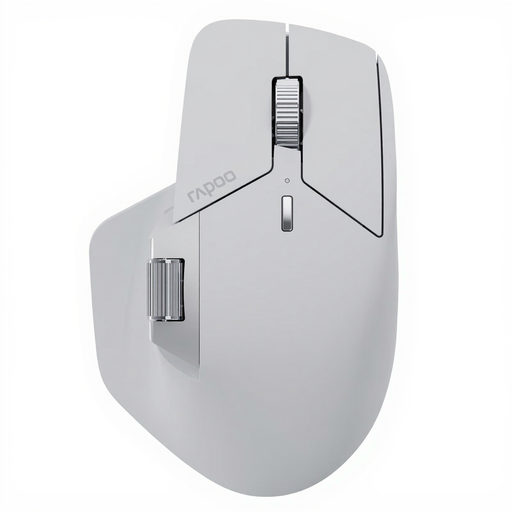
Why This Fits Their Persona: A strong Logitech MX Master alternative for programmers and IT consultants who work across multiple devices and systems. The mouse is designed for maximum connectivity and customisation to optimise complex workflows.
Instead of just touting high DPI numbers, it offers a real productivity boost with 11 programmable buttons. Connectivity for up to 7 devices completely solves the problem of inflexibility.
M+ Cross-Computer Technology for seamless control and file transfer between computers; long battery life of up to 120 days according to the manufacturer.
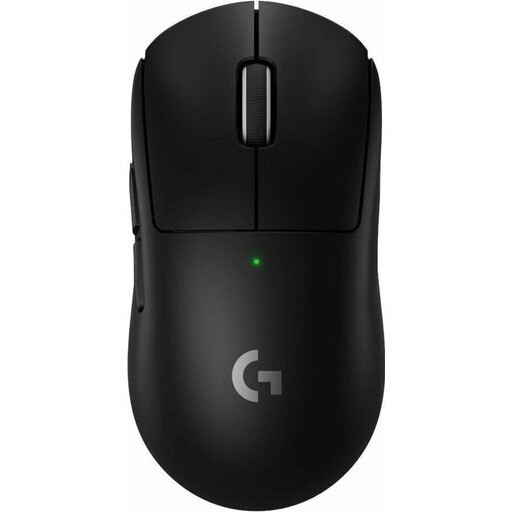
Why This Fits Their Persona: Designed for esports professionals and ambitious gamers where every millisecond and every gram counts. The focus is on minimal weight, maximum responsiveness, and a precision sensor for fast, repetitive movements.
The ultra-lightweight design (60g) is a deliberate functional feature for gaming, not a generic 'one-size-fits-all' ergonomic claim. The high DPI performance is functional for precise aiming here, not just a marketing figure.
Extremely low weight of 60g for fatigue-free gaming; HERO 2 sensor with up to 44,000 DPI for maximum precision; LIGHTFORCE hybrid switches for tactile and reliable feedback.
We've compiled a complete, up-to-date list of products that fully meet these strict selection criteria and current regulations.
Battery life varies depending on the model, usage frequency, and settings. Many modern models offer a runtime of several weeks to months. For example, Logitech claims up to 70 days for the MX Master 4, while Rapoo states up to 120 days for the MT760 PRO. Most mice with a USB-C port feature a quick-charge function that provides several hours or a full day of use after just a few minutes of charging.
Basic functions like cursor movement and standard clicks usually work without additional software (plug-and-play). However, to use advanced features such as custom button mapping, DPI level adjustments, macro creation, or multi-device connection management, you will need to install the manufacturer's provided software (e.g., Logi Options+ or Rapoo Driver).
Ergonomic mice are designed to promote a more natural posture for your hand, wrist, and forearm. This can help reduce strain during long and intensive computer use. However, it's important to understand that an ergonomic mouse is not a medical device and cannot cure existing health conditions. For persistent or severe pain, a doctor should always be consulted.