For browsing a photo gallery, it helps to have a mouse with adjustable scrolling and pointer speed, so you can move through images quickly and select them precisely. At a shared desk, quiet clicks, a comfortable shape and a connection that works with your computer also matter. A stationary trackball needs less room to move, but works differently and needs regular cleaning.
Which mouse is right for you?
For people sorting photo galleries
If you’re reviewing lots of photos, you’ll want to browse quickly while keeping precise control when selecting individual images. Logitech says the Signature M650 features a SmartWheel that supports different scrolling speeds.
For considerate use at a shared desk
If you work alongside other people, quiet clicks and a connection that works with the shared computer are important. CHERRY describes the STREAM MOUSE COMFORT as having quiet buttons; still, check that its right-handed shape and receiver suit your workspace.
For people with limited space or specific grip needs
If there’s little room to move on your desk, or several people use the same mouse, its shape should suit their hand size and preferred hand. Kensington describes the Orbit Wireless Trackball as ambidextrous, while Logitech also offers the Lift in a left-handed version.
What should you look for when buying?
First, decide how you want to navigate through lots of images. Then check that the noise level, connection and shape suit your shared workspace.
| What matters when buying |
What to check |
Who will value this? |
| Navigating images and selecting them precisely |
Check the scrolling behaviour, adjustable pointer speed and, where relevant, customisable buttons in the gallery software you use. |
If I want to browse lots of photos quickly and select individual images with care, I need both. Around 28% of consumers prioritise image navigation and precise selection. |
| Quiet operation |
Where possible, listen to the clicks for yourself and check the shape and connection of the specific model. |
At a shared desk, I want to work as quietly as possible without compromising on a suitable shape or connection. Around 28% of consumers prioritise low noise levels. |
| Connection and switching between devices |
Check for Bluetooth support, an available USB port, a receiver and permission to install software on the computer you use. |
If I switch between computers, the mouse needs to work with the connections actually available. Around 22% of consumers prioritise a suitable connection and the ability to switch between devices. |
| Space to move and hand comfort |
Consider the available space, hand size and preferred hand. With a trackball, also bear in mind the different way of controlling it and the need to clean it. |
With limited space or several people sharing the mouse, it should suit my hand and preferred hand; a trackball also takes some getting used to. Around 22% of consumers focus primarily on space requirements or grip comfort. |
Avoiding common buying pitfalls
-
Assuming an ergonomic shape will suit everyone sharing the mouse
The Logitech Lift comes in separate right- and left-handed versions, while CHERRY designed the STREAM MOUSE COMFORT for right-handed users. So a shape that suits one person may not work for everyone at the desk.
Before choosing, consider who will use the mouse and what grip preferences they have.
-
Relying on application-specific button functions without software approval
Logi Options+ is required to customise the haptic feedback on the Logitech MX Master 4. KensingtonWorks is used to customise trackball functions.
Before buying, check whether you’re allowed to install and use the required software on the shared computer.
If the software isn’t available, setup may take more effort or you may not be able to use personalisation features.
-
Thinking of a trackball as a maintenance-free way to save space
Kensington notes that dirt and debris can affect the ball’s movement.
Weigh up the smaller amount of space needed to move the mouse against the unfamiliar controls and the need for cleaning.
Brands to consider
Logitech
The range spans the Signature M650, with versions for different hand sizes, and MX Master models with additional navigation and software features. The Lift and MX Vertical are vertical alternatives.
- Logitech says the M650 features a SmartWheel and comes in versions for different hand sizes, including left-handed users.
- Personalisation and haptic features won’t necessarily work in every gallery app, so check that the software requirements suit your computer.
CHERRY
The STREAM MOUSE COMFORT is a wireless mouse with a right-handed shape and buttons designed for quiet operation.
- CHERRY lists quiet buttons, adjustable DPI settings and a Nano USB receiver.
- Its pronounced right-handed shape and the need for a receiver connection may limit how well it works in a shared space.
Kensington
The Orbit Wireless Trackball with scroll ring is a stationary alternative when you have little room to move a mouse.
- Kensington describes a scroll ring, adjustable cursor speed and two wireless connection options.
- The ball controls need to suit the way you work, and dirt and debris may mean regular cleaning is needed.
HP
The range includes a variety of office mice, including models with quieter clicks or horizontal scrolling.
- HP lists quiet clicks and vertical and horizontal scrolling for the HP 405.
- These features apply to the model mentioned and shouldn’t be assumed to apply to all HP mice.
Dell
Dell offers office mice, including the compact MS355.
- Dell describes the MS355 as compact and quiet.
- This product description alone doesn’t tell you how loud the clicks will sound at your desk or whether the mouse is suitable for editing images.
Joybuy products for browsing photo galleries
This selection includes wireless mice for different connection and control preferences, including models described as having quiet clicks.
 No image available
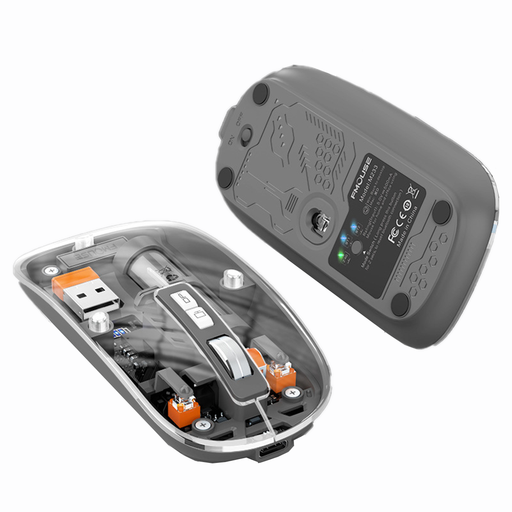
KINSI M233 Wireless Bluetooth Mouse, 3 Modes, Transparent
An option if you’re looking for a wireless mouse with clicks described as quiet and several connection modes.
The product name lists three modes, a rechargeable design, silent clicks and 1600 DPI.
View at Joybuy
 No image available
ATTACK SHARK X11 Wireless Gaming Mouse, Black
An option if you want programmable buttons and the choice of several connection types.
The product name lists a PAW3311 sensor, 22,000 DPI, three connection types, five programmable buttons and a weight of 62 g.
View at Joybuy
 No image available
HOFOTEK M308 2.4G Silent Office Mouse
An option for a shared desk if quiet clicks and a wireless connection using a USB receiver work with your computer.
The product name lists adjustable DPI settings and compatibility with several systems.
View at Joybuy
 No image available
HOFOTEK M311 2.4G+BT Silent Office Mouse, White-Grey, 1xAA Battery
An option if you want to switch between Bluetooth and a 2.4 GHz connection when choosing which device to use.
The product name lists adjustable DPI settings, compatibility with several systems and a 1xAA battery.
View at Joybuy
 No image available
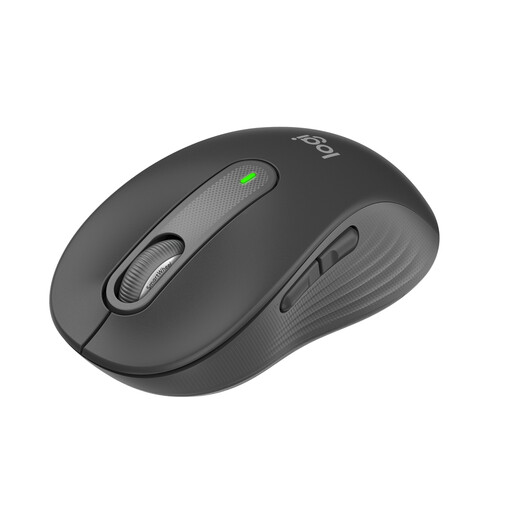
Logitech Signature M650, Small & Medium Hands, Graphite
An option if you want to switch between controlled and faster scrolling while browsing. Logitech says the Signature M650 features a SmartWheel.
The product name lists Silent Clicks, Bluetooth and Logi Bolt, plus a 24-month battery life. Logitech offers the M650 in versions for different hand sizes.
View at Joybuy
Frequently asked questions
Do I need the highest possible DPI for browsing a photo gallery?
No, you don’t automatically need a particularly high DPI. What matters is whether you can adjust the pointer speed to suit your selection and editing tasks; Logitech lists this as an adjustable feature on the MX Master 3S Bluetooth Edition.
Do I need software for a trackball, and how should I look after it?
According to Kensington, the Orbit Wireless Trackball with scroll ring works on a plug-and-play basis; KensingtonWorks is for customising its settings. If the ball feels stiff or moves unevenly, Kensington recommends carefully removing dirt and debris with your finger or a dry cloth.
Who should I contact if a product develops a fault after purchase in Germany?
For statutory consumer rights relating to a consumer purchase, the seller is responsible, not automatically the manufacturer. The Verbraucherzentrale explains the general two-year period and special rules for a chosen repair for sales contracts from 31 July 2026; a voluntary guarantee is separate.
Does German workplace law require a particular mouse for a shared desk?
For workplace screen-based workstations covered by the rules, ASR A6 sets out requirements for workstation design. This doesn’t mean that private buyers need a specific mouse; the equipment required depends on the individual workplace.


