Students organising observations
If you’re reviewing lots of plant images or data sets, precise scrolling and navigation that works well with your lists and software can make things easier.


When you’re reviewing lots of plant photos and observation data, prioritise controlled scrolling and a mouse that fits your hand. In a shared room, quiet buttons may matter more. Then check whether your computer has Bluetooth or the right USB port for the receiver. A vertical shape or several connection options are only useful if they suit your hand and devices.
If you’re reviewing lots of plant images or data sets, precise scrolling and navigation that works well with your lists and software can make things easier.
If you work close to other people, pay particular attention to quiet buttons. You can’t be sure how noisy a mouse will seem in your own room based on this alone.
If you spend long periods at your desk, hand fit, grip and enough space for your mouse and arm all matter. Whether a vertical shape suits you is a personal choice.
Compare the controls and fit first, then consider noise and connectivity. This helps you choose a mouse that suits the way you work at your computer and the ports available.
| What matters | What to check | Who may value this most |
|---|---|---|
| Control when reviewing content | Check the scroll wheel, adjustable pointer speed and, where relevant, side buttons in the software you use. Logitech describes SmartWheel on the Signature M650; CHERRY lists three DPI settings for the MW 2310 2.0. | If you want to select lots of images and entries precisely and navigate longer lists, control is your main consideration. Around 33% of consumers prioritise it for this type of use. |
| Click noise | Check whether quiet buttons are specified for the exact model variant. Logitech lists SilentTouch for the M240 Silent; Rapoo describes quiet switches on the M500 Silent. | If you work close to other people, quieter clicks may be a deciding factor; how noisy the mouse seems in your own room will depend on the surroundings. Around 25% of consumers prioritise quiet clicks. |
| Hand fit and posture | Consider your hand size, whether you need a right- or left-handed version, the feel of the grip and the space available for your mouse and arm. Logitech describes different M650 variants; the BAuA recommends leaving enough room for your mouse, keyboard and arm support. | If the way you position your hand and arm during longer sessions is your top priority, try the shape for yourself rather than assuming a particular design will automatically suit you. Around 17% of consumers put fit first. |
| Connection and ports | Check that your computer supports Bluetooth and has a free USB port, and confirm the connection type for the exact variant. Logitech lists Bluetooth without a dongle for the M240 Silent; CHERRY lists USB-A for the MW 2310 2.0. | If your computer only has certain ports or you switch between devices, the right connection matters more than extra features. Around 25% of consumers prioritise port compatibility. |
Logitech offers the M650, M650 L and M650 L Left, with options based on hand size and whether you’re left- or right-handed. Choosing the wrong version can make it harder to find a mouse that fits your hand.
Before ordering, check the full model name and choose the right size and handedness.
According to Logitech, the M240 Silent connects without a dongle, while the CHERRY MW 2310 2.0 uses a USB-A receiver. The right choice depends on the ports available on your computer.
Before choosing a model, make sure its connection type, the ports available and its power source suit the way you’ll use it.
With a battery-powered model, replacing the batteries is part of ongoing use.
A different grip doesn’t guarantee that you’ll be free of discomfort or that your arm will be in a suitable position. The BAuA stresses the importance of having enough space for your mouse and keyboard, as well as support for your hand and arm.
Consider the grip and the space available together. Don’t assume the design will provide a health benefit.
The models to consider here are the M650 variants, the M240 Silent and the vertical Lift. Their features vary by model.
The MW 2310 2.0 is worth considering if you’re looking for a wireless mouse with a USB-A receiver and adjustable pointer speed.
The M500 Silent may suit you if you want to switch between connected devices.
The vertical Bayo II is a wireless mouse for people who find this type of grip comfortable.
This selection includes wireless mice, including several vertical models. Check that the grip and connection of the specific variant suit your workspace.
 No image available
The vertical shape offers an alternative grip, if it feels right for your hand during longer sorting sessions.
Six buttons; adjustable DPI settings; USB-C charging. A USB receiver is used for the 2.4 GHz connection.
 No image available
This vertical design is an option if you find the grip comfortable and want to adjust the pointer speed.
The product title lists 2.4 GHz wireless and three DPI settings; the description lists six buttons, a rechargeable battery and USB-C charging.
 No image available
The vertical shape offers an alternative grip; make sure it suits your hand and the space available.
Bluetooth and 2.4 GHz connectivity; rechargeable battery with USB-C charging. The description lists six buttons and three DPI settings: 800/1200/1600.
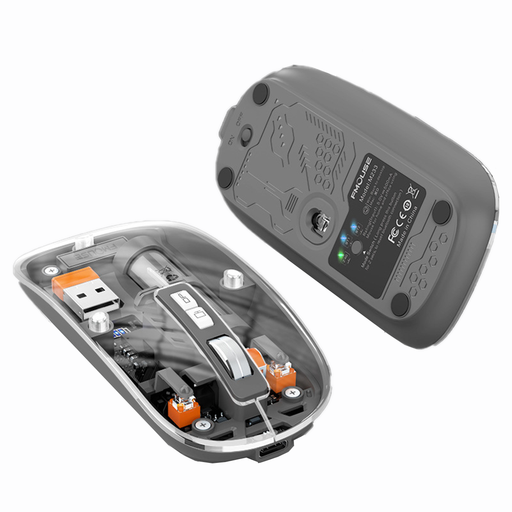 No image available
If quiet operation or switching between connections matters to you, check that the exact variant works with your devices and suits your workspace.
The product title lists three connection modes, a rechargeable battery, quiet operation and 1600 DPI.
 No image available
The vertical shape is one option for longer sessions, provided it suits your hand.
The product title lists 2.4 GHz USB wireless and a rechargeable mouse. The description lists five buttons, five adjustable DPI settings from 800 to 4800, and use while charging.
It depends on the model: according to Logitech, the M240 Silent connects via Bluetooth without a dongle, while the CHERRY MW 2310 2.0 needs a USB-A port for its nano receiver. Check your computer’s ports and Bluetooth support.
No, this isn’t guaranteed for everyone. Check whether the shape suits your hand and whether there’s room for the mouse and hand and arm support beside your keyboard. The BAuA also highlights the strain caused by fixed postures and repetitive movements.
When you buy from a business seller in the EU, you’re generally entitled to a legal guarantee of at least two years from the date you receive the goods, as explained by Your Europe. This is separate from any additional manufacturer’s warranty. According to the Verbraucherzentrale, online purchases are also generally covered by a 14-day withdrawal period from the date you receive the goods.
No. The German Environment Agency advises against disposing of old electrical equipment in household waste, packaging waste, bulky waste or scrap metal. Find out where your local separate collection point is.