What to look for when buying
First, decide whether precise navigation, a comfortable hand position or a straightforward connection matters most to you. Then compare conventional and vertical mice with trackballs, taking into account how you use a mouse and how much space you have.
| Buying criterion |
What to check |
Who it matters most to |
| Pointer control and navigation |
Check the adjustable pointer speed, scroll wheel and, where available, horizontal scrolling. Logitech lists these customisation options for selected models, such as the MX Master 3S. |
When switching between small controls and long pages while designing, I need controllable pointer movement and scrolling that suits the task. Around 36% of consumers put control and navigation first. |
| Hand fit and posture |
Check the mouse against your hand size, whether you need a left- or right-handed version, and how it feels to hold. The Federal Institute for Occupational Safety and Health recommends choosing a mouse that is not too large and is as flat as possible. |
For long sessions, I want to choose a shape that suits my hand and preferred hand, rather than relying on the word “ergonomic” alone. Around 29% of consumers prioritise hand fit and posture. |
| Connection and compatibility |
Check the operating system, Bluetooth, USB port and whether you need a receiver. Suitable software may also be required for certain features. |
When I work with several devices, I want to be sure the mouse can connect in the way I need. Around 21% of consumers put connectivity and device compatibility first. |
| Power and accessories |
Check whether the mouse uses a rechargeable battery, disposable batteries or a cable, and compare what’s included with the accessories you already have. Logitech says that a USB-C charging cable is not included with the MX Ergo S. |
Before buying, I want to know whether I’ll need an extra cable or will have to charge the mouse regularly or replace its batteries. Around 14% of consumers prioritise the effort involved and accessories needed. |
Related products at Joybuy
The products below include conventional productivity mice and vertical mice, with a range of connection and customisation options.
 No image available
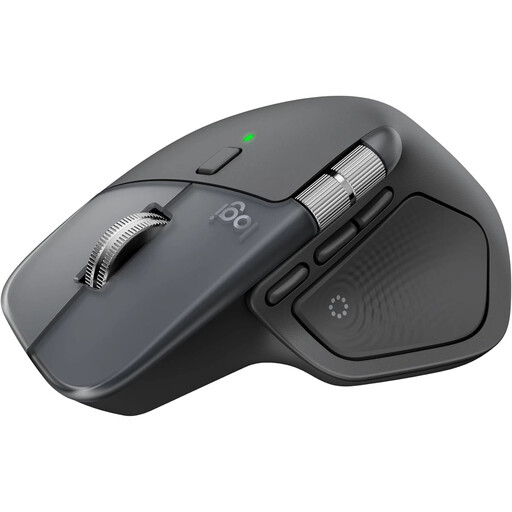
Logitech MX Master 4
For frequently scrolling through long pages and switching between devices; the product description lists MagSpeed scrolling and a connection to up to three devices.
8K DPI sensor; Bluetooth and Logi Bolt USB-C receiver. The description lists Logi Options+ for Windows and macOS for full customisation of features.
Joybuy
 No image available
Vertical wireless mouse with USB-C charging
For anyone wanting to try a vertical grip and adjustable pointer speed; you’ll need to assess how well it fits your hand.
Bluetooth and 2.4 GHz connection; three DPI settings of 800, 1200 and 1600 dpi, plus six programmable buttons. A USB receiver is used for the 2.4 GHz connection.
Joybuy
 No image available
KINSI vertical wireless mouse
For a vertical way of working with adjustable pointer speed; whether the shape suits you for longer sessions depends on your hand.
Five DPI settings from 800 to 4800 and five buttons; according to the product title, the 2.4 GHz connection uses USB.
Joybuy
 No image available
HOFOTEK M308
For a fixed workstation where you want a wireless connection and several adjustable DPI settings.
2.4 GHz wireless connection via a USB receiver; the product description lists four DPI settings.
Joybuy
 No image available
HOFOTEK M311
For switching between several devices: the description says it can connect to up to three devices.
Bluetooth and 2.4 GHz wireless; five DPI settings and one AA battery are listed.
Joybuy
Frequently asked questions
What should I consider when setting up my mouse area?
Leave enough space beside your keyboard to position your mouse and arm support comfortably, and avoid keeping your body in a rigid position for long periods. This is ergonomic guidance, not proof that a particular mouse model can treat discomfort.
Do I need specific software to use extra buttons?
It depends on the model and the feature you want to use. Logitech lists Logi Options+ for personalising the MX Master 3S for Business on Windows and macOS. Check that your chosen feature and operating system are supported.
Do workplace rules also apply to my home office?
ASR A6 sets out requirements for display screen workstations and teleworking workplaces within its scope. The Federal Institute for Occupational Safety and Health explicitly excludes use in private homes outside teleworking workplaces. So simply describing a space as a “home office” does not mean there is one set of legal mouse specifications for everyone buying one.
What rights do I have in Germany if my mouse is faulty?
If goods have a defect, Section 437 of the German Civil Code (BGB) provides for remedies including, subject to the relevant conditions, repair or replacement and further rights. For the type of purchase covered here, the standard limitation period under Section 438 BGB is two years from delivery; this is separate from any additional manufacturer’s warranty.


