Form designers
When placing and checking fields, labels and spacing, precise mouse control matters. Figma Learn – Help Center documents mouse controls for viewing and zooming. The software you use will also determine which extra features are useful.


Start by choosing a mouse that fits your hand and lets you select and move form elements with precision. At a shared desk, quiet clicks and connections that work with the computers you use are particularly important. Extra wheels or programmable buttons are most useful when they support your design software and workflow.
When placing and checking fields, labels and spacing, precise mouse control matters. Figma Learn – Help Center documents mouse controls for viewing and zooming. The software you use will also determine which extra features are useful.
If you work alongside other people or switch between work computers, quiet buttons and suitable connections may matter more than extra features. Logitech, CHERRY and Dell list these features for certain models in their ranges.
For extended use, hand size, whether you use your left or right hand, and a comfortable posture are important considerations. The Federal Institute for Occupational Safety and Health also stresses the need for enough space for your mouse, keyboard and arm support.
Start with your hand size and preferred hand, then check click noise and connections. Assess extra features in light of the tasks you actually do.
| What matters | What to check when buying | Who is this important to? |
|---|---|---|
| Precise selection and navigation | Test the pointer feel and scroll wheel with your design software. Compare extra buttons only in relation to tasks you do regularly. | When I place form elements precisely and switch between detail and overview, I want to use the pointer and scroll wheel confidently in my software. Around 33% of consumers prioritise precise selection, placement and navigation. |
| Quiet operation | Look for clicks specifically described as quiet, and check that the mouse’s size and shape suit your hand and preferred hand. | When I work alongside other people, repeated clicks should cause as little disruption as possible without compromising on fit. Around 25% of consumers prioritise quiet operation at a shared desk. |
| Connecting to multiple computers | Check Bluetooth, the USB ports you need, operating systems and how you switch connections on each computer you use. | When I switch between work computers, I want to know which connections are actually available and how to switch the mouse between them. Around 25% of consumers prioritise connecting to and switching between computers. |
| Hand fit and posture | Compare the size and right- or left-handed version, and check there is room for your arm and mouse movement. Assess vertical designs on an individual basis. | When I use a mouse for extended periods, I want a version that suits my hand and preferred hand, and that I can move comfortably at my desk. Around 17% of consumers prioritise hand fit and posture for extended use. |
The sensor’s maximum resolution alone doesn’t tell you whether you’ll be able to control the pointer more precisely in your software.
Test how the pointer feels and adjust the settings using the layout features you actually use, rather than simply comparing the highest dpi figures.
According to the manufacturer, switching between Bluetooth and the receiver on the CHERRY MW 9100 requires using a switch on the underside of the mouse. The ports and operating systems must also be compatible with the computers you use.
Before choosing a model, compare its connection options and switching method with each computer at your workplace.
Logitech offers M650 versions for different hand sizes and preferred hands; according to the manufacturer, the Lift is designed for small to medium-sized hands. That doesn’t mean a particular shape will suit everyone.
Check the specific size and right- or left-handed version, and make sure there’s room on your desk for the mouse and your arm.
Logitech describes the Signature M650 as a quiet standard mouse, available in versions for different hand sizes and preferred hands. The Lift is a vertical alternative, while the MX Master 4 offers extra workflow features.
CHERRY positions the compact MW 9100 for office work and mobile use, with Bluetooth or a USB wireless receiver.
Dell describes the MS5320W as offering multiple connection options, plus vertical and horizontal scrolling.
HP describes some models as quieter standard mice or rechargeable mice for use with multiple devices.
Microsoft describes the Surface Arc Mouse as a Bluetooth mouse that folds flat for carrying.
This selection includes quiet standard mice in versions for different hand sizes and preferred hands, as well as models with extra features or connection options. For each model, check that the fit, connections and software are right for your workplace.
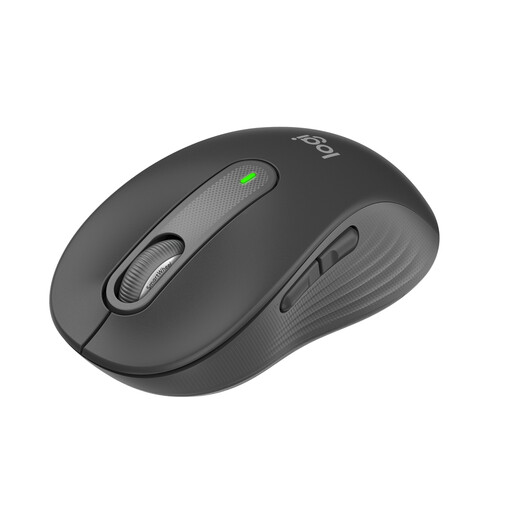 No image available
A suitable option if you’re looking for quiet clicks and a mouse for small to medium-sized hands at a shared desk.
The product title lists SilentTouch, SmartWheel, Bluetooth and Logi Bolt.
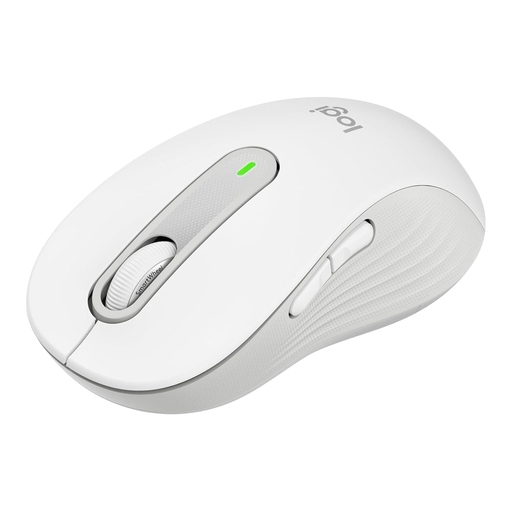 No image available
This version could suit you if you’re looking for a larger mouse for your right hand with quiet clicks.
The product title lists SmartWheel, SilentTouch, Bluetooth, Logi Bolt, five buttons and 24-month battery life.
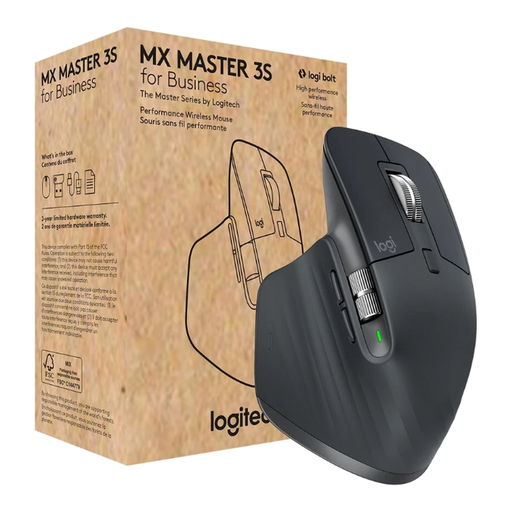 No image available
A possible choice if you want quiet clicks, extra navigation and connections to multiple computers, and a right-handed shape suits you.
The product title lists an 8.000 DPI Darkfield sensor, MagSpeed, Bluetooth and Logi Bolt. Logi Options+ is listed for customising the buttons.
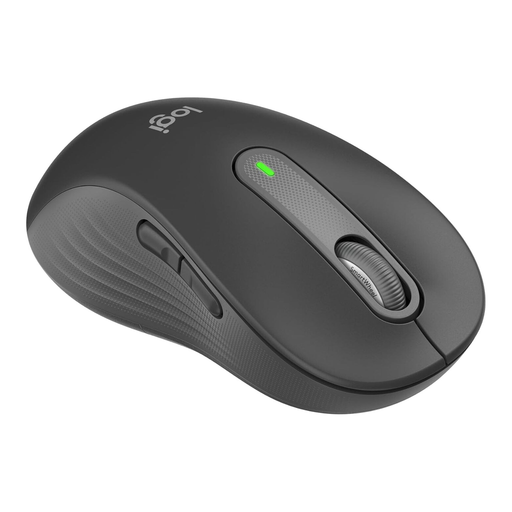 No image available
This left-handed version is designed for large left hands and combines a specified fit with quiet clicks.
The product title lists SmartWheel, customisable side buttons, Bluetooth and Logi Bolt. Logitech Options+ is listed for customising the side buttons.
 No image available
A possible option if you’re looking for quiet clicks and Bluetooth and 2,4-GHz connections at a shared workplace.
The product title lists adjustable DPI settings, compatibility with multiple systems and an AA battery.
No. The documented zoom control in Figma Design works with the mouse wheel: hold down Ctrl on Windows or Command on macOS and turn the wheel. Any extra mouse features should suit your other tasks. Figma Learn – Help Center describes this control.
Check the operating system, Bluetooth support and whether a USB port is needed on each computer. According to CHERRY, switching between Bluetooth and the receiver on the CHERRY MW 9100 requires using a switch on the underside. So having two connection types doesn’t necessarily mean you can switch without touching the mouse.
Under statutory consumer rights, the seller is generally responsible, not the manufacturer. The Verbraucherzentrale states that the period is generally two years from delivery. For purchase contracts entered into from 31 July 2026, choosing a repair may extend the period once by twelve months, subject to the conditions it describes. A voluntary manufacturer’s guarantee is separate.
Radio equipment placed on the market in the EU is covered by the Radio Equipment Directive, including requirements for safety and electromagnetic compatibility. The European Commission and Your Europe explain that manufacturers are responsible for meeting the relevant EU requirements and providing the required CE marking. A product title or listing alone does not confirm that the specific product complies.
No. A vertical mouse is not a general requirement or a treatment recommendation. The Federal Institute for Occupational Safety and Health stresses the importance of having enough room for your mouse and arm, and arranging your workstation appropriately. Logitech describes the Lift as a vertical design for small to medium-sized hands; whether it suits you depends on your individual hand and preferred hand.