For a recipe index, a scroll wheel you can control easily and a shape that fits your hand are key. At a shared desk, quiet buttons and a connection that works with the computer you’re using also matter. A symmetrical wired mouse can be a straightforward option for different users, while a vertical mouse is only suitable if its shape feels comfortable for the person using it.
Which mouse suits which user?
Frequent scrollers working through an index
If you’re reviewing lots of recipe pages and often switching between an overview and individual details, an easy-to-control scroll wheel is an important consideration. Logitech says the SmartWheel on the Signature M650 family supports both slow and fast scrolling.
People sharing a quiet workspace
If several people use the same desk or take turns, quiet buttons, a shape that suits different hands and straightforward cleaning may all be important. Logitech says the Signature M650 family has quieter clicks and recommends switching devices off and disconnecting them from the power supply before cleaning.
Switching between devices or working for longer sessions
If you edit the index on several devices or spend long periods at your desk, check that the connections are suitable and that the mouse supports a comfortable hand position. HP lists Bluetooth and a USB-A receiver for the HP 430. The Federal Institute for Occupational Safety and Health emphasises having enough space to position the mouse and keyboard flexibly.
What should you look for when buying?
| Buying priority |
What to check |
Who it matters most to |
| Scrolling and precise navigation |
Scrolling performance on long recipe pages and individual entries; the exact model variant. |
When I’m looking through lots of recipes, I want to switch between fast scrolling and individual entries with control. Around 36% of consumers put this navigation feature first. |
| Consideration and cleaning |
Information about quieter buttons and cleaning instructions for the exact model; do not let liquid get inside the mouse. |
When other people are working at the same table, I look for discreet clicking sounds and cleaning instructions that suit the model. Around 29% of consumers prioritise quiet operation and cleaning. |
| Hand fit and posture |
Hand size, preferred hand, grip feel, and space for the mouse and arm support. |
When several people use the same mouse or I spend a long time working on the index, its size and shape need to suit my hand. Around 21% of consumers place the most importance on fit and posture. |
| Connection and switching between devices |
Available ports, Bluetooth support and permission to pair your own devices with the computer. |
When I work on the shared computer and occasionally on my own device, I want to use a connection that is both available and permitted on both. Around 14% of consumers put connection and device switching first. |
Common buying mistakes
-
Choosing a mouse for large hands without checking if it suits everyone
According to the manufacturer, the Logitech Signature M650 L is designed for large hands. At a shared desk, it may not fit other people comfortably.
Before buying, check the hand sizes and preferred hands of everyone who will use it. If lots of people will take turns, consider a symmetrical shape too.
-
Assuming a vertical shape is guaranteed to relieve discomfort
The Federal Institute for Occupational Safety and Health points out that there should be enough space to position the mouse and keyboard flexibly, and to support your hand and arm. The design alone does not prove that a mouse is right for an individual.
Assess the shape and size for the person who will use the mouse most, and arrange the workspace accordingly. Don’t assume product claims mean it will provide a health benefit.
-
Buying a wireless or wired mouse without checking the computer
A USB-A wired mouse needs a suitable port to be available. With Bluetooth or a USB receiver, check whether that connection is available and permitted on the shared computer.
Check in advance which ports are available and whether you’re allowed to pair your own devices or plug in a receiver.
Brands to consider
Logitech
According to Logitech, the Signature M650 family features SmartWheel, quieter buttons and different options for hand size; Lift is a separate vertical option.
- The range includes options for different hand sizes, as well as a left-handed version.
- Check the exact variant and fit. The manufacturer’s comfort claims are no substitute for assessing what suits you personally.
CHERRY
According to CHERRY, the MC 1000 is a symmetrical USB-A wired mouse for basic use with a shared computer.
- The model has three buttons with a scroll wheel and, according to the manufacturer, is suitable for both left- and right-handed users.
- The MC 1000 has no thumb buttons, and its cable needs a suitable port to be available.
HP
According to HP, the HP 430 is designed to connect to two devices using Bluetooth and a USB-A receiver.
- HP lists customisable buttons and a battery life of up to 24 months.
- The stated battery life depends on usage conditions. Also check whether both connection types are available and permitted on your devices.
Trust
According to Trust, the Bayo II is a wireless vertical mouse with a USB receiver, designed for people who find this grip comfortable.
- The manufacturer lists a rechargeable battery and quiet side buttons.
- Quiet side buttons don’t mean every click is silent; the shape needs to suit your hand.
Mice for a recipe index
This selection includes mice for quiet use and scrolling at a shared desk, as well as wired and wireless options for different device connections.
 No image available
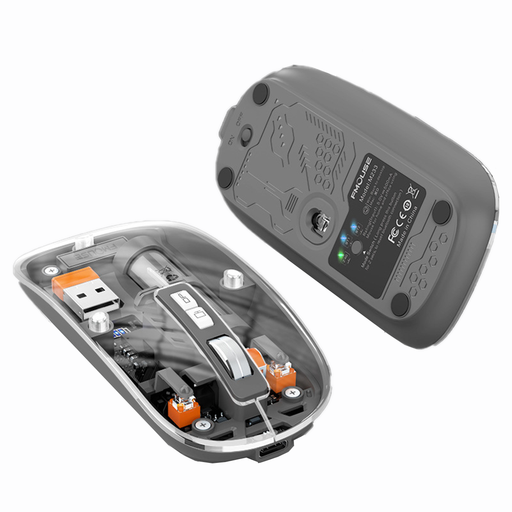
KINSI M233 Wireless Bluetooth Mouse, 3 Modes, 1600 DPI, Transparent, Rechargeable, Silent
Its stated symmetrical shape and quiet clicks may be useful for people taking turns at the desk. Check which of the three connection types your devices support.
Three connection modes; Bluetooth; 1600 DPI; rechargeable.
View at Joybuy
 No image available
HOFOTEK M308 2.4G Silent Office Mouse, Adjustable DPI, Multi-System Compatible
Its description as a Silent Office Mouse makes it an option for a shared desk. Check that the specific connection and compatibility suit your computer.
2.4G; adjustable DPI; compatible with multiple systems.
View at Joybuy
 No image available
HOFOTEK M311 2.4G+BT Silent Office Mouse, Adjustable DPI, Multi-System Compatible (1xAA Battery)
The quiet design may be a good fit when other people are working at the desk. Check in advance which connection is available and permitted on the shared computer.
2.4G+BT; adjustable DPI; compatible with multiple systems; (1xAA Battery).
View at Joybuy
 No image available
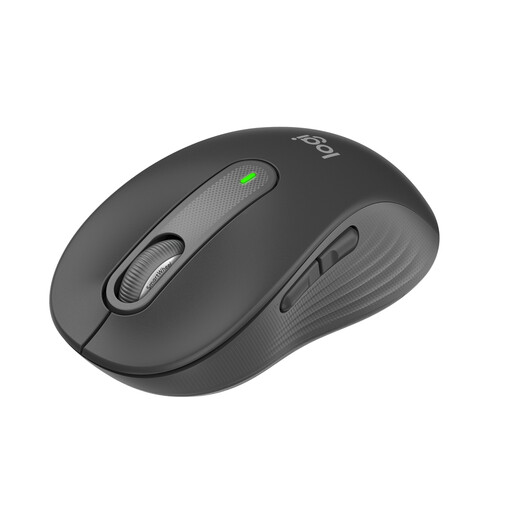
Logitech Signature M650, Wireless Mouse for Small & Medium Hands, Quiet Clicks, SmartWheel, Bluetooth & Logi Bolt, Graphite
If you switch between long recipe pages and individual index entries, SmartWheel and the stated quiet clicks are relevant to how you’ll use this mouse. This version is designed for small to medium-sized hands.
Bluetooth and Logi Bolt; Graphite.
View at Joybuy
 No image available
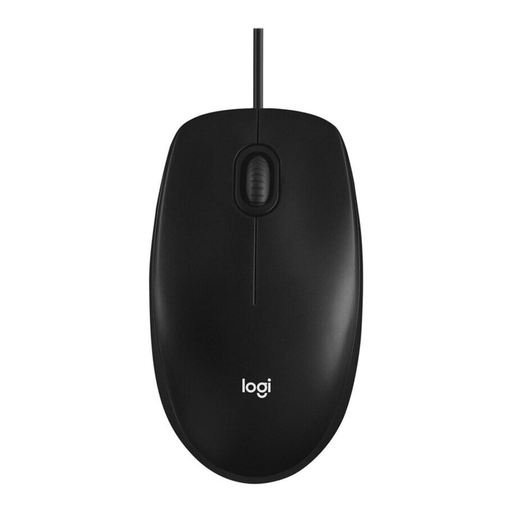
Logitech Mouse M100, Optical, Corded, Black
If there’s a suitable port available on the shared computer, this wired model is an option that doesn’t require wireless pairing. Check whether its stated ambidextrous shape suits everyone who will use it.
Wired; optical; black.
View at Joybuy
Frequently asked questions
Is Bluetooth or a wired connection easier to use with a shared computer?
A USB-A wired mouse avoids wireless pairing if there’s a suitable port available. Bluetooth is an option if the computer supports it and pairing is permitted on the shared device; a USB receiver also needs a free port.
How do I clean a Logitech mouse that’s shared with others?
Logitech recommends switching the device off, disconnecting it from the computer and waiting five seconds before cleaning. Use only a small amount of liquid on the outer surfaces, and follow the instructions for the specific model if it’s from another brand.
Are statutory consumer rights and a manufacturer’s warranty the same thing?
No. For consumer purchases in Germany, statutory consumer rights are set out in law and apply to the seller; a manufacturer’s warranty is an additional voluntary service with its own terms. Consumers generally also have a 14-day right to cancel an online purchase.
Does ASR A6 require a particular mouse shape for a shared desk?
ASR A6 does not require a particular mouse shape for this buying decision. It applies to screen-based work in workplaces and at teleworking locations within its stated scope; whether a specific shared workspace falls within that scope depends on how it is used.
Where should I dispose of an old mouse and its removable battery?
In Germany, electrical waste must not be disposed of with household rubbish. The Federal Environment Agency lists recycling centres and suitable take-back points; removable batteries should be taken separately to battery collection points.


