What should you look for when buying?
First, consider who will use the mouse most and how long you’ll work with it. Then you can weigh up noise levels at a shared desk, switching between devices, scrolling and ongoing upkeep to suit your workspace.
| Consideration |
What to check before buying |
Who will find this most important? |
| Comfortable fit for long sessions |
Hand size, preferred hand, support and room to move; try out vertical designs if possible. |
If I spend a long time working on the programme, I want a shape that suits my hand and feels comfortable to use. Around 28 % of consumers would put hand fit at the top of their list. |
| Click noise at a shared desk |
Look for main buttons explicitly described as quiet; assess the scroll wheel and other buttons separately. |
If other people work right next to me, I want to keep disruption from clicking to a minimum while making corrections. Around 22 % of consumers would put quiet clicks first. |
| Switching between computers |
Check how many devices can be saved, how the switch button works and whether it has the Bluetooth or receiver connections you need. |
If I work on the programme across several computers, I want to be able to switch between them easily rather than repeatedly reconnecting the mouse. Around 22 % of consumers would prioritise switching between devices. |
| Navigating long documents |
Check whether the specific model offers both precise and fast scrolling and whether the wheel is easy to use. |
If I often switch between individual points to correct and long pages, I want to be able to control scrolling to suit what I’m doing. Around 17 % of consumers would put document navigation first. |
| Cleaning and ongoing upkeep |
Check the cleaning instructions, battery type or charging port, and any cable or receiver connections. |
If several people use the same mouse, I want to be able to care for it in line with the manufacturer’s instructions and know how much power it needs. Around 11 % of consumers would put upkeep and running costs at the top of their list. |
Mouse models at Joybuy
These models have been selected for quiet desk work and, depending on the version, switching between devices. Check that the shape suits your hand and that the connection and power options work for your workspace.
 No image available
HOFOTEK M311 2.4G+BT Silent Office Mouse
For a shared workspace where quiet clicks and switching between several devices matter.
2.4 GHz and Bluetooth connections; switches between up to three devices according to the product description. Adjustable DPI settings; 1 × AA battery according to the product name.
View at Joybuy
 No image available
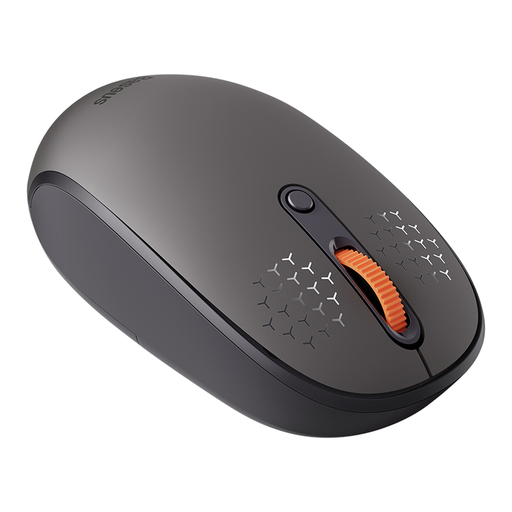
Baseus F01B Tri-Mode Wireless Mouse, Frosted Gray
An option if you need quiet clicks and several connection options, and a right-handed design suits your hand.
Supports 2.4 GHz, Bluetooth 5.0 and Bluetooth 3.0, and switching between up to three devices, according to the description. Adjustable DPI settings.
View at Joybuy
 No image available
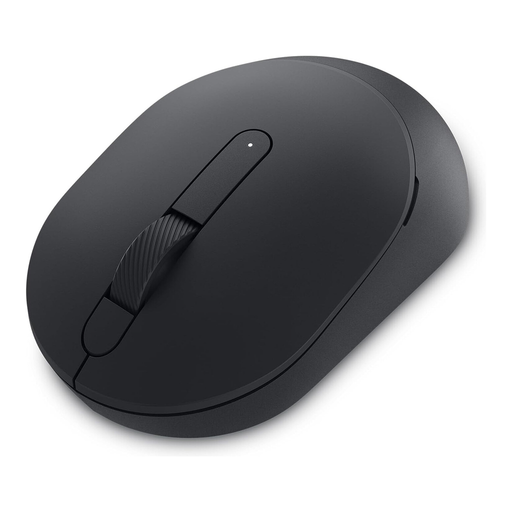
DELL Silent Mouse MS355
For a workspace where quiet clicks and switching between Bluetooth and wireless connections matter.
Bluetooth and 2.4 GHz wireless; according to the product description, you can switch between Bluetooth devices and the USB wireless connection. Quiet clicks, scrolling and gliding are also mentioned.
View at Joybuy
 No image available
Logitech MX Master 3S Bluetooth Edition
For longer documents where fast or precise scrolling and quiet clicks are useful; the design described is for right-handed users.
MagSpeed scroll wheel and connection to up to three devices according to the product description.
View at Joybuy
 No image available
Logitech Signature M650 L Wireless Mouse, Graphite
For larger hands and longer documents where quiet clicks and different scrolling speeds matter.
Bluetooth Low Energy and Logi Bolt USB receiver according to the description. SmartWheel for precise or fast scrolling; this version is designed for large hands.
View at Joybuy
Frequently asked questions
Is a vertical mouse a better choice for everyone sharing a desk?
No. The key factors are which hand you use, your hand size and your personal posture. A design made for one hand may not suit someone else; you should also consider how your desk, keyboard and mouse are arranged if you work at a screen for long periods.
Do I definitely need a USB receiver for two computers?
Not necessarily. According to Logitech, the Pebble Mouse 2 M350s offers Easy-Switch for three devices; check whether your computers support Bluetooth. For the Trust Bayo+, the manufacturer lists two Bluetooth connections and a 2.4 GHz receiver.
How should I clean a shared mouse?
Follow the instructions for the specific model. Microsoft recommends disconnecting its mice or removing their batteries before cleaning, and not applying liquid directly to the device. Its recommendation to use isopropyl alcohol at up to 70 % isn’t blanket approval for other brands.
What should I check about batteries, rechargeable batteries and cables before buying?
Check the power supply, the connections you’ll need and the information for the specific model. According to the product description, the Signature M650 L uses a replaceable AA battery; a wired model such as the PERIMICE-513 L doesn’t need a mouse battery.
Can I put an old mouse in household rubbish in Germany?
No. According to the German Environment Agency, electrical and electronic waste must be collected separately from unsorted household waste. Local collection points and suitable retailer take-back points are options. If batteries can be removed easily, take them out and dispose of them separately at a battery collection point.
Do display screen rules apply to every desk shared at home?
Not across the board. ASR A6 sets out requirements for workplaces on business premises and telework workplaces within its scope; it expressly doesn’t apply to using display screen equipment outside business premises.


