If several people use the same mouse, an ambidextrous mouse or a trackball is a sensible starting point, as neither is designed for use with one particular hand. For weather charts, look for easy scrolling and adjustable pointer speed; a high DPI rating alone does not mean you’ll get more accurate results. With a vertical mouse, the size and left- or right-handed version need to suit you. And a manufacturer’s ergonomic claims are not proof that a model will prevent discomfort.
Who are the different types of mouse suited to?
Team sharing a data desk
If several people take turns analysing readings, the connection and design should suit a shared workstation. Kensington says the Orbit is designed for both right- and left-handed users; with other mice, check which hand the specific version is designed for.
Anyone working with long sets of readings
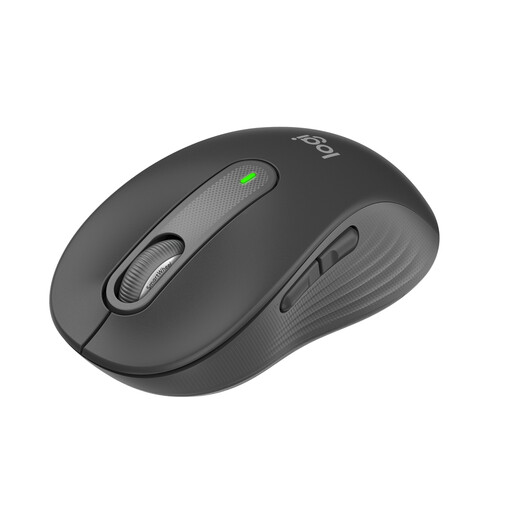
If you often scroll through weather records and plot points on charts, look for easy-to-use scrolling and adjustable pointer speed. Logitech says the SmartWheel on the Signature M650 supports both slow and fast scrolling, while Dell lists adjustable pointer speed for the MS3220.
Anyone looking for a particular fit or needing to save space
With a vertical mouse, hand size and which hand you use are important considerations: Logitech says the Lift is for small to medium-sized hands, while CHERRY offers separate left- and right-handed versions. If you have little room to move a mouse, a stationary trackball is another option.
What should you look for when buying?
At a shared desk, first check which hand the mouse is designed for and how it connects. Then consider how well it handles long sets of data and whether the fit is right.
| What you need |
What to check before buying |
Who it matters most to |
| Sharing between users |
Check that the design suits different users’ hands and that USB or an approved Bluetooth connection is available. |
If we take turns using the mouse at the same desk, I don’t want to assume it’s designed for left- or right-handed use. Around 36% of consumers say sharing is their main consideration. |
| Charts and sets of readings |
Look for scrolling that suits your needs and an adjustable pointer speed. |
When I’m plotting readings and working through long data sets, I want to be able to control the pointer and scrolling to suit the task. Around 29% of consumers say using charts is their main consideration. |
| Hand fit |
Check the hand size and whether the model is left- or right-handed. If you’ll be using a vertical mouse for long periods, consider how well it fits you personally. |
If fit is what matters most to me when using a mouse for long periods, it needs to suit my hand and the hand I use. Around 21% of consumers say fit is their main consideration. |
| Room to move |
Allow enough space for the mouse or trackball, as well as room for your hand. |
If there’s little room to move the mouse on a shared desk, I want a way to control the cursor that takes up little space. Around 14% of consumers say a small footprint is their main consideration. |
Common misconceptions when buying a mouse
-
Confusing a left-handed version with an ambidextrous mouse
A separate left-handed version is not the same as a mouse designed for either hand. A design made for one particular hand can make it harder to share at a workstation.
Check the actual design and version name before choosing a model.
-
Assuming a high DPI means more accurate charts
Here, DPI refers to a pointer control setting. On its own, it does not prove that you’ll be able to plot weather data more accurately.
Check whether you can adjust the pointer speed to suit you, and try the mouse with the software you use.
-
Choosing extra buttons that rely on software without checking compatibility
Dell says the additional software for the MS3220 is for Windows; Kensington describes TrackballWorks as software for customising the buttons.
Before buying, check which operating system the shared computer runs and whether you’re able to install software.
Relevant brands and product ranges
Logitech
The Signature M650 and Lift have different designs and suit different fit requirements.
- Logitech says the M650 has a SmartWheel and connects via Bluetooth or Logi Bolt. The Lift is designed for small to medium-sized hands.
- The M650 comes in different sizes and hand-specific versions. In its June 2025 test of ergonomic mice, F.A.Z. Kaufkompass named the Lift its favourite; this verdict does not apply to all Logitech mice.
CHERRY
The MW 4500 and MW 4500 LEFT are separate wireless vertical mouse versions.
- CHERRY lists a design tilted at around 45° and three adjustable resolution settings up to 1200 dpi.
- The versions are designed for different hands. Claims about reducing discomfort come from the manufacturer and are not independent proof of effectiveness.
Dell
The MS3220 is a wired office mouse designed to connect to a fixed computer.
- Dell lists a 1,80 m USB cable, 3200 dpi and five buttons for the MS3220.
- The additional software is listed for Windows only, and you’ll need to consider how to manage the cable at a shared workstation.
Kensington
The Orbit with Scroll Ring is a stationary trackball that offers an alternative to a mouse you move around.
- Kensington lists a Scroll Ring, a 40-mm ball, USB plug-and-play and a design for both right- and left-handed users.
- You control the cursor with the ball rather than by moving the device. Try this way of working to see whether it suits you for using charts.
Mouse models at Joybuy
This selection includes wired and wireless standard mice, as well as a wireless vertical mouse. At a shared desk, the connection, suitability for different users’ hands and features for working with long sets of data are key considerations.
 No image available
Wireless vertical mouse with 6 buttons, 800–1600 DPI
Could suit you if you want to adjust the pointer speed for different chart views.
With 2.4 GHz wireless connectivity and six buttons. The 4-way scroll wheel could help you navigate longer records; check whether it works with your software.
View at Joybuy
 No image available
HOFOTEK M311 wireless office mouse
Could suit a workstation with several devices if both 2.4 GHz wireless and Bluetooth are options.
With adjustable DPI settings and 1 AA battery. Check in advance which connection types are allowed on the shared computer.
View at Joybuy
 No image available
Logitech Signature M650 for small to medium-sized hands
Could be worth considering for long weather records if you want to switch between precise and fast scrolling.
With SmartWheel, Bluetooth or Logi Bolt, and quiet clicks. This version is listed with a battery life of 24 months.
View at Joybuy
 No image available
Philips 3000 Series SPK7378B/00 wireless mouse
Could be an option for a shared workstation used by both left- and right-handed people; check that the shape suits everyone.
With a 2.4 GHz connection, USB receiver and 1600 DPI. This version is listed as compatible with Windows and Mac, and has quiet clicks.
View at Joybuy
 No image available
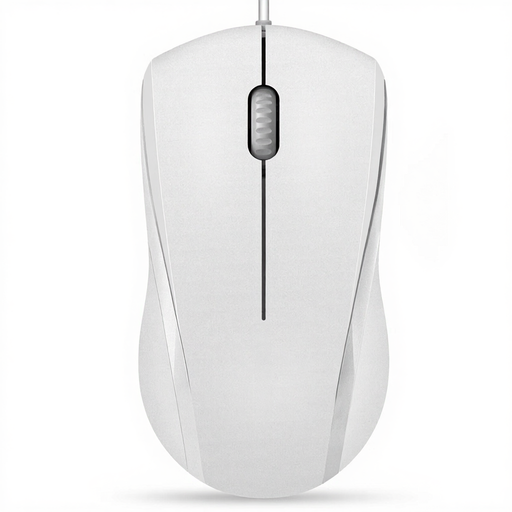
RAPOO N1600 wired mouse
Could suit a fixed USB workstation if a cable is practical at your shared desk.
Listed for use with either hand, with three buttons, 1000 DPI and a 5-ft cable.
View at Joybuy
Frequently asked questions
How do I check whether a mouse will connect to a shared computer?
Check that there’s a suitable USB port or a Bluetooth connection you can use. Logitech says its wireless mice can be set up using a USB receiver or Bluetooth; the Dell MS3220 connects via USB. The right option depends on the specific model and computer.
Can I clean every mouse at a shared desk with the same product?
No. Follow the cleaning instructions from the relevant manufacturer. Logitech specifically describes tests using 70 % isopropyl alcohol for selected education products; this does not mean it’s approved for the Lift, M650 or any of the other models mentioned here.
What should I do if a product develops a fault after purchase in Germany?
Your statutory rights are separate from any voluntary guarantee. The consumer advice centre (Verbraucherzentrale) explains the difference; what you’re entitled to in a particular case depends on the purchase and the fault.
What should I check to make sure a wireless mouse complies with regulations?
The German Federal Network Agency (Bundesnetzagentur) lists CE marking, product identification and accurate manufacturer details among the aspects it monitors. Check the information for the specific model rather than assuming an individual device complies because of its brand.


