What should you look for when buying?
First, check which connections your computer supports and whether the mouse fits your hand. Then consider which features really matter for your shared workspace.
| What matters |
What to check before buying |
Who is it most important for? |
| Click noise |
Check what the manufacturer says about the main buttons on the specific model; also check its size and connection. |
If I’m writing alongside other people, I want repeated clicks to be as quiet as possible. Around 28% of consumers rank click noise as their top priority. |
| Connection |
Check for Bluetooth support and available ports; if the mouse uses a receiver, check whether it’s included. |
If I want to use the mouse with a particular computer, its connection needs to be compatible. Around 22% of consumers prioritise device connectivity. |
| Fit |
Consider your hand size and whether you’re left- or right-handed; with a vertical design, also check how much desk space it needs. |
If I work for long periods regularly, I want the size and shape to suit the way I hold my hand. Around 22% of consumers put fit first. |
| Moving between desks |
Consider the size of the mouse and whether it has a place to store its receiver; a compact design doesn’t remove the need to check the fit. |
If I take my laptop or mouse between workspaces, portability and different desk surfaces matter. Around 17% of consumers prioritise being able to move between desks. |
| Power and accessories |
Compare battery or rechargeable battery options, any accessories needed and whether they’re included. |
If I want to avoid extra hassle after buying, I check the power supply and any parts I’ll need. Around 11% of consumers put these factors first. |
Mice available at Joybuy
This selection includes wireless mice, including vertical models and options described as having quiet clicks or rechargeable power.
 No image available
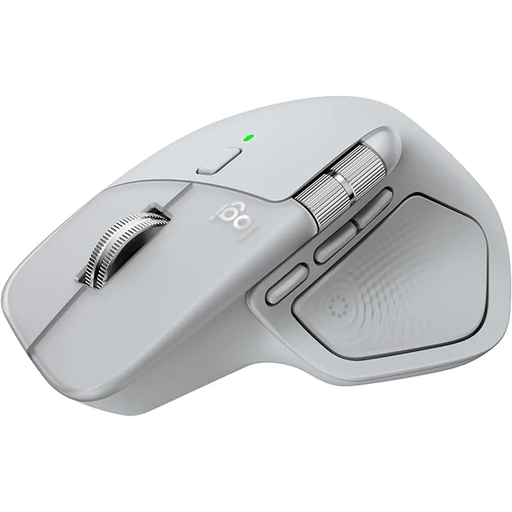
Logitech MX Master 4 Ergonomic Wireless Mouse
The product description mentions Quiet Clicks and Bluetooth, which may be useful if you’re considering click noise and switching between devices while writing.
Colour: Light Grey.
View at Joybuy
 No image available
Wireless Vertical Mouse with 6 Buttons
A vertical design may be worth considering if you’d like to try a different hand position while working; the right shape is a personal choice.
Listed in the product name: 2.4 GHz, USB-C rechargeable battery and 800–1600 DPI.
View at Joybuy
 No image available
Vertical Wireless Mouse with USB-C Charging
The vertical design and choice of Bluetooth or 2.4 GHz connectivity may suit you if you’re looking for this shape and one of these connection types.
Listed in the product name: three DPI settings of 800, 1200 and 1600 DPI.
View at Joybuy
 No image available
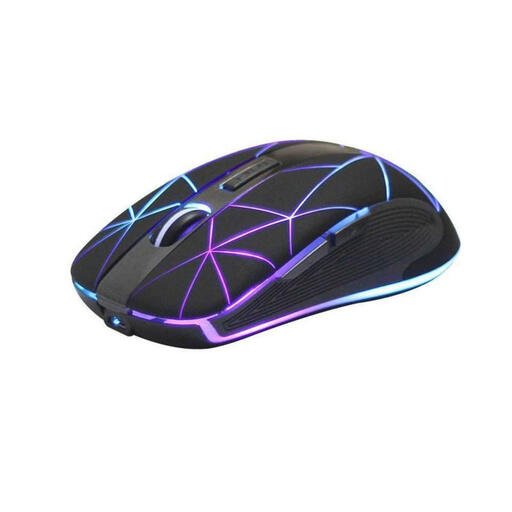
RM200 Wireless Optical Mouse
This model may suit you if you’re looking for a wireless mouse with a rechargeable battery.
Listed in the product name: 5 buttons, USB charging and an optical sensor.
View at Joybuy
 No image available
KINSI Ergonomic Vertical Wireless Mouse
A vertical design may be relevant if you’re looking for a different hand position while working.
Listed in the product name: 2.4G USB connection, rechargeable battery, 5 buttons and 800–4800 DPI.
View at Joybuy
Frequently asked questions
Do I need Bluetooth or a USB receiver?
First, check which connections your computer supports and which ports are free. Logitech lists Bluetooth Low Energy and Logi Bolt as options for the Signature M650; the compatible Bolt receiver isn’t included with the MX Anywhere 3S considered here.
How should I position my mouse and keyboard at a shared desk?
Leave enough space to arrange your mouse and keyboard to suit your work and posture. The BAuA highlights having a sufficiently large desk surface and being able to arrange equipment flexibly as important for ergonomics. Its workplace rules apply within their defined scope, not automatically to every desk used at home.
Can I wipe a shared mouse with alcohol?
Check the cleaning instructions for the specific model before using any liquids. Logitech describes tests using 70% isopropyl alcohol on certain products specifically selected for education; this doesn’t mean it’s approved for every mouse or surface.
What should I know about power and returns?
Check whether the mouse uses batteries or a rechargeable battery, and whether any accessories you need are included. If a product is faulty, your statutory rights are against the seller. Any additional guarantee is voluntary and comes with its own terms, as explained by the consumer advice centre.
What should I look for in a wireless mouse in Germany?
For products covered by its guidance, the German Federal Network Agency lists CE marking, product identification and correct manufacturer details among the points to check. A CE claim on a sales page alone doesn’t prove that the individual product listing has been independently checked.
How should I dispose of an old mouse and removable batteries?
In Germany, electrical and electronic waste must not go in household rubbish. The German Environment Agency lists recycling centres and suitable collection points; removable batteries should be taken separately to a battery collection point.


