
Lieferung heute & morgen

Qualitätsgarantie

Willkommens-Angebote freischalten: KOSTENLOSE Lieferung | Bis zu 80 % RABATT | Kostenlose 30-Tage-JoyPlus-Testphase
App herunterladen
If you’re building your own PC or upgrading an existing system, you’ll find plenty of options for an MSI Mainboard LGA 1700. The model names often look similar, but the technical differences are significant: DDR4 or DDR5, H610, B760 or Z790, Micro-ATX or ATX, and varying ports for graphics cards, SSDs and networking.
As a Joybuy Product Recommendation Officer, I focus on clear technical specifications rather than pure marketing jargon. This approach helps you avoid common buying mistakes.
An MSI Mainboard DDR4 only accepts DDR4 memory. DDR5 modules won’t physically fit into DDR4 slots, so never force them. The same applies in reverse for an MSI Mainboard DDR5.
If you want to reuse existing RAM, always check the motherboard’s memory technology first. Also consider the maximum capacity and number of DIMM slots. Two slots may be enough for a basic PC, but they offer less room for future upgrades than four slots.
An LGA 1700 Motherboard can vary greatly depending on the chipset. An Intel H610 motherboard typically focuses on essential features. An Intel B760 motherboard usually offers more ports and upgrade options. An Intel Z790 motherboard is aimed at users who need more expansion and, depending on the processor and BIOS configuration, additional overclocking capabilities.
What matters isn’t just the chipset name, but the specific features of the model: number of M.2 slots, PCIe generation, USB ports, network standard and power delivery.
A PCIe 5.0 motherboard doesn’t necessarily have multiple PCIe 5.0 slots. Often, only the primary graphics card slot is wired accordingly. Similarly, a motherboard with M.2 might only offer a single SSD slot.
Before buying, you should check:
The LGA 1700 socket is designed for Intel Core processors of the 12th, 13th and 14th generations, provided the specific board supports these models according to the manufacturer. For processors from a later supported generation, a BIOS update may be required. Before installation, it’s worth checking the CPU compatibility list for your specific MSI model.
Also pay attention to the processor’s integrated graphics unit. Only then can the motherboard’s HDMI, DisplayPort or VGA outputs deliver a picture without a separate graphics card.
A Micro-ATX motherboard like the MSI PRO H610M-G DDR4 or the MSI B760M GAMING PLUS WIFI needs a compatible Micro-ATX case or a larger ATX case. It saves space but usually offers fewer expansion slots.
An ATX motherboard like the MSI MAG Z790 Tomahawk Wi-Fi typically provides more room for add-in cards, M.2 heatsinks and additional ports. Before buying, check case compatibility, the position of standoffs and the maximum CPU cooler height.
For DDR4 systems, typical supported speeds vary by model, for example up to 3200 MHz. DDR5 boards can enable higher clock rates, though figures marked “OC” depend on the memory kit, BIOS and processor.
For powerful Intel Core processors, the CPU power connectors and the heatsinks around the voltage regulators are also relevant. A larger VRM design isn’t a blanket performance promise, but it can offer a sensible feature reserve under sustained high load and with powerful processors. Adequate case ventilation remains essential regardless of the motherboard.
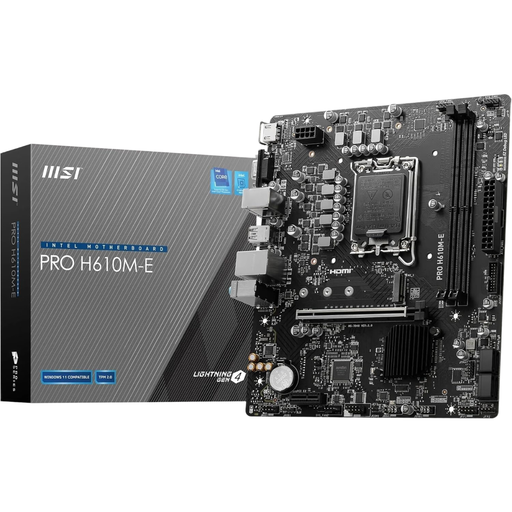
Why this product fits the profile: This Micro-ATX board is aimed at office PCs, everyday computers and simple builds with compatible Intel processors. Existing DDR4 memory can be reused.
DDR4 support is clearly stated. Additionally, the limitations are transparent: two DIMM slots, a maximum of 64 GB and one M.2 slot.
Intel H610, PCIe 4.0 x16, one Gen3 M.2 slot, plus HDMI, DisplayPort and VGA.
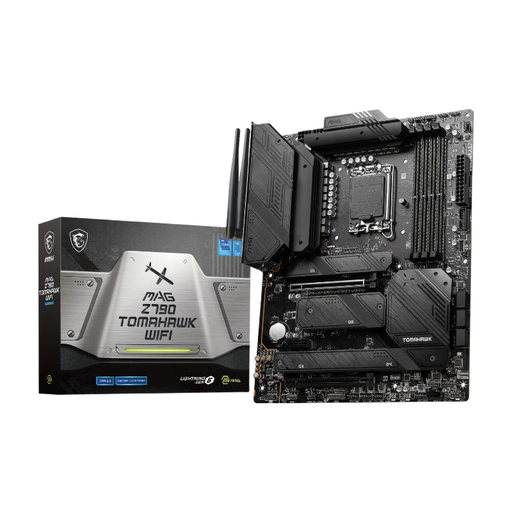
Why this product fits the profile: This ATX motherboard provides a comprehensive platform for performance-oriented gaming PCs and workstations with DDR5 memory.
The specification clearly lists four M.2 slots, PCIe 5.0 for the primary slot, plus Wi-Fi 6E and 2.5 Gigabit LAN.
Four DDR5 DIMM slots, four M.2 connectors, PCIe 5.0 x16 and integrated wireless connectivity.
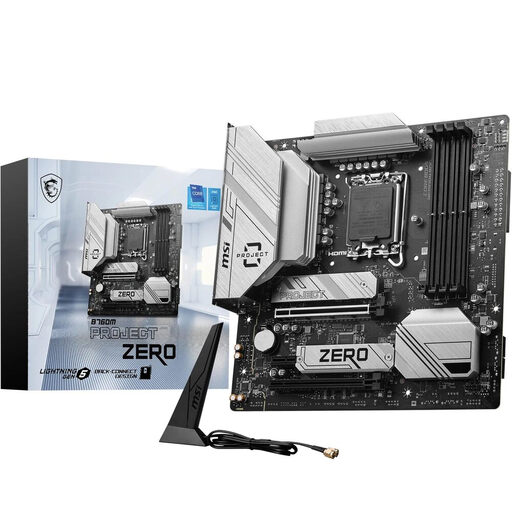
Why this product fits the profile: This Micro-ATX motherboard is ideal for users with multiple SSDs, fast network connectivity and a case that supports back-connect design.
The case requirement is explicitly stated. This helps you avoid installing a back-connect board in an incompatible case.
Two M.2 Gen4 slots, PCIe 5.0 x16, four DDR5 slots, plus Wi-Fi 6E and 2.5 Gigabit LAN.
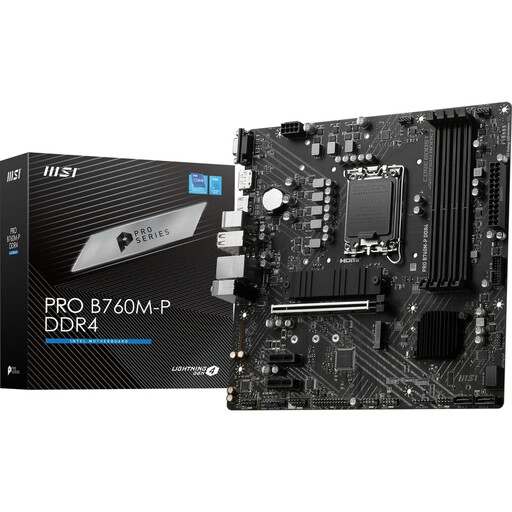
Why this product fits the profile: This Intel motherboard combines LGA 1700 with four DDR4 slots, making it ideal for upgrading to a B760 chipset without replacing your existing RAM.
DDR4 compatibility and four DIMM slots are clearly specified. This keeps your memory planning straightforward.
Up to 128 GB DDR4, two M.2 slots, PCIe 4.0 x16 and support for multiple Intel Core generations.
Before buying and installing, you should check the following points:
We’ve put together a complete, regularly updated list of products that fully meet these strict selection criteria and the safety regulations in force in the EU.
That depends on your memory, case and desired features. For basic systems, an H610 board may be sufficient. B760 offers more upgrade options, while Z790 models provide additional ports and a more extensive platform. The specific CPU compatibility list remains the deciding factor.
No. DDR4 and DDR5 have different slot notches and electrical specifications. Buy a motherboard that matches your existing memory, or factor in new RAM modules when changing platforms.
It depends on the model. The MSI PRO H610M-G DDR4 has one Gen3 M.2 slot, while the MSI MAG Z790 Tomahawk Wi-Fi offers four M.2 slots. You should also check the interface, form factors and any potential limitations on SATA ports.