
Lieferung heute & morgen

Qualitätsgarantie

Willkommens-Angebote freischalten: KOSTENLOSE Lieferung | Bis zu 80 % RABATT | Kostenlose 30-Tage-JoyPlus-Testphase
App herunterladen
A high-performance gaming PC needs a case that matches your hardware, not just in looks. When you’re working with large graphics cards, E-ATX motherboards and extensive cooling loops, the interior space, mounting options and airflow determine how practical the build is day to day. The MSI MEG PROSPECT 700R PC Case is designed for DIY builders, content creators and overclocking enthusiasts who want to fit plenty of components into an ATX mid-tower.
Before you buy, though, it’s worth checking a few common marketing pitfalls. A high fan count, for example, doesn’t automatically mean great cooling performance. Similarly, a case with glass panels can look stunning, but it may have drawbacks if ventilation is restricted or maintenance is fiddly.
“Lots of fans” tells you very little about the actual airflow. What really matters is where the fans are positioned, whether fresh air can flow in freely, and whether warm air is channelled out effectively. A gaming case with ARGB fans should therefore be judged not just on its lighting, but on fan positions, supported sizes and radiator mounting points.
Specs like “up to 400 mm graphics card length” often only apply without a front radiator or certain brackets in place. So before you buy, you need to consider the graphics card, water cooling, power supply and cables all together. With the MSI MEG PROSPECT 700R, the quoted figures are up to 400 mm GPU length, 185 mm CPU cooler height and 220 mm power supply length. For a vertical graphics card mount, note that the required riser cable is not included according to the product data.
A touchscreen or RGB control can make daily use more convenient, but it doesn’t replace thoughtful maintenance. Magnetic dust filters, easily accessible components and tidy cable channels are at least as important for a build that stays practical over time.
According to the manufacturer, the MSI MEG PROSPECT 700R gaming case supports E-ATX motherboards up to 310 × 304.8 mm, as well as ATX, Micro-ATX and Mini-ITX. E-ATX isn’t a fully standardised size, so you should compare the exact dimensions of your motherboard with the case’s clearance.
An ATX mid-tower can be enough for many gaming PCs. However, if you’re planning multiple radiators, extra fans, large graphics cards and extensive cable management, a larger interior gives you more freedom during assembly.
The MSI case comes with four pre-installed 140 mm ARGB fans: three at the front and one at the rear. According to the product description, you can install up to ten fans in total, including seven 140 mm and three 120 mm fans. Radiators up to 360 mm can be mounted at the front, side and top; the rear supports up to 140 mm.
For a PC case designed for water cooling, you should also check whether the radiator, fans, RAM and motherboard heatsinks all have enough room at the same time. A modular bracket can make planning easier, but it may change the airflow depending on your configuration.
The 4.3-inch IPS touchscreen panel on the MSI MEG PROSPECT 700R can, according to the product specs, display and control hardware monitoring, ARGB lighting, fan speed and your own media content. On the front, you also get a USB 3.2 Gen 2x2 Type-C port at 20 Gbit/s, two USB-A ports and HD audio.
For maintenance, there are four magnetic dust filters, tool-free swing-open side panels and separate cable routing channels. Before you set it up, bear in mind the dimensions of roughly 200 × 490 × 500 mm and a weight of about 13 kg.
The recommendations below match products to specific needs. Technical details are based on the respective product data.
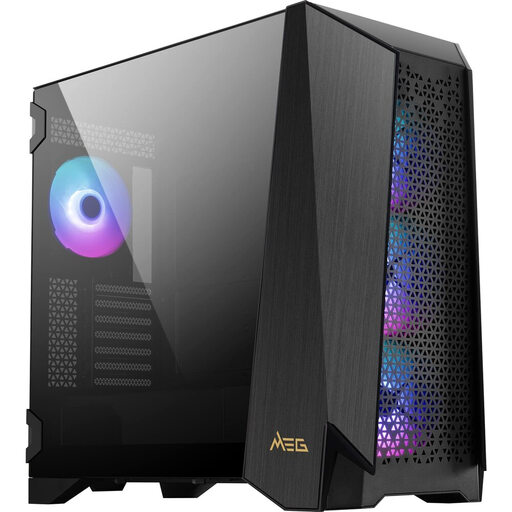
Why this product fits the profile: E-ATX support, modular side panel options, a touchscreen and extensive cooling compatibility appeal to users who want to plan and customise their build in detail.
The four 140 mm fans, four dust filters and the clear specs for GPU, cooler and radiator sizes make planning more transparent than a pure RGB setup would.
4.3-inch IPS touchscreen, up to ten fans, 360 mm radiator mounts and support for graphics cards up to 400 mm.
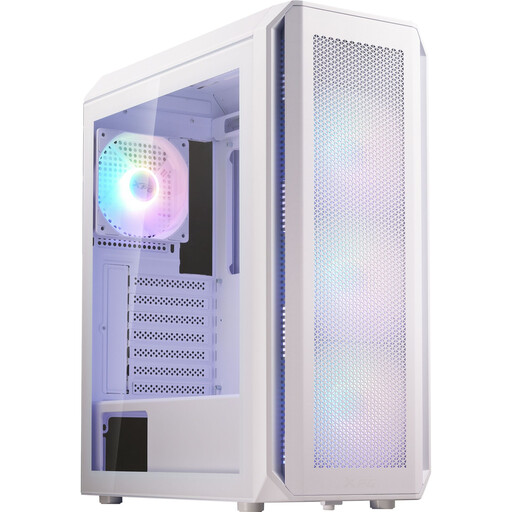
Why this product fits the profile: For a classic ATX build with pre-installed lighting and a 360 mm front radiator, this white mid-tower case is neatly proportioned.
The specs set clear limits: a maximum GPU length of 340 mm, cooler height of 160 mm and up to six fans.
Four pre-installed 120 mm ARGB fans, support for ATX, Micro-ATX and Mini-ITX, plus a removable dust filter.
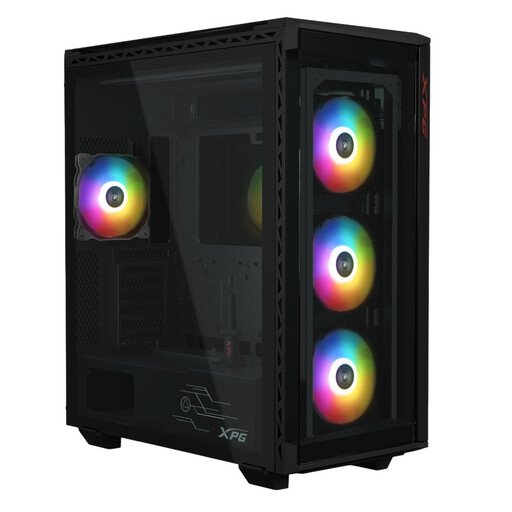
Why this product fits the profile: Content creators and users with multiple drives get an E-ATX case with room for up to six 2.5-inch SSDs and three 3.5-inch hard drives.
The high drive capacity reduces the need for external storage solutions. Still, you should check the actual dimensions of your drives before buying.
E-ATX compatibility, GPU support up to 400 mm and four pre-installed 120 mm ARGB fans.
We’ve put together a full, regularly updated list of products that meet these strict selection criteria and comply with EU safety regulations.
Yes, according to the product specs, E-ATX motherboards up to 310 × 304.8 mm are supported. You should compare the dimensions of your specific motherboard with this limit before buying.
Yes. Support for up to 360 mm is quoted for the front, side and top. You should check the actual combination of radiator, fans, RAM and motherboard before installation.
The case comes with four 140 mm ARGB fans and supports up to ten fans according to the product data. The exact distribution is given as seven 140 mm and three 120 mm fans.