
Lieferung heute & morgen

Qualitätsgarantie

Willkommens-Angebote freischalten: KOSTENLOSE Lieferung | Bis zu 80 % RABATT | Kostenlose 30-Tage-JoyPlus-Testphase
App herunterladen
A modern MSI X870E GAMING PLUS WIFI motherboard is designed for PC gamers, streamers, enthusiasts and system builders who want to combine several current interfaces in an ATX system. But what matters isn’t how long the spec sheet is: it’s whether the processor, memory, storage drives, case and network setup are all compatible.
When choosing an AMD X870E motherboard, three common misconceptions can lead to unnecessary expense:
The MSI X870E GAMING PLUS WIFI uses the AMD X870E chipset and AM5 socket. According to the manufacturer information available, the board is designed for AMD Ryzen 7000, 8000 and 9000 Series processors. Even so, check the manufacturer’s latest CPU support list before installation. A specific BIOS version may be required, depending on the processor.
A Ryzen 9000 motherboard is particularly appealing for a new gaming PC if you’re planning to upgrade the processor later within the AM5 platform. You should also check that your existing CPU cooler is compatible with the AM5 motherboard. Not every cooler is mechanically compatible with the socket, and case ventilation is another factor to consider with high-performance CPUs.
According to the product information, the MSI board features a 14+2+1 Duet Rail Power System with 60 A Smart Power Stages. These figures describe the power delivery design, but they’re not a blanket guarantee for every overclocking scenario.
Other practical features include:
If you’re running a gaming motherboard under sustained heavy loads, keep an eye on temperatures inside your case. A large heatsink on the motherboard doesn’t replace good airflow or a suitable CPU cooler.
As a DDR5 motherboard, the MSI X870E GAMING PLUS WIFI has four DIMM slots and, according to the spec sheet, supports up to 256 GB of memory. Memory speeds of 8000+ MHz and 7200+ MHz are listed as overclocked (OC) figures. For dual-channel operation with two modules, slots A2 and B2 are usually used. Check the QVL list to confirm compatibility.
There are three M.2 slots for storage:
This makes the board a good M.2 motherboard for systems with several NVMe SSDs. Install a PCIe 5.0 SSD in the designated Gen5 slot and cover it with the heatsink. Drive temperature can affect actual speeds during long write operations.
For connectivity, the spec sheet lists Wi-Fi 7, Bluetooth 5.4, Realtek 5G LAN and USB4 Type-C at up to 40 Gbit/s. USB4 devices, Wi-Fi routers and network components must also support the relevant standard. Otherwise, the connection will operate at the lower performance level available.
The options below match specific products to different uses. Figures for speeds, interfaces and compatibility are based on the product information provided. Check the latest manufacturer details and what’s included in the box before buying.
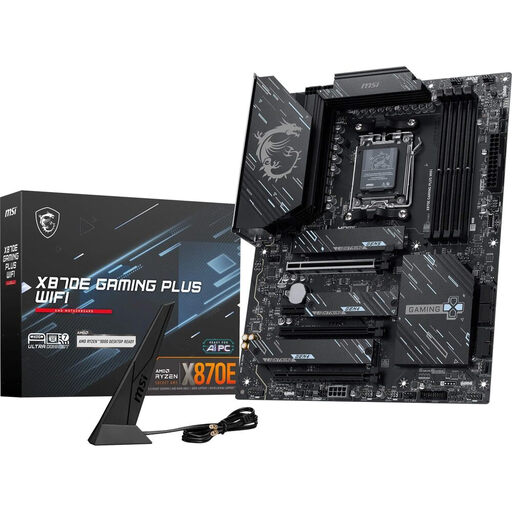
Why this product suits this profile: For an ATX PC with an AM5 processor, several NVMe SSDs and modern networking and USB connectivity, this board brings together a range of current interfaces on one board.
The slot layout specifically identifies PCIe 5.0 for the primary x16 slot and one M.2 slot. DDR5 and OC figures are listed separately, so they shouldn’t be mistaken for guaranteed standard speeds.
AMD X870E, AM5, three M.2 slots, Wi-Fi 7, 5G LAN and USB4 Type-C at up to 40 Gbit/s, according to the product information.
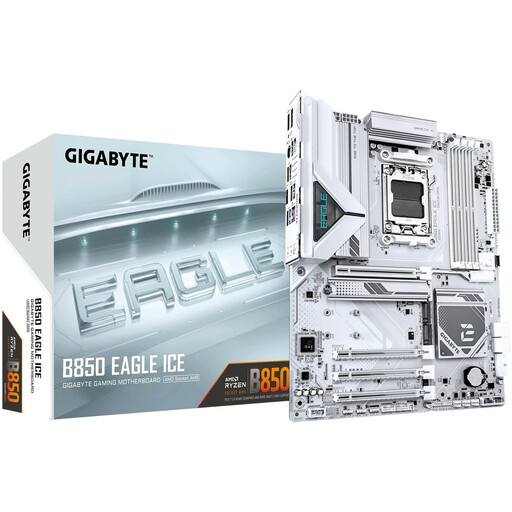
Why this product suits this profile: For an AM5 gaming PC with DDR5 memory and several M.2 drives, the B850 chipset may offer everything you need if Wi-Fi 7, USB4 and 5G LAN aren’t priorities.
The product information lists three M.2 slots and clearly specifies 2.5 GbE LAN, making it easier to check whether your existing network setup meets your needs.
ATX form factor, four DDR5 DIMM slots, support for up to 256 GB according to the spec sheet, and three M.2 slots.
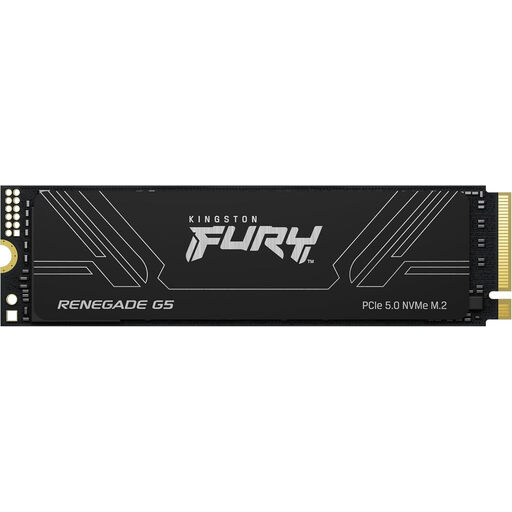
Why this product suits this profile: For large game libraries, video projects and data-intensive applications, this SSD is a great match for an M.2 system with PCIe 5.0 support.
Install the SSD in the designated PCIe 5.0 x4 M.2 slot. Fit the motherboard’s heatsink, as high transfer rates can generate heat.
4 TB capacity, with read speeds of up to 14.800 MB/s and write speeds of up to 14.000 MB/s according to the product information.
We’ve put together a complete, regularly updated list of products that meet these strict selection criteria and fully comply with the safety regulations in force in the EU.
Before installation, check the following:
Before building, disconnect the power supply, take ESD precautions and handle the board only by its edges. After the first start-up, you can update the BIOS and configure the EXPO profile and fan curves. An EXPO profile is an overclocking setting; if the system is unstable, switch to a more conservative memory speed.
According to the product information available, the board supports AMD Ryzen 7000, 8000 and 9000 Series processors with the AM5 socket. Before installation, check the latest CPU support list, including the required BIOS version.
The spec sheet lists three M.2 slots: one with PCIe 5.0 x4 and two with PCIe 4.0 x4. There are also six SATA 6 Gb/s ports. Check the manual for the precise lane allocation and any potential limitations.
Without a Wi-Fi 7 router, your PC won’t be able to take full advantage of the standard. The built-in Wi-Fi can still work with older compatible standards. When deciding what to buy, consider your existing network setup rather than relying on the name on the box alone.