
Lieferung heute & morgen

Qualitätsgarantie

Willkommens-Angebote freischalten: KOSTENLOSE Lieferung | Bis zu 80 % RABATT | Kostenlose 30-Tage-JoyPlus-Testphase
App herunterladen
The idea of getting complex, multi-colored models straight from the printer is appealing. But the market for multi-color 3D printers is filled with marketing promises that often lead to frustration and unexpected costs in practice. As your Joybuy Product Recommendation Officer, I'll help you identify the crucial features and avoid the common pitfalls, ensuring your investment pays off in the long run.
Many users invest in a device that promises impressive specs on paper, only to find that reality looks quite different. Before you make a decision, you should know the three most common pitfalls:
To make an informed decision, you should focus on objective technical features rather than pure marketing claims.
The maximum print speed (in mm/s) is only part of the equation. At least as important is acceleration (in mm/s?), which indicates how quickly the print head can change its speed. High speeds are only usable with high acceleration values.
This is where the design plays a crucial role. A CoreXY 3D printer uses a clever belt system where the motors for the X and Y axes are fixed to the frame. This reduces the moving mass of the print head, allowing for higher accelerations and fewer vibrations at high speeds. Look for a sturdy metal frame and high-quality linear rails that ensure precision even during rapid movements.
A true multi-color system automates the process of switching between different filaments. These systems, often realized as external boxes or integrated units, feed the required filament to the nozzle and cut the previous one. This process creates a "purge tower" next to the actual print object, where the nozzle is cleaned and the new color is extruded.
Before buying, check carefully:
The size of the print bed alone does not define a printer's capabilities. For successfully printing engineering materials like ABS, ASA, Nylon (PA), or Polycarbonate (PC), a 3D printer with a heated chamber is essential.
An actively heated chamber that maintains a constant temperature of, for example, 60°C or more, prevents the outer layers from cooling too quickly, thus minimizing thermal stress in the part. This is the key to preventing warping and ensuring strong layer adhesion, especially on a 3D printer with a large build volume. An open-frame printer is generally only reliable for PLA and PETG.
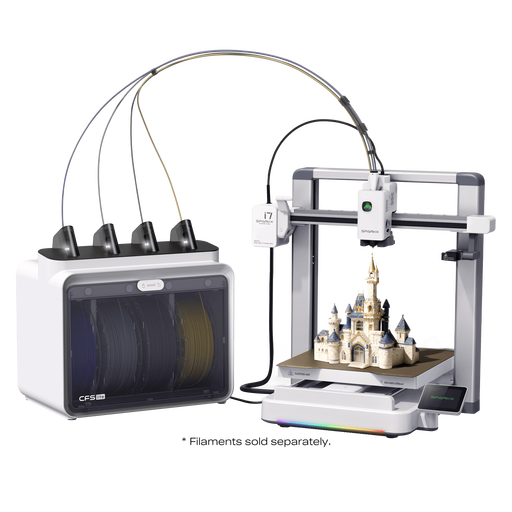
Why This Fits Their Persona: Offers a hassle-free entry into multi-color printing without a complex setup. The AI modeling function, according to the manufacturer, lowers the barrier to entry for users without prior experience who want to achieve creative results quickly.
The model comes directly as a "Color Combo" with a 4-color system (CFS lite). No separate purchase is necessary, which bypasses the "multi-color ready" myth.
Quick setup right out of the box and easy operation via the associated model community. Tool-free hotend swap for simple maintenance.
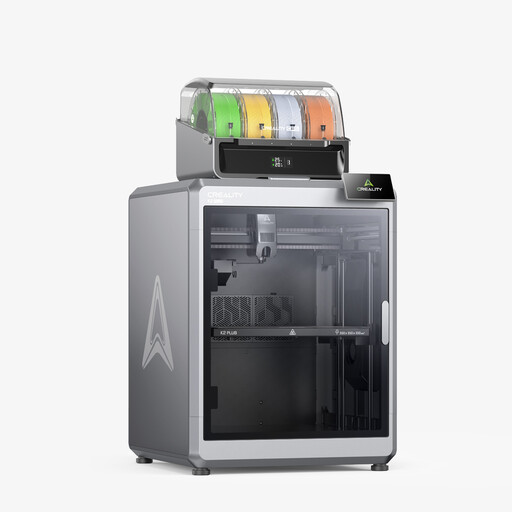
Why This Fits Their Persona: Ideal for users who produce large prototypes, functional parts, or small-batch series. The very large build volume, combined with high speed and an advanced multi-color system, maximizes productivity.
Combines a 3D printer with a large build volume (350x350x350 mm) with an actively heated chamber (up to 60°C). This prevents warping on large objects and solves a core problem found in many competing models.
The Combo version includes the CFS system for up to 16 colors. The high nozzle temperature (≤350°C) and the heated chamber allow for processing a wide range of materials, including fiber-reinforced filaments.
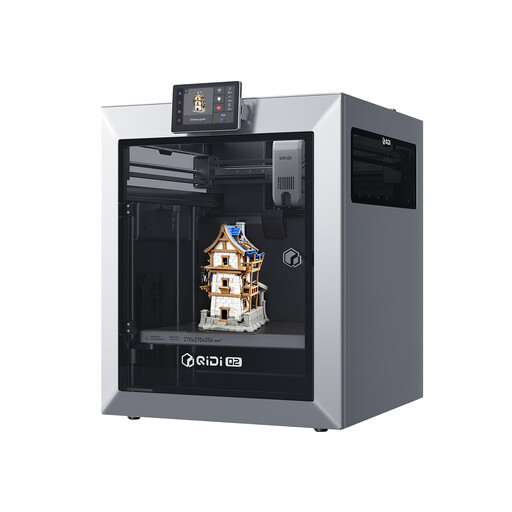
Why This Fits Their Persona: Perfect for users who need to work with engineering filaments like ABS, ASA, or fiber-reinforced materials. The controlled printing environment is crucial for producing robust, functional components.
Features a fully enclosed and actively heated chamber up to 65°C. This is a fundamental requirement for successfully printing high-temperature filaments, which often fail on open-frame printers.
An all-metal hotend with a temperature of up to 370°C and the heated chamber enable the processing of demanding materials. The optional QIDI BOX expands the printer to 16-color printing.
We've compiled a complete, up-to-date list of products that fully meet these strict selection criteria and safety standards.
An automated multi-color system requires slightly more maintenance than a standard printer. The filament paths and the cutting mechanism should be regularly checked and cleaned for debris to prevent clogs. Additionally, the waste generated during color changes (from the purge tower) must be disposed of. However, the effort is manageable and is outweighed by the creative possibilities gained.
Although most standard PLAs will work, special High-Speed PLA Filament is recommended for optimal results at high speeds. This type of filament is formulated for a higher flow rate in the hotend and faster cooling on the print bed. This leads to sharper details, less stringing, and clean color separation, even during rapid print jobs.
Besides the initial purchase price of the printer and the multi-color system itself, the increased material consumption is the biggest cost factor. For every color change, a certain amount of filament is used to clean the nozzle and is deposited on a purge tower. The more color changes in a print job, the higher this material loss. However, modern slicer software offers options to minimize this waste, for example, by optimizing the purge amount or using the purged material as infill for the actual object.